Can we please get improvements to text titles?

If we add another method, we still need to maintain the existing one, for some approximation of forever, because if we don’t, then we break all existing projects created by all existing users that ever used it.

Premiere depreciated one Title tool. Ended it up hiding access to it, and, I suppose with the intent to remove the ability to create text elements with it at all. The new (current) title tool works completely differently. Whether they continue to support older tools remains to be seen. - update, No. Old titles will be internally converted to new titles.

Also, and even more importantly,
Adobe Premiere Pro … (also) phased out support for older, 32-bit codecs, particularly those associated with legacy QuickTime formats on Windows. … starting around 2018 (version 12.0.0 and later). This change affected a variety of old and niche codecs, many of which were rarely used by the majority of users, but could impact those with old archival footage.”

So phasing out legacy support has historical precedence.
Do people expect tools to develop and get better? yes.
Do people expect tools to never change and work like they did over a decade ago? less so

We have long had a mechanism to update project files when incompatible changes have been unavoidable - but that doesn’t change anything I said about that. Using it is a Last Resort because every use of it imposes a new maintenance burden in perpetuity.

If we have to do that for text support, we should do it once to a complete and future proof solution, not to something that we already know will not meet the current, let alone future, expectations for people making state-of-the art productions.

So phasing out legacy support has historical precedence.

There’s a very long list of things with historical precedence that sane people would not wish to repeat. That Adobe can make a business case for planned obsolescence being profitable to their shareholders doesn’t make gratuitously telling your longest loyal users “yeah, it sucks to be you” a Good Thing to do or something that we should aspire to emulate.

cf. the bit about being Better than them.

I get that, and I am using KDEN because I’m not using Premiere any more. But when user statistics show that something isn’t being used any more, - and older versions of the app are still available for those what need a depreciated feature, then it doesn’t need to continue to be used and maintained BECAUSE.

We don’t have hand cranks on our engines any more either.

Even Apple completely ended support for QuickTime for Windows in 2016, and for dozens of codecs with OS Catalina, also in 2019. QuickTime handled over 50 codecs internally. Apps that leveraged QuickTime have not added native support for all those codecs that used to be handled by QuickTime, KDENlive included. So the idea that KDEN does, or will universally support tomorrow, everything it has ever supported in the past, overlooks what has already changed, and changes out of KDEN’s control.

So for KDEN to willingly focus on new capabilities, while also maintaining older versions of the app for backward compatibility should be enough compliance.

Where are these user statistics you speak of? You’re new here, so I’m guessing (from your comments here) that you so far really have no idea at all how rapidly each release of Kdenlive has been evolving into something far more powerful than its predecessor. Or how many people want us to spend time improving other things fundamental to actual video editing before fiddling around the edges with another toy-grade attempt at title handling.

There are lots of things we could still do better at. But actual professional audio editors use actual professional audio tools. And actual professional title artists use actually professional titling tools.

And one day, we’ll integrate seamlessly with those sort of tools. And there will be much rejoicing.

We’re not here to build a cheap clone of commercial software for people who want that but don’t want to pay for it. We’re here with a long term vision to do much much better than that. When this is actually the most important thing for us to focus on, we will.

When you’ve written (or even just researched and found!) a professional grade titling tool that’s ready to integrate with Kdenlive, we’d love to hear your opinions on that. Until then you might just have to trust that there’s a very good reason we’re doing this here, the way we are, instead of working for Adobe or Apple. And that this isn’t our first day on the job.

We don’t have hand cranks on our engines any more either.

Some cars don’t even have a spare wheel anymore for people to be able to replace themselves. Not all change that suits corporate interests is in the genuine best interests of their users.

Even Apple completely ended support

Apple makes everyone throw their hardware away every couple of years if they want to use new software. And makes developers throw it away if they want to write it.

You’re not really picking shining examples of Best Practice here.

We’re not here to build a cheap clone of commercial software for people who want that but don’t want to pay for it.

No one said that.
So you don’t need to act like someone did.

But actual professional audio editors use actual professional audio tools. And actual professional title artists use actually professional titling tools.

um, I honestly don’t know where you’re going with that one.
Are you saying KDENlive ISN’T a professional tool?
Or are you saying that Professionals wouldn’t use KDENlive?

I’m guessing (from your comments here) that you so far really have no idea at all how rapidly each release of Kdenlive has been evolving into something far more powerful than its predecessor.

How that different than other production or editing software? Are you implying Blackmagic Resolve or CapCut, or ShotCut or… aren’t evolving with each release? Or that we are just stupid, ignorant users?

Apple makes everyone throw their hardware away every couple of years if they want to use new software.

As someone who has edited broadcast video and produced content for sale, on Macs since 1995, (even been highlighted on Apple’s “Hot News” page back when that was a thing) my 30 years of experience demonstrates this is categorically false.
MacOS supports older hardware extensively. You have to go back to a 2017 to find a computer what isn’t supported by the absolute latest MacOS ‘26. Moreover, every 3rd party software tool can be upgraded, and work flawlessly, for years after that.
Throw their hardware away every couple years? No. There’s a 2014 iMac on my desk right now. Still working, still delivering. Every studio I go to has older hardware still delivering.

.
It really feels like you’re lashing out at me.
I don’t like it. No one cares to read it. And it doesn’t further the discussion.
So I’m going to stop now, and also stop following this thread.
Hava a Happy New Year. Or a happier one. Whatever.

As someone who has made speech bubbles in inkscape & then imported them in kdenlive & painstakingly gotten the text to fit inside bubbles perfectly over several days of revisions and re-revisions, certain Camtasia features shown in your video look super-fast and good, especially if Camtasia allows fine control over the spacing around the edge of the text that fits inside the bubble (I don’t know if it does)

This is the real crux and catch here. Commercial offerings like this tend to specialise in what is needed for who they think their specific target audience is, or rather who they think might be buying their product instead of their competitor’s offering - so if you’re doing a common but very specific job, chances are there will be one of them that is very specifically targeting you and your peers. But it probably won’t be the same one that is optimised for some other use case. There is no One Tool that has really nailed it top to bottom and that all other’s are aspiring to be like yet, and in the commercial space it is very segmented and targeting everything from novices who want social media likes with no input of effort or skill, to “prosumers”, to actual top end professionals, with specialised subsets of users in each of those classes.

We don’t have that kind of narrow focus on which sub-segment of the market we need to be able to reassure our shareholders that we are the leading leaders in continuing to lead - and it’s not in our long term interest to specialise in the short-term needs of the first or loudest voice at the longer term expense of other more diverse or advanced users who also have needs that we can foresee and should ultimately be able to meet.

We’re an open source project. Our strength comes from not being at the whims of a fickle market of paying customers, and from being able to combine what we excel at with what other like minded projects excel at to become something that is more excellent together than either of us could or would be alone. Because we aren’t competitors, we’re collaborators, and each contributor brings their own expertise and interests and special insights.

User experiences help us see things in new lights - but it’s the developers who are creating best of breed implementations and publishing them with licences that encourage and allow this sort of reuse who will actually drive the real future we’re heading toward.

So any actually practical talk of “better text support” really needs to start with an analysis of what is already available to us, and the relative long term pros and cons of each of them. Not with a shopping list of “things the tool I used to use did” and a hope that some GSOC student can smash something like that together as a one-off hack on their holiday break.

Yep, as I was going through his video, I had the same thoughts.

Thank you all for the input. I took @nickjanetakis Camtasia’s input and this thread to update the “Titler 2.0” issue.

Yes, updating our titler is a long-standing issue as the code is very old. We are still thinking about how to update the titler best to be “future save”.

1 Like

No problem, happy to offer suggestions in the future and will keep an eye out for titler announcements in the future.

Since I recorded that Camtasia video I have switched to native Linux, ditched shotcut and have edited around ~3 hours of screencasts with kdenlive. Despite titles, I have found a few workflows that are working well but also a number of things I would consider “interesting”.

Would it be beneficial for anyone if I recorded a future video on assorted topics related to the usability of kdenlive after I’ve used it more? Funny enough I think video demonstrates this the best because you can see the subject being talked about in real-time.

I believe we’re on the same team here. Just aiming to have a really good user experience and end users who deeply care about this subject can provide feedback / donations and hope for the best.

Camtasia’s target audience is usually folks recording screencasts but the idea of adding text callouts and common’ish overlays feels like a general feature that helps everyone I think.

Would anyone not appreciate having snapping guide lines to align objects and most of the other features seen in the video? Keep in mind that’s 10 year old tech too.

If we were going to go down the path of “best case scenario, wishful thinking”, there would be things I would change in Camtasia but what I think they did succeed in is letting folks do reasonable looking things very easily, in an intuitive way. Intuitive in the sense that I never once had to lookup or Google how to do something, it was just sitting in plain sight and dragging around a couple of sliders or clicking buttons let me see the result.

With that said, kdenlive has more features, I’d say its bones are better than Camtasia. It’s just exposing that to users is not as refined, and it’s IMO missing ways to do common things easily (like having 2 words of text with different colors).

A great example is Camtasia’s video preview controls (play, stop, etc.). They’re centered directly under the video being played and the play button is substantially larger. It’s really easy to find and click for a task you might do 100+ times in an editing session.

With kdenlive, the controls are left aligned and on a 4k monitor they are miles away from the preview video while the play button is not different than the other controls.

You could say anyone who cares about editing will never click that because they will use space to toggle play / pause and I agree, I mostly use keyboard shortcuts too but it’s just an example of UI polish that invites you in.

Another example is I wanted to assign “Cut” to my mouse’s thumb button so I can hit that with my mouse hand and get ready to "Extract Clip” with a keyboard shortcut to do a ripple delete with my keyboard hand but it doesn’t let you bind mouse buttons to keys it seems.

If it happens to be possible, it’s not explained in the UI anywhere and even Googling says you can’t unless you remap your mouse buttons to keyboard keys at the OS level.

Not being able to do that is a disappointment because I know the workflow of cutting quick with the mouse while I’m aiming over the timeline in the spot where I want to cut while ripple deleting with my other hand will be faster than having to bind “Cut” to X and then “Extract Clip” to CTRL+X.

It might seem minor but it’s not, it’s something I do dozens or hundreds of times per video and it’s feeling like I’m having to fight the editor for a common feature.

Maybe I’m wrong and it’s super easy to bind a mouse button to an action but it’s no where to be found on how to do it. Can it be done?

Yes, and/or one with italics while the nearby words are non-italicised. Both scenarios require a new instance of text to be created, carefully aligned with the nearby text to look normal. Not an ideal situation for sure.

Real user stories, especially from people who have real experience in actual Industry Best Practice are priceless for guiding future development. But honestly if you’re planning on doing that specifically for that purpose (as opposed to something like "I make pop review videos for youtube views), then what is the most useful is focusing more heavily on what you want to do over how you think you want to do it.

Because it’s the combination of everyone’s whats that really best guides how. And the best hows often turn out to be something that you didn’t initially expect until the entire picture started to come into focus. And you probably will get more “busy developer” attention for your ideas if you can summarise your “whats” into a couple of hundred words somewhere like here rather than expecting them to find time to watch an hour long video.

But videos about “here’s how I do some part of the things I do” can be separately useful independently of that (something like this series: https://www.youtube.com/@Arkengheist20/videos), especially if that engages other users with similar needs discussing how they do them and what that might reveal about how everyone might up their game.

I believe we’re on the same team here

I have no doubt about that, this is just one of those topics that somehow always seems to quickly devolve into (or start as) an XY problem - where (well meaning!) people who don’t know the underlying implementation details and/or the bigger picture make their starting point for discussion their proposed solutions, and fixate on that instead of focusing more precisely on their actual underlying problem.

Would anyone not appreciate having snapping guide lines

We had this, “use grid” is supposed to (and did) snap object to it … but it … seems to be busted in current releases? Not quite sure when that happened, but that’s just an ordinary bug if so.

With kdenlive, the controls are left aligned and on a 4k monitor they are miles away

Screen real estate is precious and every decision to preference something comes at the cost of something else for someone else. Some of the toolbars are customisable, there might be some future benefit in making the monitor one so too.

With dual 4k monitors they could be on an entirely different screen.

You could say anyone who cares about editing will never click that because they will use space to toggle play / pause

Actually, I’d say they’ll use ‘jkl’ or a jog shuttle. : ) Or the mouse wheel to scrub. Or … depending on exactly what phase of editing you’re in and what job you need to do and how many times you need to do it before doing something else.

Fast and efficient editing is a two handed job, but it does take time to turn everything needed for that into muscle memory.

It might seem minor but it’s not, it’s something I do dozens or hundreds of times per video and it’s feeling like I’m having to fight the editor for a common feature.

That’s definitely in the category of “if you explain your entire workflow problem clearly, you might be surprised at what solutions exist that you haven’t considered yet”.

Maybe I’m wrong and it’s super easy to bind a mouse button to an action

That’s definitely in the “something you need to do at the OS or DE (if yours lets you) level”, we can’t do that as such, and trying to let people remap “mouse clicks” in the application sounds … let’s go with Fraught.

But if that’s really how you like to work, then a jog shuttle with a bunch of shortcut buttons or something similar might be the productivity gift you ought to be looking at next.

I’m not sure what that is. I make software development focused screencast style videos on YouTube and also technical video courses. I’m not an industry professional but I have recorded and edited over 1,000 videos in ~10 years.

All of the YouTube videos have no ads. I don’t care about views or I would have stopped recording them 9.5 years ago.

Ideally it all boils down to not feel like the editor is holding me back or causing friction / delays in the hot paths of editing the types of videos I created. I do have opinions sure, but I don’t think they are so personalized they don’t apply to others.

I did include a text based TL;DR bullet list in the post. That can be skimmed in even less than a few hundred words. I also linked to the video directly to the text title part which is ~5 minutes long (and called that out in a sentence right after the link).

Was there an even easier way to submit this information that I’m not seeing?

In this case nothing is under the preview area to replace that. It’s just left aligned controls and then a ton of empty space. There is no toolbar setting or adjustment that I saw which says “center the controls so they appear under the middle of the video preview”.

Yes exactly, I want to move the timeline play head with my right hand using the mouse and then click the thumb button to make a cut. This feels natural to me because I am aiming and clicking with the same hand and motion.

Then my left hand is free to sit back like a dumb machine and CTRL + X to do ripple deletes without having to worry about also being double loaded to hit X to do the cut. There is so much cognitive load introduced from that.

Remapping it at the OS level would make those keys act differently or affect other tools that do support it like browsers and many other non-video editing tools that support these buttons.

I had to Google what this is. It’s funny because being able to use the thumb button on the mouse would give me a similar effect as this hardware without needing to buy anything new. I already use the mouse wheel to scrub left and right and that works well.

I rarely use the right click context menu and Kdenlive also disallowed me to bind the right mouse to a custom bind too. That would have worked as a fallback plan but the tool prevented it. So this problem isn’t isolated to the thumb button, it’s Kdenlive doesn’t let you bind any mouse button to an action.

Again, this just amplifies “the editor is getting in my way” experience. I know what I want and I know it’ll be faster but instead Kdenlive’s answer is, “go down a rabbit hole of researching jog wheels, spend a $100, hope it works on Linux and then also figure out how to have it fit on your current desk in a natural way even though you’ll also be using the mouse too since it’s a computer that you multi-task on and also if you ever feel like editing on the road with a laptop, congrats now you need to pack another piece of hardware”.

Think about that result vs “ability to bind mouse buttons”.

The other day I read a great quote from a developer woking on card readers for a subway / metro in NYC. Look at it through the lens of:

People travel on public transport to get somewhere, not to interact with the ticketing system.

This is the exact same scenario. The video editor is a mechanism to produce a video.

The editor is cool, it does nice things but really, it should be insanely stable and reduce friction to help enable folks to focus on delivering videos.

Of course Kdenlive does that now, but if there’s a technical challenge preventing mouse buttons from being bound, maybe that’s something to look into because you’re not experiencing what users are experiencing who don’t have a jog wheel.

Empty space?

I know what I want and I know it’ll be faster but instead Kdenlive’s answer is

Kdenlive didn’t invent jog wheels. People who edit video for a living and created professional editing desks did.

Kdenlive didn’t invent mice, or create the conventions, or write the operating system drivers that define how they work.

These aren’t our answers. They are some of the tools we have at our disposal.

The thing about hardware is that it’s firmly embedded in reality, and just like reality it doesn’t care what you want if what you want isn’t grounded in the fundamental reality of how it works.

If you want to try to force the wrong hardware for the job to do a job it wasn’t intrinsically designed to do, and don’t like the options that are available for doing that, then good luck. But you’re absolutely complaining to the wrong people to fix that.

This is the exact same scenario

If you somehow equate passively riding a bus with the tools and skills required for creative art, then I can only reiterate. Telling us about what you want to do is useful. Telling us how you imagine we should enable that - probably a lot less so.

Yes, that would be helpful. But in a new thread.

This is what it looks like on my machine at 4k resolution:

When I’m editing on the timeline, usually a 1080p video is in that black region in the middle but look how far the play / stop, etc. controls are to the left underneath it.

I know, but it not supporting mouse button binds requires you to get one for dual hand editing or deal with having to do most things with your keyboard hand which is inefficient for one of the most common combo actions (cutting 2 points + extracting out the middle, etc.).

Camtasia had a different way to cut so you could mostly do it with the mouse since its head selector allowed you to quickly grab a range (effectively performing 2 cuts with the mouse in 1 motion) and then you can ripple delete with the keyboard right after. I demo’d this in the video in my OP too.

Being able to bind my mouse’s thumb button wouldn’t be quite as fast but it would be close.

Who would I report feedback to for getting mouse binds if it’s not Kdenlive?

I think that’s where there’s a conflict. These things often go together.

“I’d like to be able to cut + ripple delete quickly in a way that I can leverage 2 hands”.

Using mouse button + keyboard actions together is a completely natural way to do this.

Can you suggest a way to do this that doesn’t require buying a new piece of specialized hardware or remapping the behavior of my mouse at the OS level which will break every app that does support using mouse buttons as actions?

Sure, but to be honest Ron’s replies are making it sound like it won’t matter in the end because it’s too prescriptive and getting categorized as complaining.

I don’t mean you should implement everything I or the community ask for, but look at this conversation about mouse button actions as an example.

I think a question to ask is why is binding a mouse button request getting this much resistance? Is it a fundamental limitation of the technology where only keys are accepted as bindable targets? What would changing that look like (is it a big change or small change)? Is it a time / money problem? Has it been thought of in the past but decided against, if so why?

I don’t think so. But rn it is what it is, and not (yet) on the roadmap. I’m afraid we don’t have the resources (time, people) to work on this.

At any rate, a keyboard mapping program might be the stopgap solution. Assign a ridiculous key combo to the Cut function so that it doesn’t interfere with other programs, and then assign that to the thumb button of your mouse.

I get it that the limitations imposed on your workflow are frustrating but adding a feature to map a command to a mouse button will take some time to implement. Until then be patient or find another (interim) solution.

So not “empty space”? And if you wanted the playback control central you’d have to add empty space around it, which would then be wasted space that could have been used to show detail in the audio level meter?

And for “4k” (or rather 16:9), you’ve made that dock window too wide anyway, and the real empty wasted space is the grey bars which are there because you’ve made that window too wide for the aspect of what you are editing? So fix that and your controls automatically stop being in a dead area that you created?

it not supporting mouse button binds requires you to … deal with having to do most things with your keyboard hand

Which really is not “inefficient” at all. For a proficient editor, it’s extremely efficient. It’s just not a novice UI. It takes time to learn what’s possible, and practice to develop the skill.

Adding an extra row of buttons for your right hand isn’t going to make you a one-handed piano virtuoso. It’s a two handed instrument, even if beginners can do a few things with it with just one hand.

It might not be what you want to hear, but no amount of UI tweaking can fix “I don’t want to learn”. If you want your life to be easier, there really is no shortcut around learning the skills that will do so. And yes, your new tool is different to your old tool, so not all your skills and experience and habits are directly transferable.

Being a fantastic piano player doesn’t make you a flamenco guitar player.

Being able to bind my mouse’s thumb button

And I don’t know how many times I can repeat there is no technical mechanism for this. That’s not a “kdenlive thing”. I might sympathise with you wanting that to be different, but that doesn’t change the reality that means it’s not possible in the way that you want it to be.

There is one for rebinding keyboard mappings, and we use it to let you customise the hotkeys. But that is not how mouse actions work. It’s a different brand of input device, with its own idioms and customs and interoperability concerns.

If you have a mouse with “extra buttons” and you want them to act like keyboard keys, you’ll need to use a tool that intercepts and translates them to keyboard keys. And find a way to make that fit into the way you work. Or buy a device that offers them as actual keyboard keys - there’s been plenty of experiments with those over the years too, but none have had the general purpose utility to become ubiquitous.

You bought a device with extra buttons, that in most use contexts have no standard or established meaning, and no way that you like to make them applicable in any general way. We didn’t expect you to buy it any more than we expect you to buy a jog console, but to us it just looks like a “mouse”, so all you get to do with it is standard mouse-things that any device professing to be a “mouse” can do.

Hard coding kdenlive actions to depend on more than the usual number of mouse buttons (which is the only way mouse actions are actually handled), and forcing people to use such a mouse, would be no different from forcing people to use a jog shuttle. And would probably make the UI more unfriendly because now everyone has to learn what all those extra buttons do in each context as well as the keyboard mappings.

I think that’s where there’s a conflict.

Yes. Because if you repeatedly insist “I want to do <something> in a way that is fundamentally impossible”, then nobody in the world can help you with that.

But if you ask “what’s the best way to do <something>”, then you’re much more likely to get some useful guidance and start a conversation on the various options and their merits and if there is in fact some new way we could do that thing better.

It’s a problem that people seem to make so often that it Has A Name. And it’s a problem because it’s initially impassible and wastes enormous amount of time trying to translate what you’ve been trying to do into what you actually want to achieve before any possibility of meaningfully recognising what’s actually failing you and what if anything might benefit from being improved can emerge.

Can you suggest a way to do this that doesn’t require buying

Learn how to do more than one thing with the hand that’s on the keyboard? There are a vast array of options that will make your work simpler and your life better if you develop and nurture that skill.

it’s too prescriptive and getting categorized as complaining

Some of it is definitely coming across that way, or if not ‘complaining’ then as extreme fixation - but as you might have noticed I’m trying pretty hard to find some way to move this discussion beyond that and into territory where something good and productive might actually come from it - and the more you write, the more it starts to seem that you’re just both very new to Linux, whatever DE you’re running on it, and Kdenlive - and you have a lot of experience/baggage from another app/environment that you’re trying to bring with you, but at least a few of those bags simply don’t fit in the overhead lockers, so your only options for those ultimately are “leave them behind”, or “build a new vehicle with different shaped lockers”.

And kdenlive is not the vehicle in this analogy, we’re just the cabin service riding on it too.

I think a question to ask is why is binding a mouse button request getting this much resistance?

Because you might as well be asking “why can’t I fly when I flap my arms?”. That’s not something arms let you do in the universe we live in.

You might be able to create one where you can, but it would take far more fundamental changes to the Basic Laws that govern it than “can’t you just just add some feathers?”.

I don’t mean you should implement everything I or the community ask for

Your use case is definitely one we should support, ultimately in the best way that we can. But there really is a “when in Rome” element to any working environment, and I do think the potential feedback you have to offer will be a lot more valuable if you take the time to take a step back from all the old habits you learned with different tools to learn the ways that many years of experience and user feedback have already shaped the current “kdenlive way” of doing things. And to do that with ‘new eyes’ and an openness to try to learn different ways of doing things, as if you were new to this all over again.

Because right now you seem very annoyed at the things which don’t work the same way they used to for you, but you don’t really seem to have explored the strengths of the alternative ways to do them that kdenlive offers, and I do get the feeling that many of them you are still completely unaware of.

Retraining people is often much harder than just training them in the first place, because it can be really hard to unlearn old, inapplicable, habits that you’ve deeply internalised.

I think your potential for genuinely and richly useful and actionable feedback will greatly improve once you’ve gained a deep enough familiarity with your new environment to be able to objectively compare the new ways you learn to do something with what was possible in other tools you have experience with (as opposed to just noting that what you used to do doesn’t work the same way as it used to, with no real insight yet into what other options you might have for doing it in some different but even more efficient and powerful way).

Every good tool as fundamentally complex as Kdenlive really has two user interfaces, there’s the “as self-evident as possible” simplistic one that lets new or infrequent users find their way around like a one-fingered typist. And there’s the one that actual power users use, which makes them orders of magnitude more productive than the novices.

It is usually a mistake, in both directions, to try and make either of those more like the other, because in both cases it compromises the utility for the actual target audience.

You seem to be coming from a place where you were something of a power user with your previous tool, into the dissonance of initially being a novice user of Kdenlive, and you’re talking about that conflict before you’ve really had time to investigate and understand all the little secrets and fundamental axioms which are what make ‘power users’ powerful.
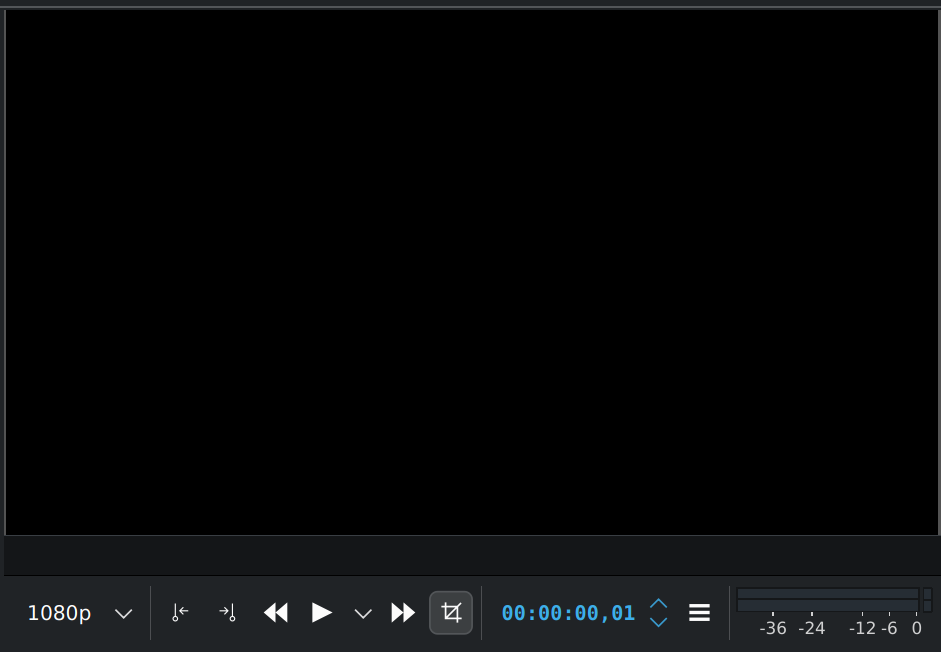
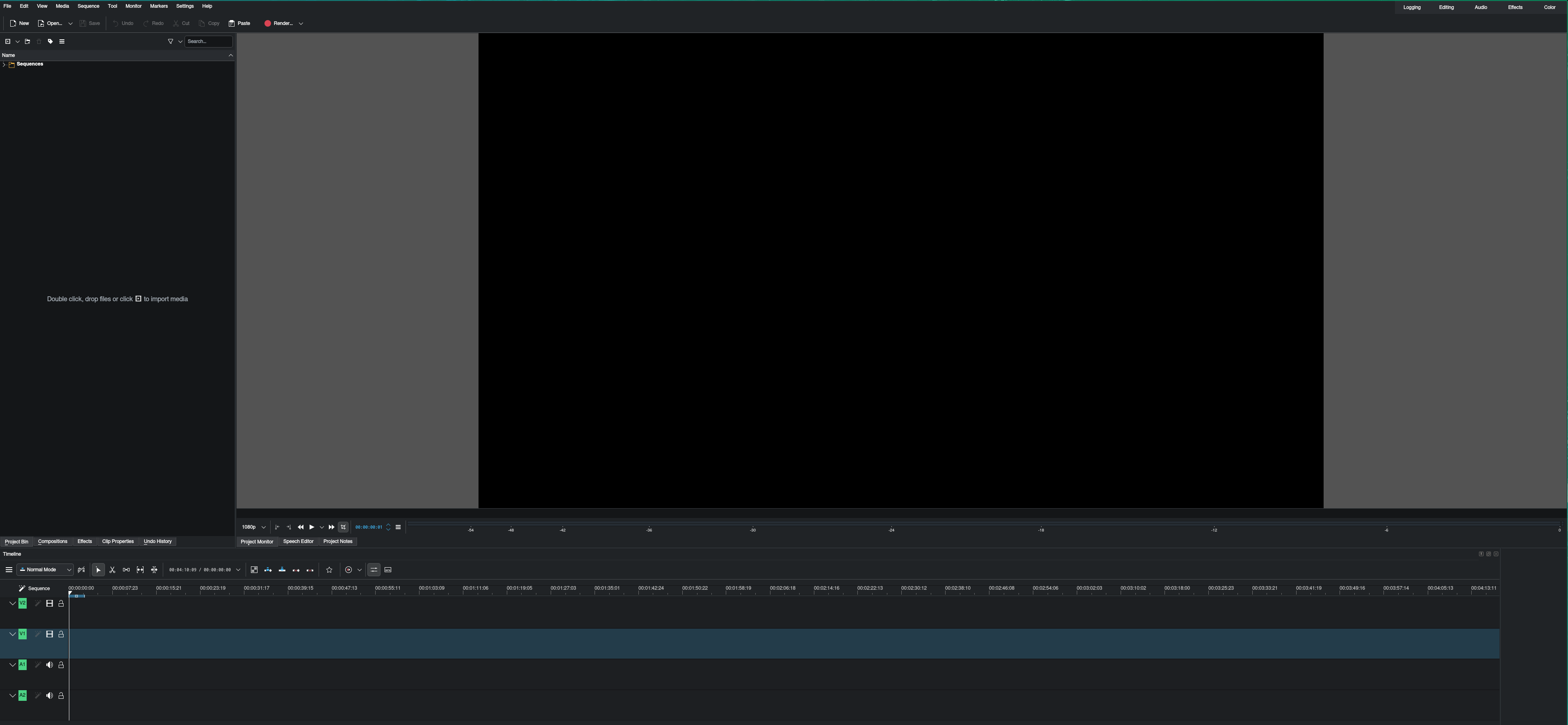
I see the problem. In Premiere the play/stop “key block” is always centered, no matter how wide the window is pulled. I think we should have the possibility to move the audio meter vertically and center the play/stop “key block”. I have added this to the internally “Refactor the monitor UI” issue.

A workaround or another way is to use ripple with `(` and `)`. See here in the manual.

To do it fast, put a shortcut on ripple (i.e `q`) and maybe change the shortcut `(` and `)` for a faster access. Then you can do it with the keyboard only.

1 Like