The functionality of “sleep” means that the CPU is put into “sleep mode” and can no longer be used to run applications until it is woken up. Depending on what hardware exactly is in your computer, other sub-systems may also sleep or not - for example, with most modern laptops the WiFi isn’t sleeping and the computer stays connected to the network, though no applications are actually running so you can’t have bittorrents downloading and uploading.
You can’t “whitelist” certain applications not to sleep - because the CPU itself is put to sleep then nothing can run, not even the operating system. If you want to keep your applications running when you stop using the computer, you need to disable “idle sleep” - use the Plasma Energy Saving control panel to disable sleeping.
Here is how my Energy Saving is setup, to prevent the computer from sleeping when it is connected to power and otherwise idle:
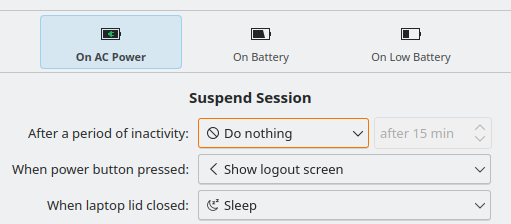
See how the “Do nothing” option is highlighted - that is because it is not the default setting and I have changed it: the default was to sleep after 15 minutes of inactivity.