@ImaginaryTango, drivers can be included in the kernel, as kernel modules, [1] or as userspace drivers. Sometimes, these are installable via the package manager. Other times, their installation process resembles how to acquire software for ntoskrnl and AOSP.
Even worse, when printing and scanning is involved, local drivers can be actively harmful in comparison, when CUPS’s driverless mode is supported.
Regardless, the “Drivers” KCM that you observe within systemsettings appears to be created by your distribution’s maintainers, so KDE cannot assist with that. For reference, on Fedora, which provides no custom KCMs, kcmshell6 --list returns:
The following modules are available:
kcm_about-distro             - Information About This System
kcm_access                   - Configure Accessibility Options
kcm_activities               - Activities help you to focus on a specific task
kcm_animations               - Configure animation speed and style
kcm_app-permissions          - Configure Application Permissions
kcm_audio_information        - Audio Device Information
kcm_audiocd                  - Audiocd IO Worker Configuration
kcm_autostart                - Automatically Started Applications
kcm_baloofile                - Configure File Search
kcm_block_devices            - Block Devices
kcm_bluetooth                - Manage Bluetooth devices
kcm_bolt                     - Thunderbolt Device Management
kcm_cddb                     - Configure the CDDB Retrieval
kcm_cellular_network         - Management of cellular networks
kcm_clock                    - Date and Time
kcm_colord                   - Manage colour profile of devices
kcm_colors                   - Choose colour scheme
kcm_componentchooser         - Choose default Applications
kcm_cpu                      - Advanced CPU Information
kcm_cursortheme              - Choose mouse cursor theme
kcm_desktoppaths             - Location for Personal Files
kcm_desktoptheme             - Choose Plasma style
kcm_device_automounter       - Configure automatic mounting of disks and volumes
kcm_disks                    - Storage device health monitoring
kcm_edid                     - Extended Display Identification Data
kcm_egl                      - EGL information
kcm_energyinfo               - Energy Consumption Statistics
kcm_feedback                 - Configure user feedback settings
kcm_filetypes                - Configure file associations
kcm_firmware_security        - Firmware Security Information
kcm_fontinst                 - Install, manage and preview fonts
kcm_fonts                    - Configure user interface fonts
kcm_gamecontroller           - Test and Configure Game Controllers
kcm_glx                      - GLX information
kcm_icons                    - Choose icon theme
kcm_interrupts               - Interrupt information
kcm_kaccounts                - Configure your internet accounts such as Google, Live, Owncloud
kcm_kamera                   - Configure Kamera
kcm_kded                     - Configure background services
kcm_keyboard                 - Keyboard Hardware and Layout
kcm_keys                     - Configure Keyboard Shortcuts
kcm_krdpserver               - Configure Remote Desktop
kcm_kscreen                  - Manage and configure monitors and displays
kcm_kwallet5                 - KDE Wallet Configuration
kcm_kwin_effects             - Configure compositor settings for desktop effects
kcm_kwin_scripts             - Manage KWin scripts
kcm_kwin_virtualdesktops     - Configure navigation, number and layout of virtual desktops
kcm_kwindecoration           - Configure window title-bars and borders
kcm_kwinoptions              - Configure window actions and behaviour
kcm_kwinrules                - Individual Window Behaviour
kcm_kwinscreenedges          - Configure active screen corners and edges
kcm_kwinsupportinfo          - KWin Support information
kcm_kwintabbox               - Navigation Through Windows
kcm_kwintouchscreen          - Configure touch screen swipe gestures
kcm_kwinxwayland             - Select which keys will be globally available to legacy X11 apps
kcm_landingpage              - Landing page with some basic settings
kcm_lookandfeel              - Choose global look and feel
kcm_memory                   - Memory Information
kcm_mobile_hotspot           - WiFi Hotspot
kcm_mobile_power             - Configure power management settings
kcm_mobile_wifi              - Wireless network setting
kcm_mouse                    - Mouse Controls
kcm_netpref                  - Configure generic network preferences
kcm_network                  - Network interface information
kcm_networkmanagement        - Edit network connections
kcm_nightlight               - Adjust screen colour temperature based on time
kcm_nighttime                - Configure the day-night cycle times
kcm_notifications            - Event Notifications and Actions
kcm_opencl                   - OpenCL API information
kcm_pci                      - PCI information
kcm_plasmakeyboard           - Configuration for Plasma Keyboard
kcm_plasmasearch             - Configure search settings
kcm_plymouth                 - Choose Plymouth boot splash screen
kcm_powerdevilprofilesconfig - Power Management
kcm_printer_manager          - Configure your printers
kcm_proxy                    - Configure the proxy servers used
kcm_pulseaudio               - Configure audio devices and volume
kcm_push_notifications       - Configure notifications from online services
kcm_qtquicksettings          - No description available
kcm_recentFiles              - Manage your file activity history preferences
kcm_regionandlang            - Language Setting, Numeric, Currency and Time Formats
kcm_samba                    - Samba status monitor
kcm_screenlocker             - Configure screen locking
kcm_sddm                     - Configure Login Manager
kcm_sensors                  - Sensors
kcm_smserver                 - Desktop Session Login and Logout
kcm_solid_actions            - Manage actions available to the user when connecting new devices
kcm_soundtheme               - Select a Sound Theme for Notifications
kcm_splashscreen             - Choose splash screen theme
kcm_style                    - Configure application style and behaviour
kcm_tablet                   - Configure drawing tablets and pens
kcm_touchpad                 - Touchpad settings
kcm_touchscreen              - No description available
kcm_updates                  - Configure software update behaviour
kcm_usb                      - USB devices attached to this computer
kcm_users                    - Manage user accounts
kcm_virtualkeyboard          - Select which virtual keyboard to use
kcm_vulkan                   - Vulkan graphics API information
kcm_wallpaper                - Configure the wallpaper
kcm_wayland                  - Information about the Wayland Compositor
kcm_webshortcuts             - Configure Web search keywords
kcm_workspace                - Configure general workspace behaviour
kcm_xserver                  - X-Server information
kcmspellchecking             - Spell Checker Dictionaries and Options
If your differs, contact Kubuntu’s maintainers about them.
Additionally, similar experiences of mine may have been caused by bugs:
Consequently, going to a forum for your distribution may be easier. Ubuntu’s similarly poor support for some my hardware, combined with a lack of any usable forum:
…is part of why I don’t utilise it. However, if it works for you, the users, there, are quite responsive, and shall likely possess experience with any additional driver issues.
You shall have been provided with the option to not utilise a GPG key. If you create a new wallet in KWalletManager, you’ll observe the alternative option to utilise Blowfish. That option does not even require a password:
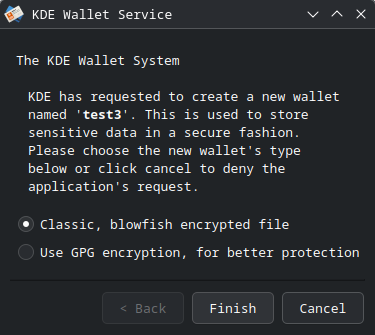
However, I don’t recommend that you retroactively attempt this process: