A Newbie question (last one!), following on from my “Skrooge newbie: introduction” post (can’t link? mostly background info, not really necessary to read)…
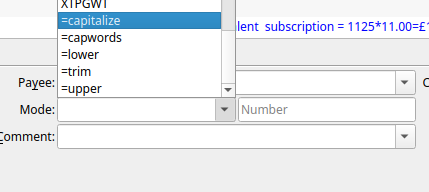
Some of the drop downs (e.g. Mode, Comment and others) contain these cryptic entries? (“=capitalize =capwords =lower =trim =upper”)
In text fields, you can use special keywords (such as =capitalize) to transform the existing values. For example, if you select 100 transactions, enter =lower in the Comment field, and click Update, the comments of all selected transactions will be replaced with their lowercase versions.