my problem with loans is a little bit hard to describe.
I have set up a loan with varying amortization and interest every month. This is perfectly calculated by KMM and the scheduled transactions are correctly set.
But, if I import new transactions from my checking account, the new entries with the payments for the loan seem to be automatically matched with the last available split entry. So the amortization and interest of the last entry is used and obviously wrong. I did not find any other way than correcting amortization and interest manually which is contradicting the scheduled transaction approach for loans.
For me this seems to be some kind of bug? Or is there any right handling of the loans I could adapt?
In this context some other question: During tidying up and fixing errors I deleted some scheduled transactions of the loan. Is it possible to “rewind” the next due date and set older (deleted) transactions again?
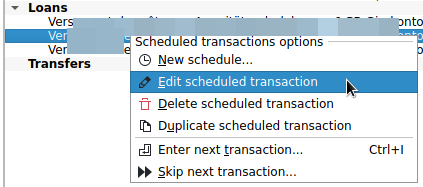
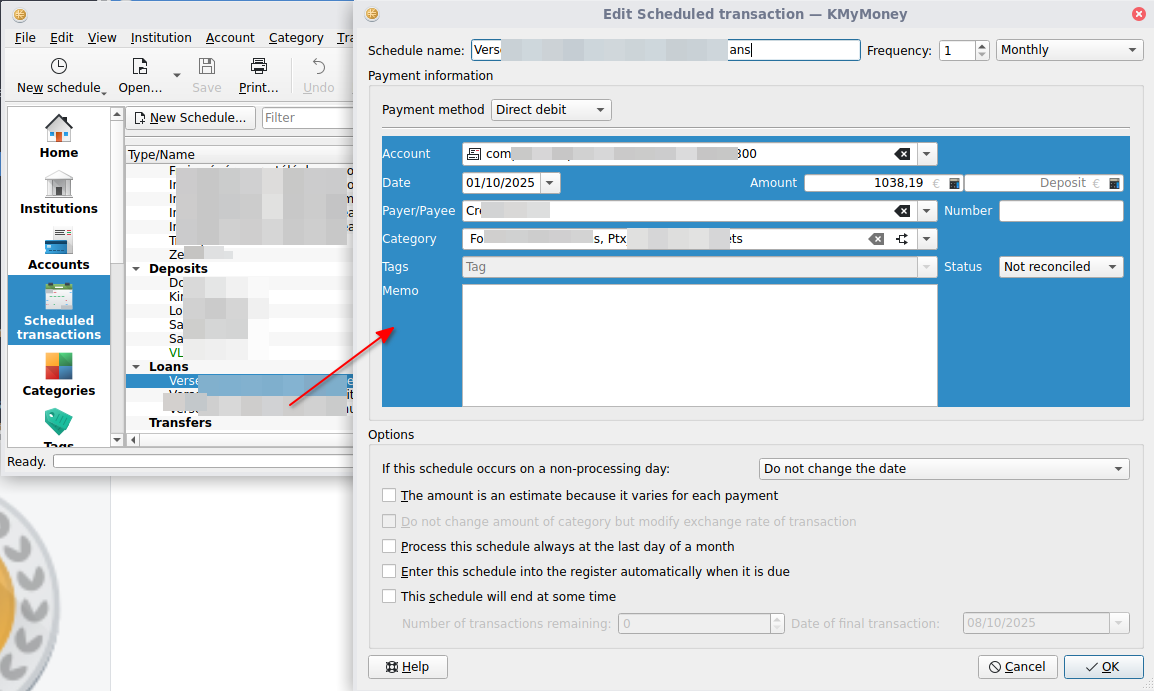
You should be able to open the normal schedules editor on loan schedules when you select the schedule in the schedules view, press the right mouse button to open the context menu, then hold down the shift key on the keyboard and select Edit scheduled transaction. Once you see that dialog you can modify the date of the next payment in the date widget.
I haven’t used loans in ages but I remember that this worked like a charm. Just checked and the last transaction happened over 16 years ago. It could well be that in the meantime something broke that. Setting up a testcase might become pretty tricky as I have to fake the import
Hello @hoblins ,
I have currently three loans set up in KMyMoney.
They are mortgages:
same fixed monthly amount is paid, e.g. 1.000 €
the monthly split between loan amortization and loan interests is different every month. The older the month, the higher the loan interest split.
the loan wizard in KMyMoney created the scheduled transaction properly
so i think you have the same loan rules, right?
Every month, the imported transaction of the 1.000 € is automatically recognized by KMyMoney, and the scheduled transaction passes (in the ledger) from grey , see example here:
(Apologize this not perfect example, this scheduled is overdue… but it looks the same for a non-overdue schedule)
to normal color (black text) AND the split between loan amortization and loan interests appears and is different than the previous month split.
I am not sure why you have the described behavior of:
the new entries with the payments for the loan seem to be automatically matched with the last available split entry. So the amortization and interest of the last entry is used and obviously wrong.
for your information, these are my settings (Settings → Configure KMyMoney) regarding the “autofill” feature in version 5.2.1-43e0ed6
other question: do you preview the schedule transaction of the loan in your ledger?
I do it three days in advance of the schedule, this can be defined here:
When I’m in the context menu and press the shift key the underscore moves from “Edit scheduled transaction” to “Edit scheduled transaction”. But if I hold shift an click on the entry nothing happens.
Using kmymoney-5.2-4851-linux-gcc-x86_64.AppImage.
As recovering deleted scheduled transactions at the moment I deleted the loan and setup again. First payment was on last day of a month which was 30th. Now every monthly rate is on 30th. Is there any option to set it on last day of a month, which could be 28th, 30th, 31st? Or even better on last working day of a month?
Matching the imported and scheduled transactions OK
Importing transactions without entering scheduled transactions before
KMM filled the new imported transaction with data from the last matched transaction. NOK
Result was that there were new entries in the loan account had identical decrease. Which should be lower every month (and is correctly calculated in the scheduled transactions) NOK
Now I deleted the whole loan. Set it up again and do not have this behaviour again.
I appreciate all the work here and the update to 5.2 very, very much! But the migration took me many hours so far and many days KMM could not be used. Not yet fully finished. Sorry for this confusion here, but deleting everything which is not working and doing again from scratch is not really a solution.
i think the loan account creation wizard doesn’t allow to specify “last day” or “last working day of the month”.
However i don’t think this is a huge issue, since:
the future transactions are defined in the scheduled transaction, so all on the 30th of month, BUT when you will import the real transactions from your checking bank account, the matched transactions will be booked on the real transaction date, not on the scheduled transaction date, so you will have the date booked as you wish, won’t you?
if you build your loan account in KMyMoney now and this account is already running in the reality, you might want to book the past transactions as well to get the full picture, right? (i did exactly this for my mortgage). In this case, either you are ok to have all past dates on the 30th of month, or you need to edit each single transaction manually… In my case, i left all past transactions booked on the 30th of month, since i don’t need more precision than the proper month of the year.
no worries, the confusion happens since it is not that easy to use everything properly right at the beginning.
I would say indeed, that doing again from scratch, in the case of a mortgage, can be a good solution.
I understand you created a loan account in KMM which began in the past, and tried to match the transactions coming from “Enter new transaction” of the loan scheduled transaction, right?
And then in this process, something mixed up between imported and scheduled past transactions.
I had the same starting position as you to build my mortgage in KMM. I had it running already 12 years (out of 27).
To protect myself against own failures, i processed like this:
create a “parking” fake checking account. This helps to have visibility and also to keep thinks cleanly separated from the real checking account
create the real loan account in KMM. It will take money from the “parking” fake checking account and books it on the loan account.
the loan account creation has two consequences: it creates one scheduled transaction (for the future) and many past transactions (in my case 12 months x 12 years = 144 past transactions).
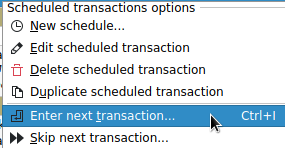
I go in my “parking” checking account and “enter” all 144 past transactions one by one For this is set the keyboard shortcut Ctrl+I to reduce the number of clicks needed.
The tricky part is when i did a few times a special principal reimbursements. KMM can manage it, i just need to enter them in the ledger of the parking account (from parking into loan account) EXACTLY before i “enter” the next past scheduled transaction. Thus KMyMoney adapts the split between amortization and interests properly. It’s magic ! Example, i paid 10.000 € on 15th March 2020, so i enter this transaction BEFORE entering the the scheduled transaction of 31st March 2020 (assuming my mortgage ist paid each end of month).
at the end, i have all my past transactions visible in the “parking” checking account, i can check for each of them if necessary the split between amortization and interests.
I can do the same (reverse) check in the ledger of the loan account and check that its balance is exactly the one i see in my mortgage table outside of KMyMoney.
next tricking think: delete the “parking” checking account. For this i first go into the real checking account, i set a filter to see only the monthly transactions corresponding to the mortgage payment and delete them. After this, i go in the “parking” account, select all transactions, right-click and select “move transaction” to my real checking account.
Last step, i edit the mortgage scheduled transaction, so that the relevant checking account is not the “parking” but the real one.
i delete the “parking” account.
this takes of course some time to do, but things are done step by step and the part touching existing transactions and accounts is good isolated (my point 8) from the risky rest. Other advantage: i can delete and restart many tries in the steps1 to 7 until it is 100% perfect.
When you originally create a loan account, one of the tasks is to create the schedule for transactions. When you do that, on the Edit Scheduled Transactions form, there is a check-box “Process this schedule always at the last day a month.” There is also a drop-down for what happens if the scheduled date is on a non-processing date, such as weekend or holiday, although I am not sure whether that would actually help here.
I’m fairly sure there is already a wishlist bug filed to allow entry always on the Nth day of the month. However, if you use this, and set it for the 31st, I’m not sure what it will do in February or months with 30 days. (perhaps something to mention in that wishlist.)
but this does not apply for loan scheduled transactions, which are an exception.
Scheduled transactions related to a loan account cannot be created nor edited the same way and with the same mask as the other scheduled transactions. They are created within the “create new loan account wizard” and editing them afterwards also triggers opening this wizard.
For the loan case, the payment date (which will be set as the regular payment date for the loan scheduled transaction) is only defined in the step 3 of 8 of the loan account creating wizard:
many thanks.
Bug 509029 Loan account field not updatable: next due date is solved now.
I have just tested it from my end in KMyMoney Version 5.2.1-04b70b9 (AppImage) and the trick: right-click on the scheduled transaction you want to edit → move mouse to row edit scheduled transaction
By the way, the trick with the shift key is not user-friendly. Why does the row edit scheduled transaction opens the loan account wizard instead of the scheduled transaction wizard? The loan account wizard is already accessible in the Accounts section, where the intuition will look for it.
Many thanks to @ipwizard, particularly for the fix.
And @surcouf for the elaborated hint with the “parking” account, which is also helpful in other circumstances.




 The tricky part is when i did a few times a special principal reimbursements. KMM can manage it, i just need to enter them in the ledger of the parking account (from parking into loan account) EXACTLY before i “enter” the next past scheduled transaction. Thus KMyMoney adapts the split between amortization and interests properly. It’s magic ! Example, i paid 10.000 € on 15th March 2020, so i enter this transaction BEFORE entering the the scheduled transaction of 31st March 2020 (assuming my mortgage ist paid each end of month).