A way to change transcode location?

Hello,

kdenlive seems to save transcoded media alongside the original footage, which is a bit of an issue when trying to keep things organized. Is there a way to adjust the location where transcoded media is parked? I would be happy to have a separate “transcoded” folder alongside my original media or even next to the project file, a bit like the proxy folder

Transcoded files are a bit different to proxies, because proxies are by design “temporary working files” that aren’t used in the final render, and can (usually) safely be deleted and recreated again later on demand.

But transcoded files generally replace the original source files and become the primary project source (ie. you could then delete the originals, but not the transcoded copies, without invalidating the project).

So while there’s no fundamental reason they couldn’t be put somewhere else, it’s probably just extra complexity that nobody was annoyed enough to spend time working on yet.

You could just move them manually after transcoding, and re-add them to the bin. Or move your originals away to an archive location since they aren’t needed by the project anymore?

But it wouldn’t hurt for us to give a bit more thought to how resources are organised and whether it’s reasonable or practical to have more classes of default locations other than just “the project dir”. And maybe even if we want to treat transcoded files as ‘temporaries’ more like proxies?

Yes you are right, transcoded files are proper assets, if I were to archive a project I would archive those too together with the original footage (or perhaps even just the transcoded media).

At the moment I solved this by having a simple script in my “footage directory” that, after transcoding, grabs all original footage and puts it in an “original” directory. I can’t really move the transcoded footage because otherwise as you said I’d have to re-import it.

So I think that having the option to choose a destination for all transcoded media would be neat, if no choice is made (blank field) it could revert to the current behavior. But I don’t think I can implement this myself

Going a bit off topic here, it would also be nice if when opening the file manager for the first time (say to add a picture in the titler, or to extract a frame) it would open directly the project folder, Or at least offer some kind of button to navigate directly to the project folder.

From there it is trivial to navigate through the rest of the filesystem as the most common shortcuts are available in the file manager. While in my experience starting from the filesystem root or user home and finding the project is quite hard. This is something I could perhaps implement myself if you think there is value

My personal practice is that I usually try to keep the job of organising and archiving my footage and related resources at least conceptually separate from the projects that use them - so for anything but the most trivial projects, my project dir (and subdirs) usually includes a symlink farm importing all the shared things that project uses.

I don’t have a lot of raw footage that needs transcoding to edit, but indeed, if I did I’d probably do something similar separating the pristine resources from the transcodes used for editing.

So I think that having the option to choose a destination for all transcoded media would be neat

I think the first question to look at is how many ways you can arrive at a dialogue or prompt to transcode (or otherwise create derivative primary resources that might replace an original clip in the bin/timeline). Because ideally, we want one nice solution that work the same for all of them.

I can’t answer that offhand either, so it would need some homework to research, but if we come up with a nice “UI-centric” solution that fits all the needed cases, implementing it shouldn’t be terribly hard.

@berndmj @Eugen_Mohr I’d love to hear any thoughts you have on this one too before formulating a more formal feature request?

it would also be nice if when opening the file manager for the first time … it would open directly the project folder,

We have somewhat limited control over this, because we don’t implement a file manager, we just use the KDE/Qt one, which will then usually delegate that to your DE/platform file chooser.

Usual best practice though is to open to the last opened location unless it’s a very specific task always operating in a very specific directory. And most modern file choosers will include some sort of history to make it easy to get back to recently used locations.

Or at least offer some kind of button to navigate directly to the project folder.

Are you not seeing some sort of one click button to take you to the project folder?

I see one in both the MATE and Plasma file choosers - though as a separate issue again, it’s often seemed broken to me - working as expected in a brand new project with a custom project dir set - but then after saving and reopening it tends to take me to the ‘default’ project dir rather than the actual project one. But that’s on my “things to look at when I pop my current todo stack or stumble into that code for other reasons” list too (it also shouldn’t be complicated to fix).
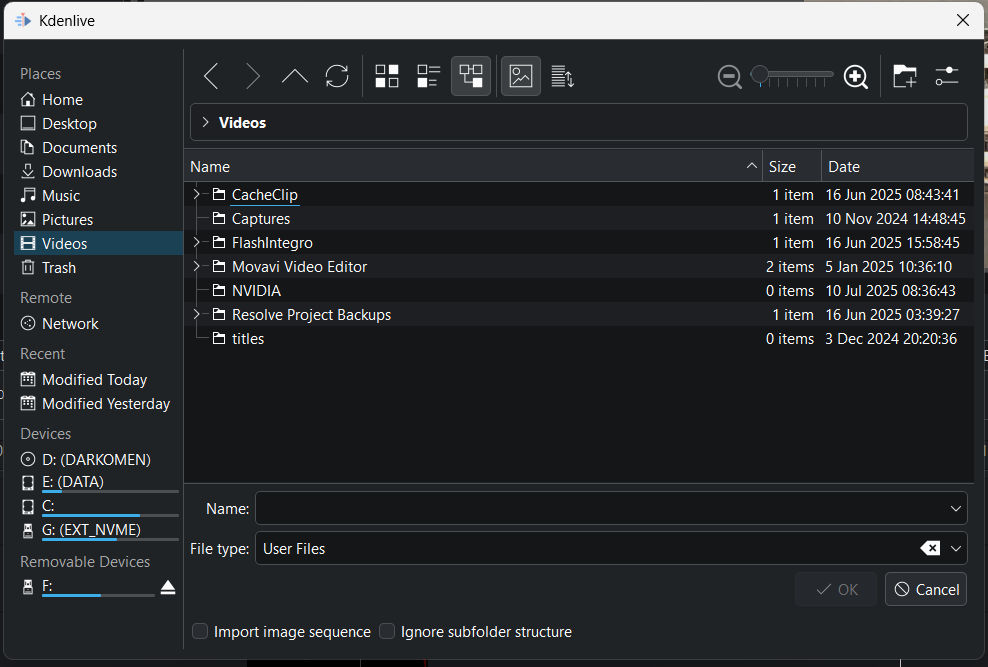
Thanks for the answer, this is what I see in the file manager under windows, within an existing project:


I tried to hover on the various buttons but nothing seems to suggest it would take me to the parent folder of the project file. I have the same on linux mint it seems. Any ideas?

I don’t recall doing anything special to make that happen …

Oh, looks like the trick is Settings->Configure Kdenlive->Project Defaults
Then set a ‘Custom’ project folder (which is something I’ve just always done).

If I set that back to ‘Default’ I lose that shortcut in the file selector.

You do need to restart kdenlive to see it take effect though.

WAIT!!! there is a way. The trick (at least for me) is to make sure that in the project settings the project folder is set to the parent folder of the project file. Then the entry “project folder” appears in the “places” menu. Weirdly enough it takes you to the .cachedfiles folder which at this point is next to the project file, and not to the parent folder of the project but hey, massive QOL improvement nonetheless.

At any rate, apparently right-clicking on “places” allows to add global entries, which I find rather handy. So yeah, the situation is very livable.

As for the transcoded files, if anything is done in that regard I think it would make sense to have the “special location” defined relative to the project folder/file, so that each project will maintain its own bundle of transcoded files, which helps with archival.

I think it would be a good idea if the user can choose a specific folder for saving transcoded files. The same as we have for proxies. Premiere Pro and Davinci Resolve has this functionality too.

I’ve done something similar in the past (adding a menu entry in a Qt application) so I might have a go at it. I need do find where the transcoding command is performed and figure out how to give it an output path different than the original folder, and then the relevant menu definition to add the textbox (empty for default) and somehow connect the two. I should have time next week, any pointers would be highly appreciated

A good code entry point is when you search for the message Transcode to Edit Friendly Format.

If you do find time to explore this more and have a crack at it, open an issue in the issue tracker (not the bug tracker) outlining what you think we should add where, and any open questions you still have about it.

That way you’ll get some pre-review, and maybe insight and suggestions of alternatives that come with free cake and unicorns - before you spend too much time paving good intentions down a different road - and it will give us a place to focus any ongoing discussion before it turns into an actual MR of a proposed implementation.

[We use the issue tracker for work that someone is actually undertaking, and the bug tracker for things that people have seen, or want to see, which don’t actually have someone on point to fix/implement yet.]

Seems to be an issue for others, too: See the Transcode Manager written in python.

I prefer this to be part of Kdenlive natively, though, so please, @sideprojectslab, give it a try :wink:

Looks like something I could tackle, a nice holidays project if you will. I might need some hand-holding to set up the development environment because I think the way I have it set up right now with craft is very slow. Perhaps we can take this private over PMs or other channels?

I’ll add “Extract Audio” as another one to put in this basket. It likewise dumps the newly created clip next to the footage it was extracted from.

I don’t think we want infinite fine-grained configuration for every possible thing that works this way, but it would be nice to have something uniform that works for all of them.