Due to recent oopsie with flatpak version I had to use the appimage version for a couple of days. Despite being told:
“Both have some support for using some hardware for some operations - but there shouldn’t be any difference between our builds in that respect.”
in a separate topic, I have come to realize that appimage version indeed does not support hardware accelerated encoding while flatpak version does. Tried to render a project using Vaapi Av1 format and immediately had an error. My GPU is an AMD RX 7600.
If I run config wizard in appimage version, I get “no hardware encoder found” error and as a consequence cannot enable “VAAPI hardware acceleration” option. One other possible related difference between appimage and flatpak version is they use different LLVM versions.
Appimage: LLVM 20.1.8 (same as the OS)
Flatpak: LLVM 19.1.7 considerably older version
Can someone shed some light as to why appimage version cannot utilize VAAPI Hardware Acceleration? Honestly I would like to keep using the appimage version but at this point this limitation makes flatpak the better choice. Thanks for any answers in advance.
I use Bazzite as distro and have Ryzen 5 5600 CPU with AMD RX 7600 GPU.
ffmpeg in the AppImage appears to be built with support for av1_vaapi:
DEV.L. av1 Alliance for Open Media AV1 (decoders: libdav1d libaom-av1 av1 av1_cuvid av1_qsv) (encoders: libaom-av1 libsvtav1 av1_nvenc av1_qsv av1_amf av1_vaapi)
So not sure offhand why the wizard isn’t detecting it and it’s not playing nice (other than that it won’t be LLVM, it’s probably some other missing or incompatible dependency). Please file a bug report about this one.
But that said, the hardware encoders usually trade some quality/compression for speed, so if this is for your final render and you want the best compression/quality ratio, you might not want the hardware encoder for that anyway …
Just tried another render with Vaapi AV1 encoder and here’s the error report:
Rendering of /media/system/Storage/RenderedVideos/witchfire_introductionav1.mp4 crashed
[AVHWDeviceContext @ 0x7f9260007600] libva: dlopen of /usr/lib/dri/radeonsi_drv_video.so failed: /usr/lib/dri/radeonsi_drv_video.so: wrong ELF class: ELFCLASS32
[AVHWDeviceContext @ 0x7f9260007600] libva: /usr/lib64/dri/radeonsi_drv_video.so has no function __vaDriverInit_1_0
[AVHWDeviceContext @ 0x7f9260007600] Failed to initialise VAAPI connection: -1 (unknown libva error).
[consumer avformat] Failed to initialize VA-API: -5
[av1_vaapi @ 0x7f9260001a00] A hardware frames reference is required to associate the encoding device.
I really don’t know how to interpret this, maybe you can help?
But that said, the hardware encoders usually trade some quality/compression for speed, so if this is for your final render and you want the best compression/quality ratio, you might not want the hardware encoder for that anyway …
I’m willing to do that but libx264 encoder doesn’t apply the bitrate I enter. I use peak constrained VBR and set it to 60mbps but the resulting file has a crazy high bitrate like 260mbps which bloats video size to unreasonable amount.
It’s trying to use the libva libraries from your system, but they are incompatible with what ffmpeg in the AppImage was built with.
This isn’t code I’ve had a lot to do with, but it appears to be expecting something quite ancient (and on your machine seems to be trying to load a 32-bit version … are you really running a 32-bit OS in 2025?)
I’m seeing:
[AVHWDeviceContext @ 0x7f9d2c004300] libva: /usr/lib/x86_64-linux-gnu/dri/radeonsi_drv_video.so has no function __vaDriverInit_1_0
So the appimage is expecting to find VA-API version 1.0, while the drivers on my machine are providing version 1.22 (from libva 2.22.0).
So I assume this is an issue with the deps Craft is configured to use for building the AppImages (and in your case running 64-bit software on a 32-bit OS?).
but libx264 encoder doesn’t apply the bitrate I enter.
Why are you trying to specify or constrain to a bitrate? That’s almost never what you want for offline rendering. You should specify a quality and let the codec decide what to throw how many bits at.
Hard caps on bitrate are pretty much only useful for live streaming through a pipe with strictly constrained bandwidth, which almost nobody has in practice these days on the modern packet-switched internet.
I am certainly using a 64 bit OS. I don’t think I would be able to run anything I am running otherwise Bazzite does not have a 32 bit version anyway so that’s out of the question. I will wait for a developer to chime in before trying anything else. Surely there is a simple explanation to this.
Tried opening an issue ticket on GitHub but their page doesn’t have the “Issues” tab enabled so I will wait here for an answer.
About constrained VBR, I was just lazy to figure out what quality level corresponded to the bitrate I had in mind so just tried VBR. Turns out a CRF of 18 does the job just fine so I have already stopped using constrained VBR. Now all that remains is figuring out how to get hardware encoding to work.
Well this: libva: dlopen of /usr/lib/dri/radeonsi_drv_video.so failed: /usr/lib/dri/radeonsi_drv_video.so: wrong ELF class: ELFCLASS32
Says you have a 32-bit radeonsi_drv_video.so - so even if it was a compatible version you would still be SOL until you figure out where it came from and fix that.
Surely there is a simple explanation to this
There is, there’s a mismatch between what the appimage is being built with and the system hardware interface libraries on the systems that you and I are trying to run this on. There may not be a simple answer to that which you’re going to like though …
We might have to play favourites and pick a VA-API version that won’t work for everyone.
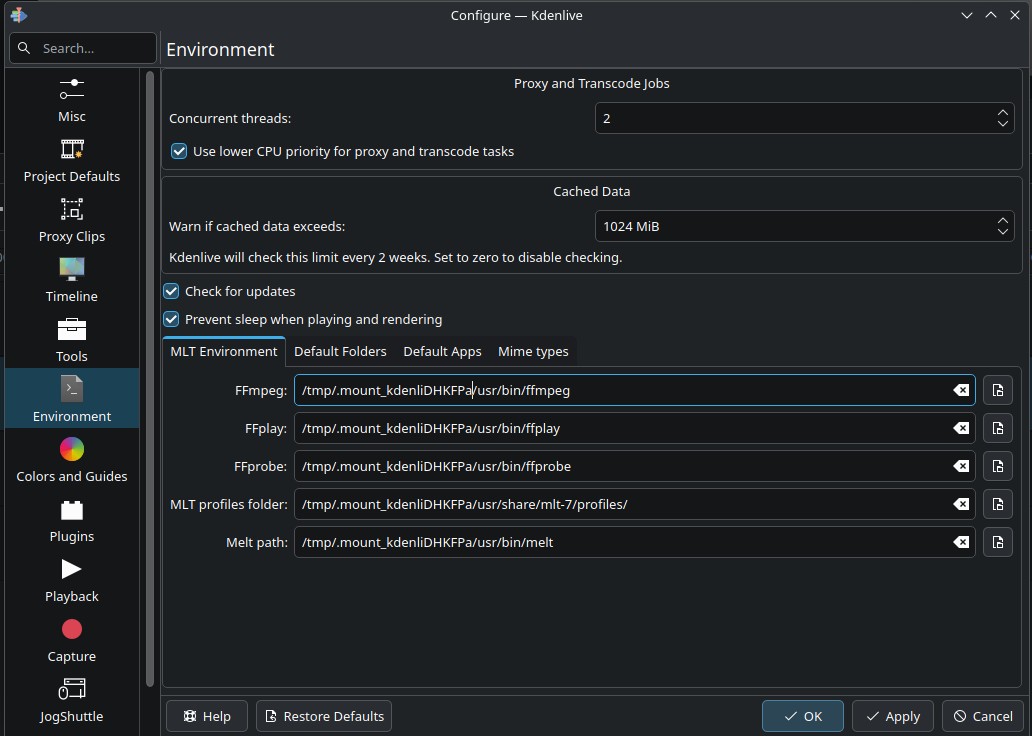
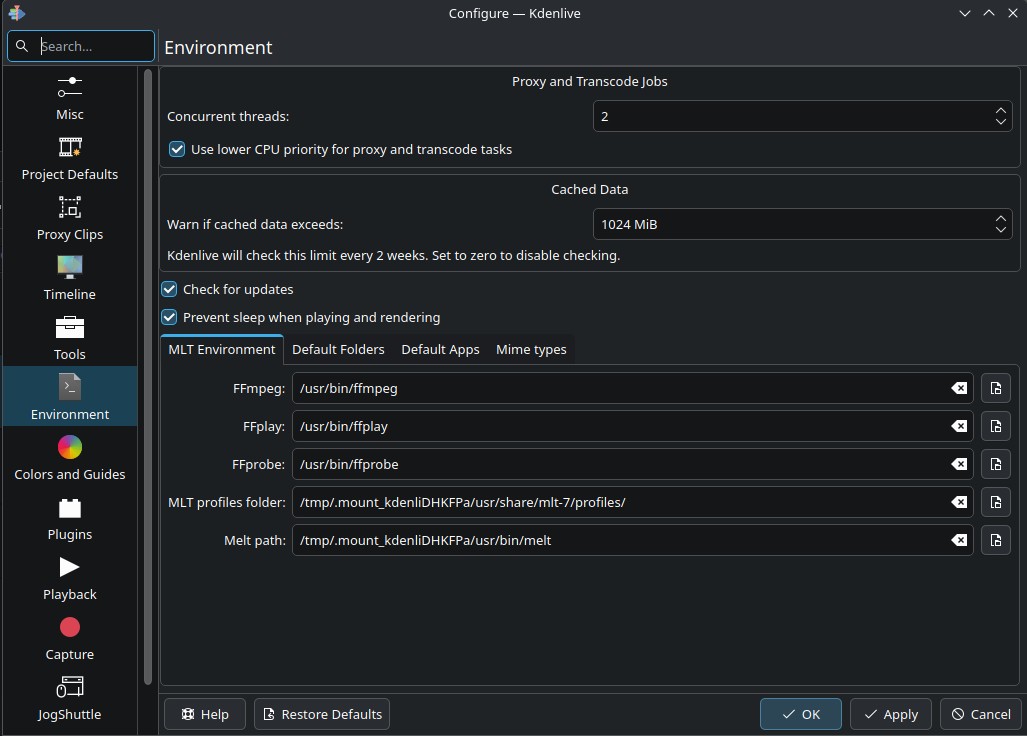
Managed to fix the issue. Turns out in appimage version, in the settings where you point to ffmpeg binaries, it had some garbage values pointing to a non-existing directory as follows:
Okay, the issue is not solved. Turns out that garbage value isn’t actually garbage. If I go to the directory shown in default settings, there are indeed all binaries there. But the default binaries provided by Kdenlive (appimage version) does not support hardware acceleration for some reason.
Now, if I manually point to /usr/bin/ffmpeg binary, hardware acceleration works. But each time I restart Kdenlive, it resets to the default folder so hardware acceleration stops working again. Basically I have to manually point to the system folder each time I start Kdenlive. Is there a way to make sure the changes I make stick? That would solve the issue once and for all.
The config file is /home/.config/kdenlive-appimagerc and indeed the values in it change every time I restart Kdenlive.
Brother I am telling you, system binaries work as intended, the only problem is each time I restart Kdenlive, environment settings are reset. All I am trying to figure out is how to make so the environment settings stick and not revert to default values each time I restart Kdenlive.
Alright, I guess I am understanding what is happening. Resetting of environment settings seem to be intentional. After all, my system binaries might be incompatible and thus create bugs, graphical issues in renders, etc. So the developers force the use of default binaries to prevent any bugs caused by user binaries. Which makes sense.
So it seems like I have a few options here:
Manually set environment settings to /usr/bin folder each time I run Kdenlive and risk things breaking.
Stick with default binaries and accept the fact that VAAPI hardware acceleration won’t work.
Use flatpak version, where VAAPI works but it has much older LLVM version.
I can see what’s going on now and honestly, I can’t blame anyone. I’m just trying to understand what’s happening, to the best of my ability. I’m not a programmer or developer and fairly new to Linux environment so understanding things take time.
Well, it’s good that things are making sense now. I understand the limitations and fair enough, I’ll use the default binaries. Hopefully in the future I get compatible binaries because timeline scrubbing is so fast with hardware decoding enabled
Thanks for help and thanks for remaining as cool headed as you could trying to explain things to a dum-dum end user. Much appreciated.
It’s a real bug. It just might not be easy to fix for everyone given the way VA-API works, and there isn’t a quick hack to escape that in the meantime. But it’s on the radar now.
If only you plainly said this like 3 weeks ago, instead of flooding me with technical stuff, telling me I’m using a 32-bit operating system and all that mumbo jumbo man. This way is more fun for you I guess. I hope I won’t have to get help on this forum again because you’re making things much more difficult than they have to be.
All you had to say was “it’s a bug and we’re working on it".”
 Bazzite does not have a 32 bit version anyway so that’s out of the question. I will wait for a developer to chime in before trying anything else. Surely there is a simple explanation to this.