Yeah, I see how that’s going to be the easiest thing to implement. And thanks for the clarification! I did look into where KGlobalAccel was pulling the shortcut options from but I didn’t find anything. So it’s up to the application… that’s a bummer. Even applications like Dolphin basically have no binding options. But once again, I’m going OT. Anyway, I’m looking forward to the future upgrades to input methods. 
1 Like
This really is about 95% - anything you can do with a command, or bash script, can be bound to a keyboard shortcut (even obscure ones you’ll never remember) and then given a shape for a gesture…
3 Likes
The old easystroke application did something, I’m not sure if you’re aware of it, so I mention it just in case: you could have global/default gestures, and then add tree-style layers for different programs.
So having a “Browsers” group, you could add Chrome, Firefox, etc. and assign a gesture = CTRL+T and it would work for all browsers under that grouping.
If you wanted the same gesture but another browser didn’t use CTRL+T, you could overwrite the keyboard shortcut for that specific program without affecting the rest of the group.
Visual explanation:
Default
    Browsers <<< gesture = ctrl+T
        Firefox <<< inherit
        Chrome <<< inherit
        Example Browser not using CTRL+T for new tab <<< override = CTRL+N
    App A
    App B
    Group B
....
3 Likes
This reminds me a lot of an open-source Windows project called poerin/Stroke. It supports whitelists(by bin path) and app-specific mappings — basically the kind of workflow you describe. I’m not sure how much of its implementation depends on Windows internals, so it may or may not translate to Linux/Wayland, but its approach seems quite relevant and might be worth a look.
Here is its setting page:
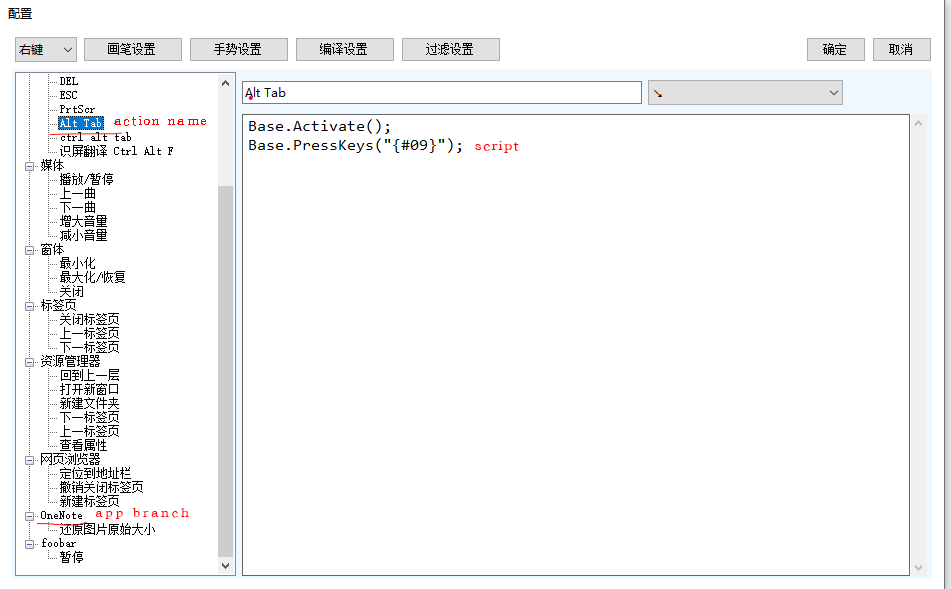
It’s end of 2025. Whats the status?
3 Likes
Yes, still my MOST desired feature for Plasma; nothing else came close to the impact that mouse gestures had (Windows '98 Firefox first time using them, and still using them in Firefox).
3 Likes
FYi input-actions, which was mentioned earlier, works very well.
It’s not as convenient to set-up due to having to manipulate a yaml file but once it’s set up it works basically just as well as the old Plasma tool. It has per-window rules, full gesture support, can run scripts as actions, etc.
5 Likes
Oh, okay - I’ll take another look. There were issues with the action key being taken over in the past; but I didn’t try it for a year or so now.
1 Like
There’s two different things: Mouse Actions and Input Actions. If I recall correctly, Mouse Actions is the one that took over the mouse button.
I haven’t gotten around to trying Input Actions, tho. Not sure if it has the same problem.
2 Likes
I’m using jersou/mouse-actions. I miss the experience on other platforms, but this one works somewhat.
1 Like
I can now say for certainty that Input Actions (not Mouse Actions) is the one we’re all looking for, if we were users of easystroke.
The YAML config file is atrocious  , though not as bad as easystroke’s broken UI. Once you get the hang of it, it’s really powerful. Also, the strokes are not visible and must be recorded with a companion tool (Desktop Effects > Tools), which outputs an encoded string for the config file.
I managed to replicate all my common-day strokes from easystroke (mostly moving around my browser, and launching a couple of programs), and have yet to get any sort of issues. There are many more features that I will be trying out as I get more comfortable with KDE.
3 Likes
I’d tend to agree with that, but I’m just not clever enough to work it out…
I have it installed, and enabled… I managed to ‘record’ a gesture and got a string ‘AAsALQxYLwBkVmQA’ but absolutely no idea what to do with it.
My initial steps would be to simply perform keyboard shortcuts using mouse gestures…
For example:
-
hold RMB, draw an ‘L’ (so down, then right) - action keyboard Ctrl+W (close tab)
-
Hold RMB, draw an ‘L’ backwards (RMB left then up) - action keyboard Ctrl_Shift_T (reopen last tab)
Just replicating common keyboard shortcuts would be a significant start… do you have a config file that you could post to give us a heads-up?
The documentation is rather abstruse… I tried several times to create a configuration to do this, and each time I got a (meaningless to me) error code with no clues about how to fix it.
2 Likes
I’ll copy/paste a few strokes for you to check out:
The first one is an upwards stroke, the string you get you paste it where it says “# UP” (it’s a comment within the config file that I made to keep track of what I pasted).
PASTE the string into the strokes: [ 'weird string'] part
mouse_buttons, in my case I use one of the side buttons on my mouse.
conditions: if the window ID is the same as the window ID where the mouse is, AND if the window class is the same as “firefox-beta” (that’s my browser).
THEN, at the end of the gesture, send the keyboard shortcut: LEFTCTRL+T
IF ELSE, the conditions is that the program is VSCodium, send LEFTCTRL+N.
LEFT/RIGHT work for both VSCodium and Firefox, since it’s the same keyboard shortcut. The conditions say if window = firefox OR VSCodium, then…
mouse:
  gestures:
    - type: stroke
      strokes: [ 'MGQA0DMnPMwwAGQA' ] # UP
      mouse_buttons: [ extra1 ]
      gestures:
        - conditions:
            - $window_id == $window_under_id
            - $window_class == firefox-beta
          actions:
            - on: end
              input:
                - keyboard: [ leftctrl+t ]
        - conditions:
            - $window_id == $window_under_id
            - $window_class == VSCodium
          actions:
            - on: end
              input:
                - keyboard: [ leftctrl+n ]
    - type: stroke
      strokes: [ 'NQAANC5kZAA=' ] # DOWN
      mouse_buttons: [ extra1 ]
      gestures:
        - conditions:
          - any:
            - $window_class == firefox-beta
            - $window_class == VSCodium
          - $window_id == $window_under_id
          actions:
            - on: end
              input:
                - keyboard: [ leftctrl+w ]
    - type: stroke
      strokes: [ 'ZDIAnQAxZAA=' ] # LEFT
      mouse_buttons: [ extra1 ]
      gestures:
        - conditions:
          - any:
            - $window_class == firefox-beta
            - $window_class == VSCodium
          - $window_id == $window_under_id
          actions:
            - on: end
              input:
                - keyboard: [ leftctrl+pageup ]
    - type: stroke
      strokes: [ 'ADEAAGQyZAA=' ] # RIGHT
      mouse_buttons: [ extra1 ]
      gestures:
        - conditions:
          - any:
            - $window_class == firefox-beta
            - $window_class == VSCodium
          - $window_id == $window_under_id
          actions:
            - on: end
              input:
                - keyboard: [ leftctrl+pagedown ]
Be very aware of the indenting, because it matters.
        - conditions:
          - any:
            - $window_class == firefox-beta
            - $window_class == VSCodium
          - $window_id == $window_under_id
is NOT the same as
        - conditions:
          - any:
            - $window_class == firefox-beta
            - $window_class == VSCodium
            - $window_id == $window_under_id
3 Likes