alex55
January 7, 2026, 11:59am
1
Hello,
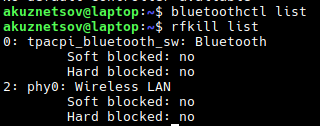
After I installed updates last December, kde looses bluetooth adapter in a few hours of work. It always happens after the system locked the screen and turned it off because of inactivity.
If I forcely turn off screen locking, everything works fine for days.
Before the december updates were installed, bluetooth on my laptop had been working for a couple of years without any issues.
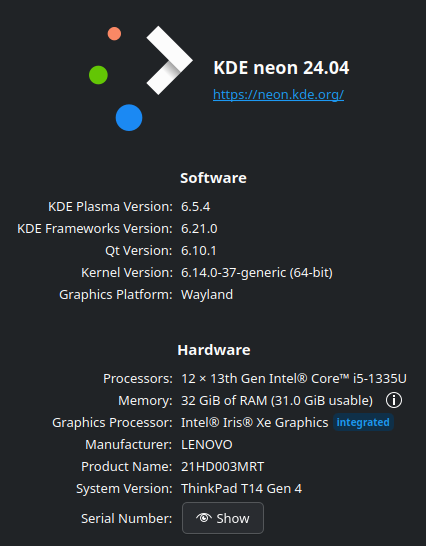
I have installed the latest updates yesterday, it solved the problem with hanging up the laptop on turning off display, but bluetooth issues still here.
alex55
January 7, 2026, 12:17pm
2
$ sudo dmesg | grep -i blue
[   35.817223] thinkpad_acpi: rfkill switch tpacpi_bluetooth_sw: radio is unblocked
[   35.849429] Bluetooth: Core ver 2.22
[   35.849459] NET: Registered PF_BLUETOOTH protocol family
[   35.849461] Bluetooth: HCI device and connection manager initialized
[   35.849464] Bluetooth: HCI socket layer initialized
[   35.849467] Bluetooth: L2CAP socket layer initialized
[   35.849471] Bluetooth: SCO socket layer initialized
[   35.984333] Bluetooth: hci0: Device revision is 0
[   35.984339] Bluetooth: hci0: Secure boot is enabled
[   35.984341] Bluetooth: hci0: OTP lock is enabled
[   35.984342] Bluetooth: hci0: API lock is enabled
[   35.984343] Bluetooth: hci0: Debug lock is disabled
[   35.984344] Bluetooth: hci0: Minimum firmware build 1 week 10 2014
[   35.984346] Bluetooth: hci0: Bootloader timestamp 2019.40 buildtype 1 build 38
[   35.986364] Bluetooth: hci0: DSM reset method type: 0x00
[   35.992826] Bluetooth: hci0: Found device firmware: intel/ibt-0040-0041.sfi
[   35.992849] Bluetooth: hci0: Boot Address: 0x100800
[   35.992851] Bluetooth: hci0: Firmware Version: 60-48.23
[   36.965120] Bluetooth: BNEP (Ethernet Emulation) ver 1.3
[   36.965125] Bluetooth: BNEP filters: protocol multicast
[   36.965129] Bluetooth: BNEP socket layer initialized
[   37.530740] Bluetooth: hci0: Waiting for firmware download to complete
[   37.531333] Bluetooth: hci0: Firmware loaded in 1502442 usecs
[   37.531423] Bluetooth: hci0: Waiting for device to boot
[   37.547424] Bluetooth: hci0: Device booted in 15676 usecs
[   37.549710] Bluetooth: hci0: Found Intel DDC parameters: intel/ibt-0040-0041.ddc
[   37.551337] Bluetooth: hci0: Applying Intel DDC parameters completed
[   37.554421] Bluetooth: hci0: Firmware timestamp 2023.48 buildtype 1 build 75324
[   37.554425] Bluetooth: hci0: Firmware SHA1: 0x23bac558
[   37.558332] Bluetooth: hci0: Fseq status: Success (0x00)
[   37.558342] Bluetooth: hci0: Fseq executed: 00.00.02.41
[   37.558344] Bluetooth: hci0: Fseq BT Top: 00.00.02.41
[   37.629496] Bluetooth: MGMT ver 1.23
[   39.767165] Bluetooth: RFCOMM TTY layer initialized
[   39.767175] Bluetooth: RFCOMM socket layer initialized
[   39.767181] Bluetooth: RFCOMM ver 1.11
[13549.869744] Bluetooth: hci0: Received unexpected HCI Event 0x00
[13549.869763] Bluetooth: hci0: Received unexpected HCI Event 0x00
<lots of repeated messages removed>
[13549.870048] Bluetooth: hci0: Received unexpected HCI Event 0x00
[13556.642269] Bluetooth: hci0: Opcode 0x0402 failed: -110
[13556.642336] Bluetooth: hci0: command 0x0402 tx timeout
[13556.642347] Bluetooth: hci0: Initiating acpi reset method
[13557.327608] Bluetooth: hci0: Device revision is 0
[13557.327618] Bluetooth: hci0: Secure boot is enabled
[13557.327620] Bluetooth: hci0: OTP lock is enabled
[13557.327622] Bluetooth: hci0: API lock is enabled
[13557.327624] Bluetooth: hci0: Debug lock is disabled
[13557.327626] Bluetooth: hci0: Minimum firmware build 1 week 10 2014
[13557.327629] Bluetooth: hci0: Bootloader timestamp 2019.40 buildtype 1 build 38
[13557.328063] Bluetooth: hci0: DSM reset method type: 0x00
[13557.333164] Bluetooth: hci0: Found device firmware: intel/ibt-0040-0041.sfi
[13557.333199] Bluetooth: hci0: Boot Address: 0x100800
[13557.333202] Bluetooth: hci0: Firmware Version: 60-48.23
[13558.861547] Bluetooth: hci0: Waiting for firmware download to complete
[13558.861563] Bluetooth: hci0: Firmware loaded in 1492613 usecs
[13558.861744] Bluetooth: hci0: Waiting for device to boot
[13558.878763] Bluetooth: hci0: Device booted in 16724 usecs
[13558.881020] Bluetooth: hci0: Found Intel DDC parameters: intel/ibt-0040-0041.ddc
[13558.882794] Bluetooth: hci0: Applying Intel DDC parameters completed
[13558.885610] Bluetooth: hci0: Firmware timestamp 2023.48 buildtype 1 build 75324
[13558.885629] Bluetooth: hci0: Firmware SHA1: 0x23bac558
[13558.889665] Bluetooth: hci0: Fseq status: Success (0x00)
[13558.889683] Bluetooth: hci0: Fseq executed: 00.00.02.41
[13558.889688] Bluetooth: hci0: Fseq BT Top: 00.00.02.41
[13558.961008] Bluetooth: MGMT ver 1.23
[49855.577151] Bluetooth: hci0: Opcode 0x0402 failed: -110
[49855.577157] Bluetooth: hci0: command 0x0402 tx timeout
[49855.577186] Bluetooth: hci0: Initiating acpi reset method
[49856.262661] Bluetooth: hci0: Device revision is 0
[49856.262675] Bluetooth: hci0: Secure boot is enabled
[49856.262679] Bluetooth: hci0: OTP lock is enabled
[49856.262681] Bluetooth: hci0: API lock is enabled
[49856.262684] Bluetooth: hci0: Debug lock is disabled
[49856.262686] Bluetooth: hci0: Minimum firmware build 1 week 10 2014
[49856.262691] Bluetooth: hci0: Bootloader timestamp 2019.40 buildtype 1 build 38
[49856.263306] Bluetooth: hci0: DSM reset method type: 0x00
[49856.270213] Bluetooth: hci0: Found device firmware: intel/ibt-0040-0041.sfi
[49856.270267] Bluetooth: hci0: Boot Address: 0x100800
[49856.270271] Bluetooth: hci0: Firmware Version: 60-48.23
[49857.805033] Bluetooth: hci0: Waiting for firmware download to complete
[49857.805053] Bluetooth: hci0: Firmware loaded in 1498896 usecs
[49857.805353] Bluetooth: hci0: Waiting for device to boot
[49857.821842] Bluetooth: hci0: Device booted in 16291 usecs
[49857.823912] Bluetooth: hci0: Found Intel DDC parameters: intel/ibt-0040-0041.ddc
[49857.825610] Bluetooth: hci0: Applying Intel DDC parameters completed
[49857.828641] Bluetooth: hci0: Firmware timestamp 2023.48 buildtype 1 build 75324
[49857.828649] Bluetooth: hci0: Firmware SHA1: 0x23bac558
[49857.832653] Bluetooth: hci0: Fseq status: Success (0x00)
[49857.832669] Bluetooth: hci0: Fseq executed: 00.00.02.41
[49857.832675] Bluetooth: hci0: Fseq BT Top: 00.00.02.41
[49857.904276] Bluetooth: MGMT ver 1.23
[64036.303292] Bluetooth: hci0: Received unexpected HCI Event 0x00
<lots of repeated messages removed>
[64042.069329] Bluetooth: hci0: Received unexpected HCI Event 0x00
[64075.225626] Bluetooth: hci0: command 0x0402 tx timeout
[64075.225650] Bluetooth: hci0: Initiating acpi reset method
[64075.225649] Bluetooth: hci0: Opcode 0x0402 failed: -110
[64075.911179] Bluetooth: hci0: Device revision is 0
[64075.911191] Bluetooth: hci0: Secure boot is enabled
[64075.911194] Bluetooth: hci0: OTP lock is enabled
[64075.911196] Bluetooth: hci0: API lock is enabled
[64075.911198] Bluetooth: hci0: Debug lock is disabled
[64075.911200] Bluetooth: hci0: Minimum firmware build 1 week 10 2014
[64075.911204] Bluetooth: hci0: Bootloader timestamp 2019.40 buildtype 1 build 38
[64075.911668] Bluetooth: hci0: DSM reset method type: 0x00
[64075.915533] Bluetooth: hci0: Found device firmware: intel/ibt-0040-0041.sfi
[64075.915544] Bluetooth: hci0: Boot Address: 0x100800
[64075.915545] Bluetooth: hci0: Firmware Version: 60-48.23
[64077.448379] Bluetooth: hci0: Waiting for firmware download to complete
[64077.449043] Bluetooth: hci0: Firmware loaded in 1497654 usecs
[64077.449381] Bluetooth: hci0: Waiting for device to boot
[64077.466247] Bluetooth: hci0: Device booted in 16701 usecs
[64077.468598] Bluetooth: hci0: Found Intel DDC parameters: intel/ibt-0040-0041.ddc
[64077.471258] Bluetooth: hci0: Applying Intel DDC parameters completed
[64077.474231] Bluetooth: hci0: Firmware timestamp 2023.48 buildtype 1 build 75324
[64077.474247] Bluetooth: hci0: Firmware SHA1: 0x23bac558
[64077.478227] Bluetooth: hci0: Fseq status: Success (0x00)
[64077.478237] Bluetooth: hci0: Fseq executed: 00.00.02.41
[64077.478242] Bluetooth: hci0: Fseq BT Top: 00.00.02.41
[64077.550326] Bluetooth: MGMT ver 1.23
[68026.989473] Bluetooth: hci0: Received unexpected HCI Event 0x00
<lots of repeated messages removed>
[68029.043108] Bluetooth: hci0: Received unexpected HCI Event 0x00
[68035.096460] Bluetooth: hci0: command 0x0402 tx timeout
[68035.096460] Bluetooth: hci0: Opcode 0x0402 failed: -110
[68035.096479] Bluetooth: hci0: Initiating acpi reset method
alex55
January 22, 2026, 4:34pm
3
Updated KDE to 6.5.5 and the problem has not appeared since that.
alex55
January 25, 2026, 11:01am
4
The problem appeared again. It appears no as often as it was before update, but still here. Just tried to connect my bluetooth speakers to my laptop and found out that there are no bluetooth adapters available again.
alex55
March 30, 2026, 10:49am
5
After some kernel/kde updates, the issues has disappeared finally and since that my bluetooth speakers and headphones work well.