Is there a way to relocate the clock in the system tray to the unused space in titlebars, just to the left of the min/max and close buttons? (I want to make as much room for open processes in the taskbar as I can.) Like so?

You should be able to create an additional short panel in that location just containing the system tray clock.
No, it’s a plasmoid.
However, I have this:
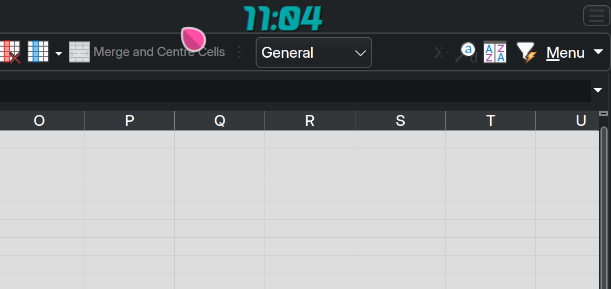
On the top right of my desktop, it will stay on top unless you do fullscreen, I set my windows to lose decorations when maximised for a similar effect.
Conky:
conky.config = {
-- Conky settings
	background = true,
	update_interval = 5,
	double_buffer = true,
	no_buffers = true,

-- Window specifications
	gap_x = 275,
	gap_y = 5,
	alignment = 'top_right',
	own_window = true,
	own_window_type = 'normal',
	own_window_transparent = false,
	own_window_argb_visual = true,
	own_window_argb_value = 0,
	own_window_hints = 'undecorated,above,skip_taskbar,skip_pager',
	own_window_class = 'conkyclock',

-- Text
	use_xft = true,
	xftalpha = 0.75,
	font = 'Arial Rounded MT bold :size=24',
	font = 'Sakana :size=24',

	default_color = '#af00a5a5',
};

conky.text = [[${time %H:%M}]];
Save that file wherever - mine’s in Dropbox, but you could also put it in ~/.config/conky and name the file ‘0clock.conky’.
I put a digit at the front to organise different conkies, so this one number 0 stays at the top.
Then a conky launcher… This will Launch or Kill conky (so it’s a conky toggle):
#!/bin/bash

if pgrep -x "conky"
        then killall conky
    else
        conky -d -c ~/.conky/c0-time.conky
fi
So this stays on top also if I play TV content in Plex maximised (fullscreen) and does NOT need a titlebar to be there.
Thanks. Just to be sure I understand what you have there, does this add a horizontal bar above what apps are putting onscreen?
No, it simply adds a transparent conky window set to stay on top… so it stays on top of other windows… it’s always there, with other conkies (like networking, disk capacities, day/date) but those always get covered up when I put windows there.
Just try it and see 
Might also be possible with standard panels.
A panel on the top, positioned with some offset and allowing windows to go under it.
Not sure about the transparency all my top edge panels are opaque
the third party panel colorizer should allow the making of a transparent panel
but i think what OP is really looking for is a window decoration that is a clock, and that does not exist
tho maybe it should.
“has a clock” but yes.
There are so many window decorations out there, some might even have that or authors willing to add it.
Right. I think it should be an option, too. It’s also a good place to show free memory (which previously on another OS I found especially useful when running FireFox with lots & lots of tabs open - memory hog but still my daily browser).


That’s a nice way to do it, at least for now.
A disadvantage is that it takes some of the vertical screen real estate, so I hope KDE will eventually allow some small insertions in existing vacant space.

Yes but it is otherwise unused screen real estate.
I had to move the Chromium window to have any of its element even close to that panel.
I would still expect this to need support by the actual decoration plugins.
An enthusiastic third party decoration developer (e.g. Klassy) might be faster in adding this than standard decorations.
Just to be clear, I’m looking for digits/text, not a dial widget.
the more i look at what is possible with the title bar decorations, it looks more and more like a dead end for something as complex as a digital clock display
beyond the simple buttons, the most i’ve seen is the application menu and that only works if the application supports it.
-–
for lteak i think some form of panel with perhaps a panel colorizer treatment is a better option and just put the digital clock widget in there instead of the main task bar panel.
or learn conky, i guess.
The app menu is only complicated because it needs communication between app and decoration.
A clock is essentially just a timer, formatting a time and a “write text” call
Start with copy and paste.
I got the urge after installing ‘OSD-clock’ some years ago, which did essentially the same thing, but died out within a year. The old XMBC Media player had an option for an always on display clock in the top corner, so conky to the rescue…
It’s not hard to ‘learn’ - we start by copy/pasting and then ‘improve’ it to suit our tastes, I quite liked a ‘modern’ style clock Plasma widget, so I just selected a fancy font and did it that way.

Sakana font for the date
No - you could make a panel ONLY for the clock and have ‘Windows go below’ so that it doesn’t occupy the screen estate, but it does stay on top and cover windows.
The conky clock also doesn’t allow ‘click through’, so it’s a matter of taste. I prefer the conky clock because it’s visible and looks nice when you’re watching TV.
I don’t have any issues if it blocks window buttons (if it’s in the top right corner) because I don’t need those to manage my windows… but I did position it slightly in from the right, so mostly it would only occupy a small part of the top right part of a titlebar - not blocking buttons - I have muscle memory for shortcuts to do that stuff (and Meta-mouse to move or resize).
Here’s my ‘alt’ version, smaller font that just fits in a titlebar.

It looks like that should do the trick. I will give it a try as soon as I get a chance.
Thanks for your help and advice!