You just need to define a custom paste function that calls ydotool or wtype to send Ctrl-V.
1 Like
Maybe, but I’m not really interested in that - I’m not going to be using it when my hand isn’t already on the keyboard…
However, OP says they’re using X11 - so for them it will just work.
I love CopyQ, I have tabs with notes ready to click and paste  like this:-
I just thought of an alternative (as ‘easystroke’ autostarts when I go into X11’)…
Using the mouse now… I can draw a V, or a C for CopyQ

(pulls up clipboard history), click an item, middle click to paste it.
With CopyQ, as soon as I click an item it is pasted.

Hmmm I’m tempted to stay in the X11 session until further notice - I forgot just how slick this is… (literally, drawing that square is how I do my rectangular screenshot).
But it does.
It allows you to change which content is currently on the clipboard. What you do with that afterwards, if you do anything at all, is up to you.
3 Likes
It doesn’t. I expect it to paste it straight away. So did the op, so do all of my friends using kde. So does every single user familiar with windows. This is not a crazy option to implement. Get your non-tech savvy mom in front of this ui and tell her meta+V shows your clipboard history that lets you paste old clipboards. She clicks an item, the window closes, nothing happens. No indication that it’s silently being copied to the clipboard. There is no user feedback for this. My first 4 or so years of using KDE, I thought that panel was just bugged, not once did I think it’d copy it to my clipboard so I’d have to press yet more keyboard shortcuts to just paste it, because this workflow is so fast on windows. Same issue with the emoji picker. When you pick an emoji, it doesn’t insert it into your chat window, it only copies it to the clipboard, which is just super clunky.
If this is the intended design, my opinion is that it’s a terrible design. And I’ve never met someone who prefers it to be this way. Reminds me of the screenshot tool copying the file path into the clipboard instead of the image contents back in the day… It’s just adding more friction that most people do not expect
1 Like
I just tested this on my mom. She’s been using windows since the times where you had to enter win into the dos menu, but she didn’t know about the clipboard history.
I told her that this feature exists under Meta+V, she clicked on one of her history items, and was confused why nothing happened. She tried 3 times and then told me it’s broken.
Feel free to do your own user testing, but I have a feeling that closing the window with no feedback and no paste action being done is not going to perform very well
It seems other system have established that copy is automatically followed by implicit paste in whatever window gets the input focus next and does not require explicit invocation of “paste” actions.
On Linux it has traditionally been a two step process, “copy” and “paste” being invoked explicitly, with the clipboard manager allowing to “copy from history”.
This way the user can still decide when to paste, e.g. after doing some other action, where to paste, e.g. a browsers address input or the web site, as well as how to paste, e.g. text with or without formatting.
However, it might be possible to implement some form of “auto-paste” mode if there are users who prefer this other behavior.
E.g. sending CTRL+V to the next focused window and hoping that it uses this shortcut for triggering “paste” and can deal with the current content type when doing so.
Or maybe just when the content type is some form of text and simulating user typing it.
First step would be to check if there is a respective feature request or creating one if there isn’t (Product “plasmashell”, component “Clipboard widget & popup” sounds the most appropriate)
i would like an auto-paste mode as well but the problem i see is how does the OS know where you want to paste it?
it would have to assume the window that has focus, at the very least but what if that window does not accept the content you are trying to paste?
if i forcibly paste text into a display only window with no active text box focused, we will still get the “nothing happens” outcome and are no better off UX wise.
btw, i changed the title of this thread to better reflect what is being discussed, and moved it to brainstorm.
2 Likes
Thanks, because you changed the title, I joined this thread.
I am with the OP, and their moms, that this is one the most frustrating things since moving to KDE. I expect WIN+V to paste something when I click from the menu of choices provided, like how it works on Windows. Same for WIN+. for emojis.
Uh, the same way it knows where to paste it when I press CTRL+V?
I understand maybe this is one of those complicated KDE things, that maybe you are talking about something technically difficult to accomplish, but from my point of view, i’m invoking the command at exactly the time and place I want to paste something. I mean, why else would I be invoking this command else to put something on the screen immediately? Buffering for later is the edge case IMO, and maybe there’s some technical reason why it’s not done, but IMO it’s a strange behaviour.
Coincidentally, a similar feature is now available (in nightly):
It lets me long press a key, and then lets me select an accented character with my mouse, and then it immediately places the character where I want it to appear. The beginning of that thread had similar “we tried this in the past, it’s too hard” lore, but now, it’s possible? Maybe piggy back this on virtual keyboard then? I’m talking out my butt here, no idea if this makes any sense, but just putting it out there.
Regards,
1 Like
that’s a different thing, but there was discussion of adding the auto-paste feature to either the emoji selector or the character selector (or BOTH!) so that when you selected or double clicked on the item it would paste it strait away.
this topic is more aligned with those than it is aligned with the virtual keyboard thing which is more closely aligned with keyboard layouts.
but the do all have the commonality of “how do i get this thing here to go over there?” kinds of UX.
In this case the application which has the input focus will get the CTRL-V and then decide on its own if it can paste at all, if the content currently on the clipboard is acceptable and where to put it.
At the time of those comments it was an incredibly difficult problem that didn’t have the needed pieces in place; work has happened since then to improve that, which led to a state where the new diacritics feature was possible. Progress! 
I haven’t looked into the technical specifics for this paste issue, but if there are similar technical hurdles they can certainly be worked on in a similar fashion — the issue as always is having sufficient people hours to do all the things. I myself have bugs/features I would love to address, but there is only so much time/energy in a day… 
I will also always encourage passionate folks to consider getting involved — we need more hands helping, and I wasn’t a developer when I was first directed to that page. 
3 Likes
I think the question here is do we want to implement something that doesn’t always work (because that’s the case in Windows). E.g., it won’t work in Konsole, because the default paste shortcut is Ctrl-Shift-V. It might even do harm when Ctrl-V does something completely unrelated to pasting in some apps.
The implementation itself would be pretty straightforward.
I’m glad the devs seem to understand the purpose of the report now and agree that this interaction is sensible as an option, even if I’d personally prefer it to be the default, but one battle at a time.
Windows seems to handle the focus by not removing focus from the window you’re pasting into. I highlighted some text because the blinking cursor would disappear in screenshots, but when you invoke Win+V, the popup opens with the main window still having focus and a blinking cursor where you’re about to insert.
(The screenshot is german even though my os is set to english… classic windows jank)
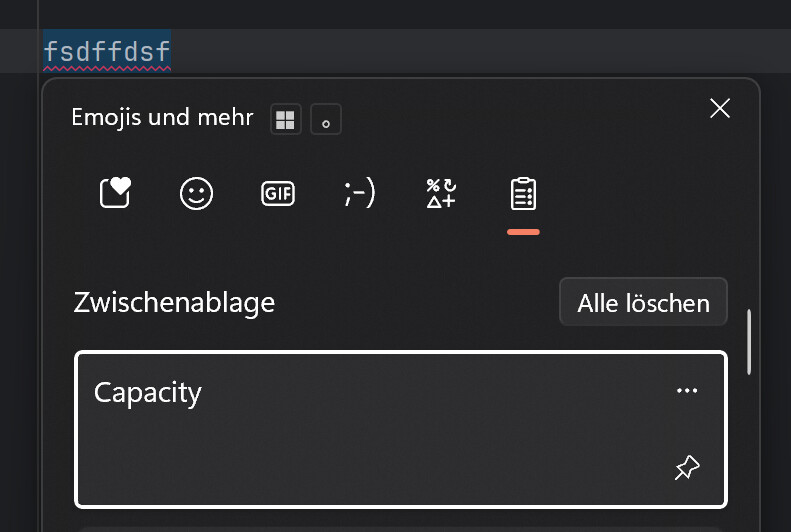
When I do the same on KDE, it seems to remove focus from the window temporarily and then gives it back when the clipboard history closes. At least that’s how it behaves in Jetbrains IDEs
I’m not a linux systems developer so I don’t know all the moving parts and what might make it difficult to implement this. I thought there’d be some generic “insert clipboard” event that apps can receive rather than implementing Ctrl+V manually, but it seems like this doesn’t exist? However it works, since I’m just a user, the backend implementation is none of my concern, I just wanted to express that the usability doesn’t behave like I expected
As a side note, my dad, who has been a linux sys admin since before linux during unix times, was also confused about this interaction. And as a reminder, I’m not the OP of this thread
Is exactly how Windows does. Try “Meta-V” in Emacs for Windows and you’ll see that, as “Ctrl-V” is page down in Emacs.
I would say so… I haven’t thought about it since I stopped using mouse gestures some time back… but at that time I did use CopyQ, I called it up with a mouse gesture, then clicking an entry sent it straight to my active text input.
It isn’t available in Wayland, and neither are Mouse gesutres (yet…), but these options are regressions for sure.
It is difficult to express just how transformative those two changes would be (together).
You can define your own keyboard shortcuts - there are always clashes.
For example - many Terminal shortcuts are taken over as soon as you have the menu on display…
I set MetaB to call up CopyQ (to recall notes/tab) at the mouse) and MetaV calls up Klipper for my basic clipboard.
How do I help? What languages I need to learn to develop this kind of things in Kde?
1 Like
We have an entire getting started guide for setting up an environment: Building KDE software | Developer
This sort of work will likely involve C++, Qt, & QML
We are always willing to help curious and passionate folks get into contributing, drop by the Matrix chat if you have development-related questions.
2 Likes