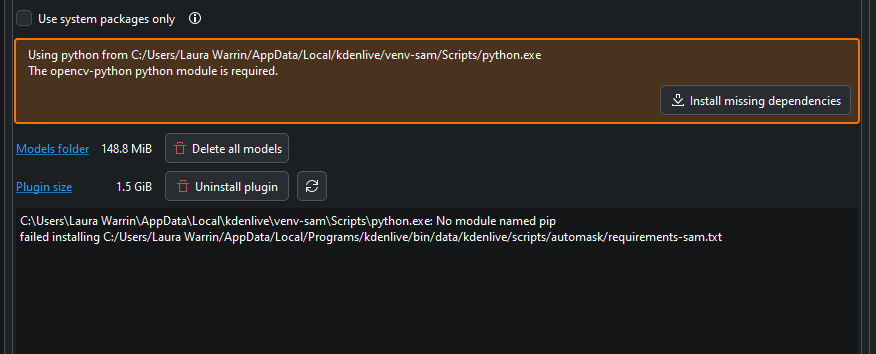
Trying to install Object Detection On an i7 laptop Win10 with an Intel Graphics 5500
Get the same error every time
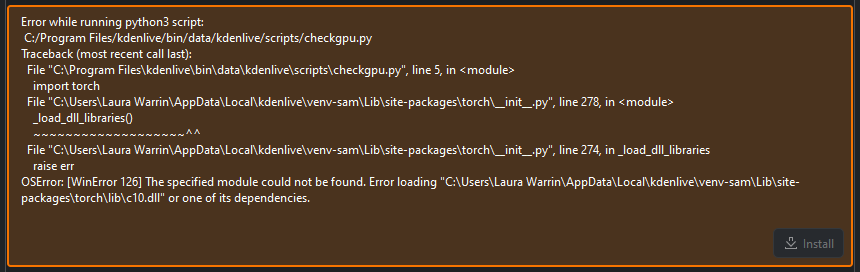
Latest Kdenlive
Python 3 installed
Thanks for your Time and Help
It seems that not all torch library files are proper installed. Close Kdenlive. Try the following:
Press winkey + r
Enter in the field: appdata
Go to the folder: Local\kdenlive\venv-sam\Lib\site-packages\torch
Rename: lib to lib-old
Start Kdenlive and try to install the libraries again under plugins.
Yes. When you uninstall you don’t have to rename the folder first.
Click on Install missing dependencies. I was hoping this message appears so Kdenlive can make a proper install.
Eugen
It WORKS!!!
I downloaded the Latest Release and Voila
Thanks again for all your Help and Time with my situation
I’m putting it through it’s paces as I write this, and looks Great 
We did some SAM installation improvements. Glad to hear it works.
We know that the installation is not that straight forward but we have no other solution so far.