Hello everyone, total Linux Noob here. In my quest to actually use the full potential of my DAC, I want to modify the alsa.conf file. I opened it with Kate as an administrator, edited it, but when I want to save, I get “Unknown Error Code 177”.
Has anyone had this problem before or can tell me, what the code means? When I searched for it online, I only found some weird medical insurance stuff.
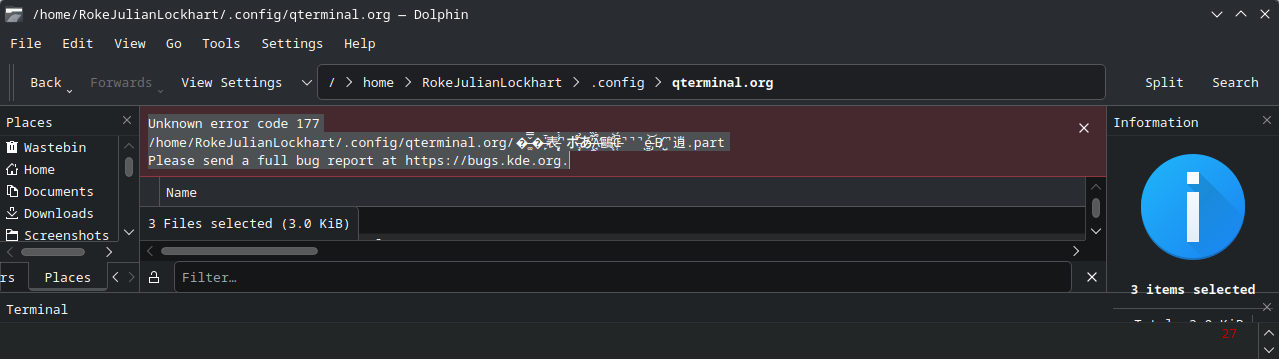
@Lith7ium, I see this in the File Picker and dolphin-25.12.0-1.fc43, when I attempt to name a file “�̵͚̺̘͎̳̲̳̌̿̒́̄͐͆̑̀̾͝�̶̙̬͙̍̄表̵̡̙̞̫͔̞́͗̌̀̀̕̚ポ̵̧̧̑̉あ̶̢̻̤̰͖͔̠̦̝̦̖̜͈͉̓͊̏̑͑̓̊̂̔̅̋̑͘A̵̛̘͉̪̬͙̘̪͌̓̔͌͌͑̈́̉̑̔́͜鷗̵̨͎͉̤̮̊͛͒̂͆͋̎͜Œ̵̹͔̤̫͚̦͖̠̲̩̼͕̘̺̯̝͆̉̔̈̊̅̇̌̍̚̚̚ͅé̵̡͍͚̬̥̙̲̱͔̝̘͍͚̣͜͝B̸̺͓̼̫̑̚逍”, [1] so it appears to relate to a subsystem rejecting the action requested by the user.
Unknown error code 177
/home/RokeJulianLockhart/.config/qterminal.org/�̵͚̺̘͎̳̲̳̌̿̒́̄͐͆̑̀̾͝�̶̙̬͙̍̄表̵̡̙̞̫͔̞́͗̌̀̀̕̚ポ̵̧̧̑̉あ̶̢̻̤̰͖͔̠̦̝̦̖̜͈͉̓͊̏̑͑̓̊̂̔̅̋̑͘A̵̛̘͉̪̬͙̘̪͌̓̔͌͌͑̈́̉̑̔́͜鷗̵̨͎͉̤̮̊͛͒̂͆͋̎͜Œ̵̹͔̤̫͚̦͖̠̲̩̼͕̘̺̯̝͆̉̔̈̊̅̇̌̍̚̚̚ͅé̵̡͍͚̬̥̙̲̱͔̝̘͍͚̣͜͝B̸̺͓̼̫̑̚逍.part
Please send a full bug report at https://bugs.kde.org.