I’ve actually typed the title like this and decided not to fix it to demonstrate the issue. I’m a programmer and so type a lot, and I’ve never had this issue on windows. I’ve just installed Ubuntu 25 with KDE Plasma desktop, and this double-maj thing happens every 5 to 10 words that use a capital letter.
Needless to say, this makes writing any code on a pascal case or camel case codebase a massive pain. Is there anything I can do to fix it ? I would hate to have to ditch Ubuntu just because of this issue.
I’ve seen this complaint many times before - and I really don’t understand it. It is certainly extremely inefficient to first LOCK the caps to type a single letter, and then UNLOCK to continue - certainly it would be a horrible way to tYpE in MiXed capitals or Single Sapital letters.
To type ‘Caps Lock’ you should use the SHIFT key when you press the C and the L. This is why we type with both hands, and usually have two shift keys, for the right and left hand. You should press SHIFT with the opposite hand… so that P uses the Left Shift, and Q uses the Right Shift.
The ‘CapsLock’ function is not frequently used, but it is useful if you want to type CAPS LOCK. The idea is based on the old latch mechanism from mechanical typewriter days. That means you PRESS CapsLock to latch it on, but when you press it again (to release the latch) it isn’t disabled until you release the key.
So pressing Caps Lock LOCKS capitals (unlike Shift Lock, which is the actual equivalent for typewriters which would also shift your 1 → ! 2→@ and so on…).
You can adjust your keyboard settings. Personally, I rarely TYPE MUCH IN CAPS so I set both SHIFT keys to lock them, and an audible ‘latch’ sound as feedback to warn me when it latches, and is disabled (by a single SHIFT).
ShiftThis is how to type ‘This’, releasing the Shift key as you press the T.
This poses another dilemma - for some folks the ESC key is too far away (checkout VIM), though for me, using an AltGr layout means I have no Right Alt to use for composing…
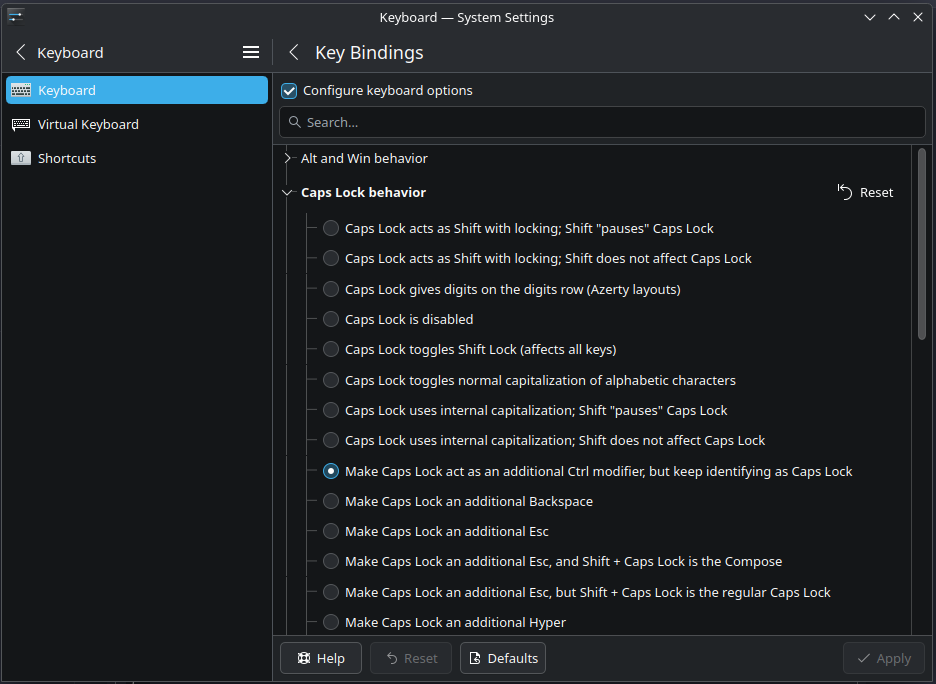
You can change your CapsLock key function.
You could set your CapsLock key to behave as a 3rd level chooser, or as a Compose key… helps me when typing ‘2×3≠6’ (no ‘x’ in 2x3). Also for typing ↑→↓←≠±.
Personally, for me ⇪CapsLock = ⎄ Compose
I’m not so keen on that symbol, maybe 🖉 Compose or Compose would be nicer.
CapsLock is evil. I always disable it under Windows even. Just use SHIFT, how many letters in a row do you need to capitalize to need CapsLock? Or use a handy shortcut to switch to uppercase in your editor when you do need many uppercase letters in a row.
I think part of what’s happening recently is that if you get used to typing on a phone touchscreen keyboard, your mental model is that capital letters come from a “lock” mechanism and not a “chord” mechanism.
Getting off topic, but I’m interested in whether phone-firsters would prefer other modifiers to work that way. Like “CtrlLock on - C - CtrlLock off” to copy and “CtrlLock on - V - CtrlLock off” to paste.
It’s older than that. Even many years ago, way before proliferation of touchscreen devices, I saw people at work using CapsLock even to type a single uppercase letter. It was painful to watch. I taught them to use their pinkies to hold Shift.
Also, while I never worked with actual programmers, i.e. software devs, but most of the web designers who coded HTML, JAVA, etc., and Windows and macOS engineers who wrote complex scripts hated the CapsLock. They always disabled it with a registry edit.
It’s fascinating - and it does come up frequently, it was a few years back that I learned Windows and MacOS had re-imagined the concept totally and changed the behaviour, so creating the pain point…
I actually enjoy engaging mine, with a notification using the actual audio of the latch mechanism of the shift-lock on a typewriter, so if I hit both Shifts I hear it engage (yes, there’s a specific notification for it…).
In the end, though, I don’t use CapsLock at all - and despite my previous suggestion, I actually set both Shifts to ‘latch’ (Both Shifts together enable Shift Lock); so I skipped CapsLock now.
I think it was most useful for postcodes (DY10 1LW) but not so much now with lightweight keys.
I use a heavier clicky switch for my CapsLock key and I intentionally put it in the least reachable part of the keyboard for me (top right).
I don’t really use it much but I do also enjoy the feel and sound of it.
I use the “standard” CapsLock position for Backspace, which is very convenient to have on my left little finger. Um, I guess I’ve just done “tell me you’re an inaccruate typist without telling me…”
having just typed 4 backspaces in a row trying to start this comment (and another 4 just there), i’m super liking the idea of converting CAPS LOCK into Backspace to give my right hand ring finger RSD a break.
so i’m gonna try this for a while and see how i like it.
FYI, for normal users it doesn’t feel useful, but Caps Lock is a legitimate use case for publishing editors/designers when doing page layout/makeup (in special cases where you don’t do small caps for example).
I’ve been typing things with Caps Lock for close to 20 years ; bit too late to change the habit. I’d rather put in the bit of work required to make it work under Linux rather than relearn a huge chunk of my typing habits.
Thank you for the script @ben2talk but I already tried that
Please test this on a distribution with Plasma 6 (and optionally on some other DEs like GNOME) and make a bug report in bugs.kde.org if it’s still happening.
People complaining about whether using CapsLock is bad or not is not relevant to solve the issue; if this happens only on Plasma but not on Windows, GNOME, MacOS etc then it’s quite likely just a bug that should be fixed (and might even already be fixed in newer versions).
I think the root of the behaviour is this (per Arch wiki):
Those who prefer typing capital letters with the Caps Lock key may experience a short delay when Caps Lock state is switched, resulting in two or more capital letters (e.g. THe, ARch LInux). This occurs because Caps Lock is enabled immediately once the Caps Lock key is pressed, but is only disabled upon release of the second key-press. This behaviour stems from typewriters where a Caps Lock function was achieved by physically locking the shifted typebars in place, and the release of a shift key-press was the action that caused the release of the lock.
It likely isn’t DE- or distro-specific and you’ll probably get the same on GNOME.
There’s a workaround suggested in that wiki page, but from a quick inspection it seems like it does the same thing as the script that @ben2talk posted, which you already tried.
>I find it unreasonable not to learn the new and objectively better behaviour of using the Shift key.
The amount of lost time losing my “flow of writing” if you will over the next months as I shift habits would be unreasonnable.
We can always learn to be better at something, but I’d rather spend my time learning to be better at gardening then typing. Can’t have everything in life.
In any case, I’ve solved my issue by modifying my /usr/share/X11/symbols/capslock file. Previously I had the issue of not being able to use other options because I’m an AZERTY user used to having numbers other Shift-accessible things with Caps Lock, but this modification combines both fixes :
This seems like a much cleaner solution, although I’m not sure of how to enable it ? How can I verify I’m on an updated version of libxkbcommon since it doesn’t seem to be a separate apt package ?
 Compose would be nicer.