Is there a widget with a good-working custom date/time format? I read about HTML Clock which is only for Plasma 6 and I am on 5. (Just started with Plasma after years of XFCE, didn’t want to go that fast in the beginning…)
I want like I can in XFCE set two custom lines: ‘w'V | yyyy-mm-dd\ddd | nhh:mm:ss with V for ISO week number.
The shipped one Digital Clock but also Better Inline Clock have the date separate so I cannot change the time format (only with/without seconds). The shipped widget has a bug that the custom date format is shown at the same position as the clock instead of below so making it unreadable. Both support only a few date formats, no time formats and no V for ISO week number. So not very customisable.
Any suggestions?
Coming from XFCE I am not used to desktop widgets. Maybe there are clocks that are properly customisable like I want? I want to know the date/time/week number quickly, I don’t care if it’s in the taskbar or somewhere else.
I cannot believe formatting a date would be limited by something graphical. I can use %V in bash, it’s been there for many years. And like you said, other apps can show it.
I’m just wondering why a so-called custom widget is not supporting proper customisations. Only HTML clock has all the formatting rules. So far, all the others are limited.
Qt is not bash, unfortunately. Maybe it is available, and I am missing something (very possible!), or it is just something that needs to be created in the code. If the clock is purely QML, then it likely only supports what Qt provides, as was recently discussed.
Instead of a specific clock app you could use the command output widget (GitHub - Zren/plasma-applet-commandoutput · GitHub) and use a shell command to output the time however you like. It has mouseover and click support too if you want to incorporate other commands that way.
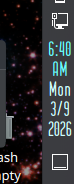
i have a hack to the .qml of the stock digital clock that will give you a new line between the time and the am/pm if you are interested in that.
but in general the digital clock will split the time and date onto new lines depending on the width of the clock widget.
it works better on vertical panels than horizontal ones because on horzontal panels it just keeps expanding as it needs to.
but on vertical panels with a width set by the user, it will truncate and add a new line to the date part without any help from the user… it’s on the time that won’t wrap, hence my hack to move the AM/PM part to a new line.
# to make changes to the digital clock edit .qml file
/usr/share/plasma/plasmoids/org.kde.plasma.digitalclock/contents/ui/DigitalClock.qml

# line 608
# to change AM/PM to appear as am/pm look for the variable declaration
    var amPm = "AP";
# change the quoted text to lower case
    var amPm = "ap";  // use lower case for am/pm display in 12hr clock

# line 621
# to move 12hr clock AM/PM display to a new line look for the if statement with
    result += " " + amPm;
# insert an escaped new line character into the string
    result += "\n" + amPm;  // puts AM/PM display on new line for vertical panels

# line 501
# to change the clock color look for
    id: timeLabel
# add a line under it to define the desired color (line 501)
    color: "#69ffff"  // changes color of the time display

# line 537
# to change the date color look for
    id: dateLabel
# add a line under it to define the desired color
    color: "#cdffff"  // changes color of the date display

# to copy the settings for the clock plasmoid manually use
# kpackagetool5 --install /usr/share/plasma/plasmoids/org.kde.plasma.digitalclock/
solution depreciated

 But would love to see that qml hack!