Configuring Kwin shortcuts without using System Settings

Hello once again,

I am trying to configure some kwin shortcuts. Specifically,

- name: "Kde | Global shortcut to toggle window decorations"
  community.general.kdeconfig:
    path: "{{ ansible_env.HOME }}/.config/kglobalshortcutsrc"
    values:
      - group: kwin
        key: Window No Border
        value: Meta+B,,Toggle Window Titlebar and Frame
      - group: kwin
        key: Window Fullscreen
        value: Meta+F,,Make Window Fullscreen

This makes the change in kglobalshortcutsrc exactly the same as if I used system settings.

However, they do not apply:
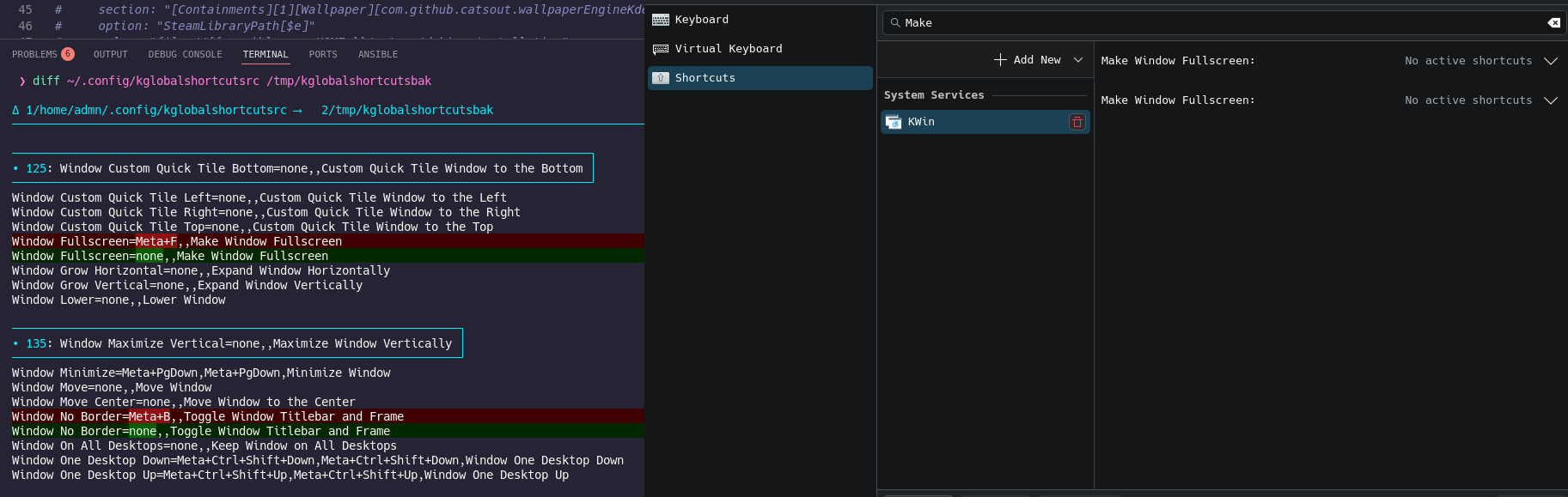
Also, the script also runs

systemctl --user restart plasma-kglobalaccel.service

and the changes are lost.
I went searching for the web and found discussion: Plasma 6 method to refresh kglobalaccel shortcuts? - #8 by RedBearAK

And made some attempts like

kwriteconfig6 --file kglobalshortcutsrc --group kwin --key "Window No Border" "Meta+B,,Toggle Window Titlebar and Frame" --notify

And

gdbus call --session \                                                                                                    took 15ms  14:18
  --dest org.kde.kglobalaccel \
  --object-path /kglobalaccel \
  --method org.kde.KGlobalAccel.setShortcutKeys \
  "['kwin', 'Window No Border', 'KWin', 'Toggle Window Titlebar and Frame']" \
  "[([$'0x08000041', 0, 0, 0],)]" \
  4

But no luck. I am clearly not understanding how this works.

Thank you. Any help is appreciated =))

Try again with another shortcut:

Window No Border=Meta+Ctrl+Alt+I,,Toggle Window Titlebar and Frame

Works for me, maybe your shortcut choice sucks :wink:

FWIW, when I try running this (excluding the rightmost took 15ms 14:18 part that was breaking the command) I get:

Error parsing parameter 2 of type a(ai)

And qdbus-qt6 org.kde.KWin /KWin reconfigure does not apply the shortcut.

ben_hotkey_sucks

Hi, thanks for answering

Please explain this then :wink:

Thanks for trying.

Apologies, the right most part is trash from my terminal. I can’t edit my previous post.

Yeah, same behavior here. That was just my attempt at trying gdbus based on the post mentioned - i tried other similar commands, tried asking gpt - same error

Edit:

Cleaned command

gdbus call --session --dest org.kde.kglobalaccel \
  --object-path /kglobalaccel \
  --method org.kde.KGlobalAccel.setShortcutKeys \
  "['kwin', 'Window No Border', 'KWin', 'Toggle Window Titlebar and Frame']"

That results in

Error: GDBus.Error:org.freedesktop.DBus.Error.UnknownMethod: No such method 'setShortcutKeys' in interface 'org.kde.KGlobalAccel' at object path '/kglobalaccel' (signature 'as')

Cool tip. I dunno why I don’t have qdbus-qt6 but

qdbus6 org.kde.KWin /KWin reconfigure

is a valid command for me. But it still failed to apply the changes made to .config/kglobalshortcutsrc :frowning:

First, I never found a way to reliably set all keyboard shortcuts in Plasma 6 in the same way the “Apply” button obviously does. For some changes, I have to tweak some setting manually and hit the “Apply” button, or log out of Plasma to get the scripted shortcut change to work correctly.

Second, if I am remembering correctly that error message is misleading, and the problem is actually the data type of the argument, which you’ve provided as an array of strings ( signature ‘as’ ). That’s what the older deprecated method wanted. Instead, what the newer method wants is an array of ( array of strings ), ( signature ‘a(ai)’ ).

There are notes in this script about the difference:

Basically you need parentheses (with a comma before the closing parentheses) and another set of brackets to get the signature to fit what the method is expecting to see. Then you shouldn’t get that error message.

There are also some related notes in this Plasma shortcut converter (encode/decode) script, at the end of the file. Regarding commands that actually ended up working for me.

Still no way to do what the “Apply” button does for all shortcut cases, as far as I know. I’m able to make the changes I wanted to the in-app shortcuts via script, but only by prompting the user to restart after making the change with the script.

Very cool. Thanks for letting us know. Will delve into it

Managed to get the reconfigure command to work with a custom KWin script.

Thanks everyone.

Gonna leave the commit ref here, hopefully it can help someone - ✨ kwin script for keyboard shortcuts (6697efae) · Commits · Miguel Teixeira / Ansible Dotfiles · GitLab