Maybe it is a DE problem? I have KDE Neon.
I made a few “whatever. desktop” files to open different obsidian vaults and the same thing happens, you get this initial entry in the task manager with the icon assigned in the .desktop file, then another entry then appears next to it with the apps default icon, and then the initial entry disappears, leaving the default icon.
this is with both the “icons and text” and “icons only”.
perhaps tangentially related is I saw a report of Cosmic DE apps creating two entries in the task manager.
I’m on Fedora 41 Workstation, with very few tweaks.
So is a launcher the *.desktop file?
I have Hide launchers after application startup unchecked.
I thought this would keep both entries in the taskbar, but it appears to make no difference. The “launcher” is removed either way.
Perhaps it’s “Activities” related, I created a new “Activity” and assigned an obsidian vault to it.
Subsequently all vaults opened, on any activity, assigned or not, use the custom icon I’d assigned to that vault.
Hi - what’s your “Group” setting for the Task Manager? If I’m interpreting correctly, you’re looking to have multiple listings for different windows of the same application on your panel - in that case, that would be the key one I believe:
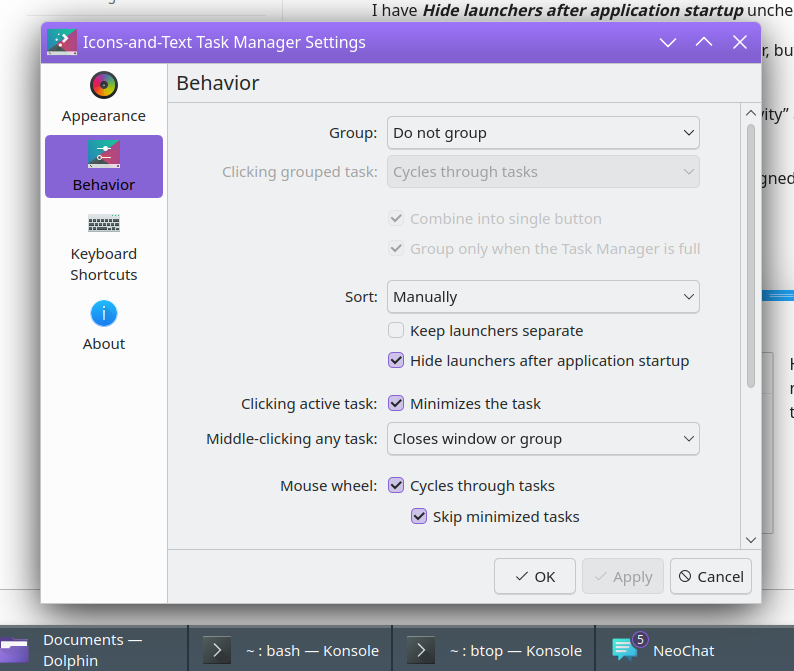
I personally prefer to have separate listings for each window, so I use Icons-and-Text with no grouping. Having “Do not group” set makes sure that, in cases like the example above, I can use a single click on the Konsole window with a shell prompt, or on the Konsole window with btop running.
Now, if you want an instance of a program, or a particular window from a program, to have its own distinct listing regardless of grouping status, that would then require that Plasma matches up some attribute of the window to something specified in the desired .desktop file. There can be several ways to do that depending on how each program sets its window classes and icons and things like that*, but personally I find the Window Rules approach in KWin to be the easiest way to get the task manager laid out the way I like it.
To your question about launchers - the way I think of it is, launchers are the icons for pinned applications that show up on your panel even if the application isn’t open. With Hide launchers after application startup unchecked, I get this after clicking to open Dolphin:
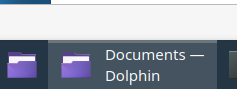
So basically, the “icon to open the app regardless of whether it’s open or not” remains there even when it is open. In my experience, you might have to either move some icons around or restart some programs for a change in that setting to be fully reflected in the task manager.
Hope at least some of that is helpful 
*Edit: which some others likely understand the real inner workings of, and could give guidance on more technically correct ways to make everything work - the reason I like the Window Rules approach, when an application isn’t already doing what I would hope, is that I don’t have to understand those inner workings quite so well 
hey, yes, using the “do not group”.
so whatever I’ve tried, customised *.desktop files launch with an entry in the task manager with the correct icon, before being replaced by another entry in the task manager with the default icon once the app has loaded.
fiddling with Activities caused it to use the custom one briefly. but then it went back to the default.
strange. seems to work for “dzon”.
anyway, not a feature that loses data or crashes so I’ll leave it. maybe it starts working one day.
cheers!
probably because of the .desktop files you created are causing the applications menu to not understand how they just “appeared” out of no where.
delete those things (or rename them something harmless)
and run kbuildsycoca5
or possibly 6, but 5 still works on my plasma 6.1 install.

I’m using the code posted earlier in the thread.
just changed the path to my firefox profile.
[Desktop Entry]
Exec=firefox --class Webapp https://www.youtube.com --profile /home/user/.mozilla/firefox/16m0xcv3.two
GenericName=Spoogly
Icon=face-smile
MimeType=
Name=Spoogly
NoDisplay=false
Path=
StartupNotify=true
Terminal=false
TerminalOptions=
Type=Application
X-KDE-SubstituteUID=false
X-KDE-Username=
Firefox is RPM version, on a pretty vanilla Fedora install.
I’ll try it with a fresh profile.
Could you try with an icon from a specific path? Not just “face-smile”.
yeah I tried it with a proper path and no joy, and using a fresh user profile didn’t change anything
I’ll have a go sometime this week with a different OS on a different computer. I seem to have a couple of other simple things not working on this system.
Anyway this isn’t my thread, and I’m going to give up for now. Thanks trying to help, good to know it does work for some.
@jamesfrederik I experimented the same issue, here is how I solved it:
- Make your desktop entry and name the file.
- Open “Window Rules” and make a new rule, you can pick the current profile and verify if it can be identified as unique (you have multiple options to do so, on my screenshot it shows the “hole class” as using app format).
- Just in case, force to “do not skip taskbar”
- The most important: Set the “Desktop file name” as the same of your .desktop file.
It has been the only way it worked perfectly for me. I can see that @johnandmegh already mentioned something related.
Give it a try and play a little with the rules, I’m confident you will make it work.
PD. I have done it with “chrome” but is the same issue you are having with firefox.
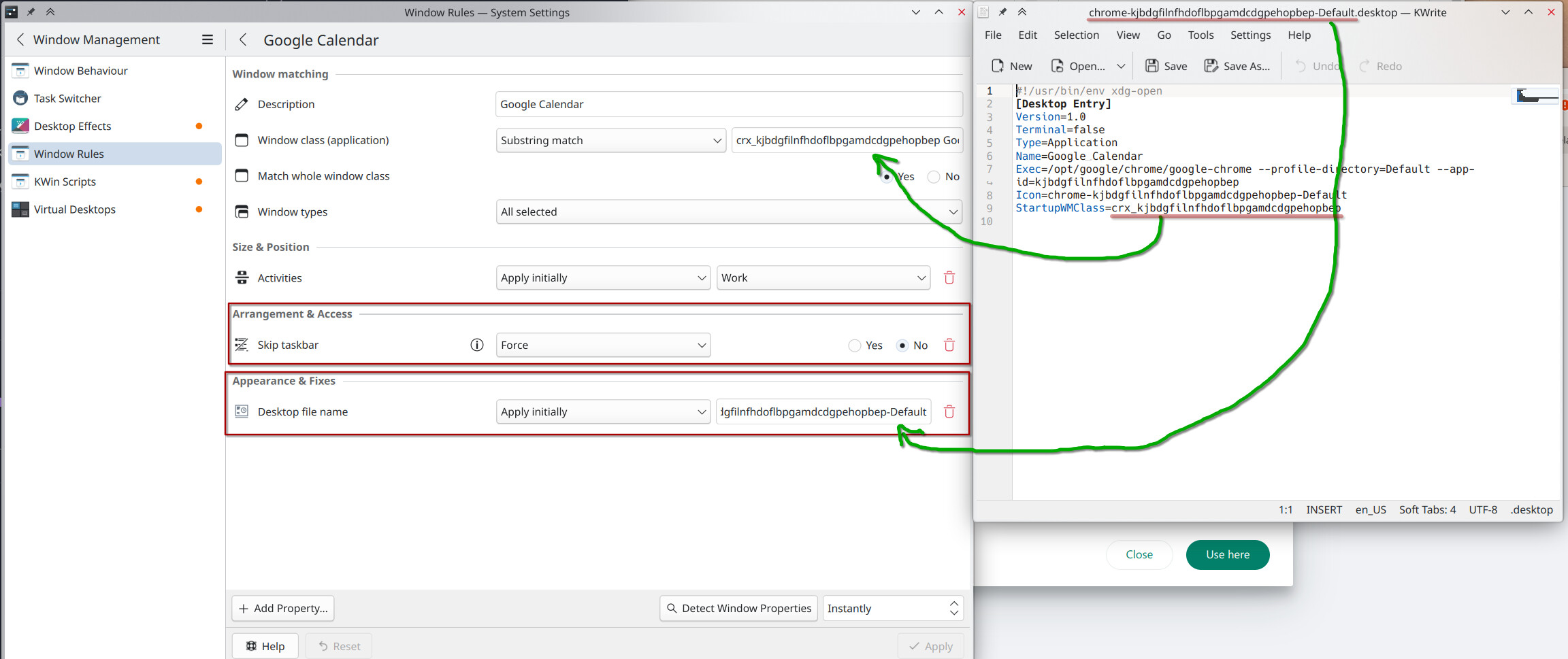
Thanks for this, will give it a go. I didn’t know “StartupWMClass” was just a unique id. I’ve not had much luck with window rules as they appear to be a bit flakey with non native stuff like electron apps which is mostly what I use. What I’ve done is I just use different FF forks, I only needed two profiles so Floorp is enough to have 2x firefox running without any fiddling about.
cheers
Hi
Using Debian KDE Plastma, newly installed and everything updated.
Firefox is installed from Firefox’s own apt repo.
When I log in, in an X11 session it works as @dzon, but when I log in as a Wayland session it doesn’t.
Where should a bug/feature request ticket be created to get it working in Wayland as well?
/nOrphf