Hi,
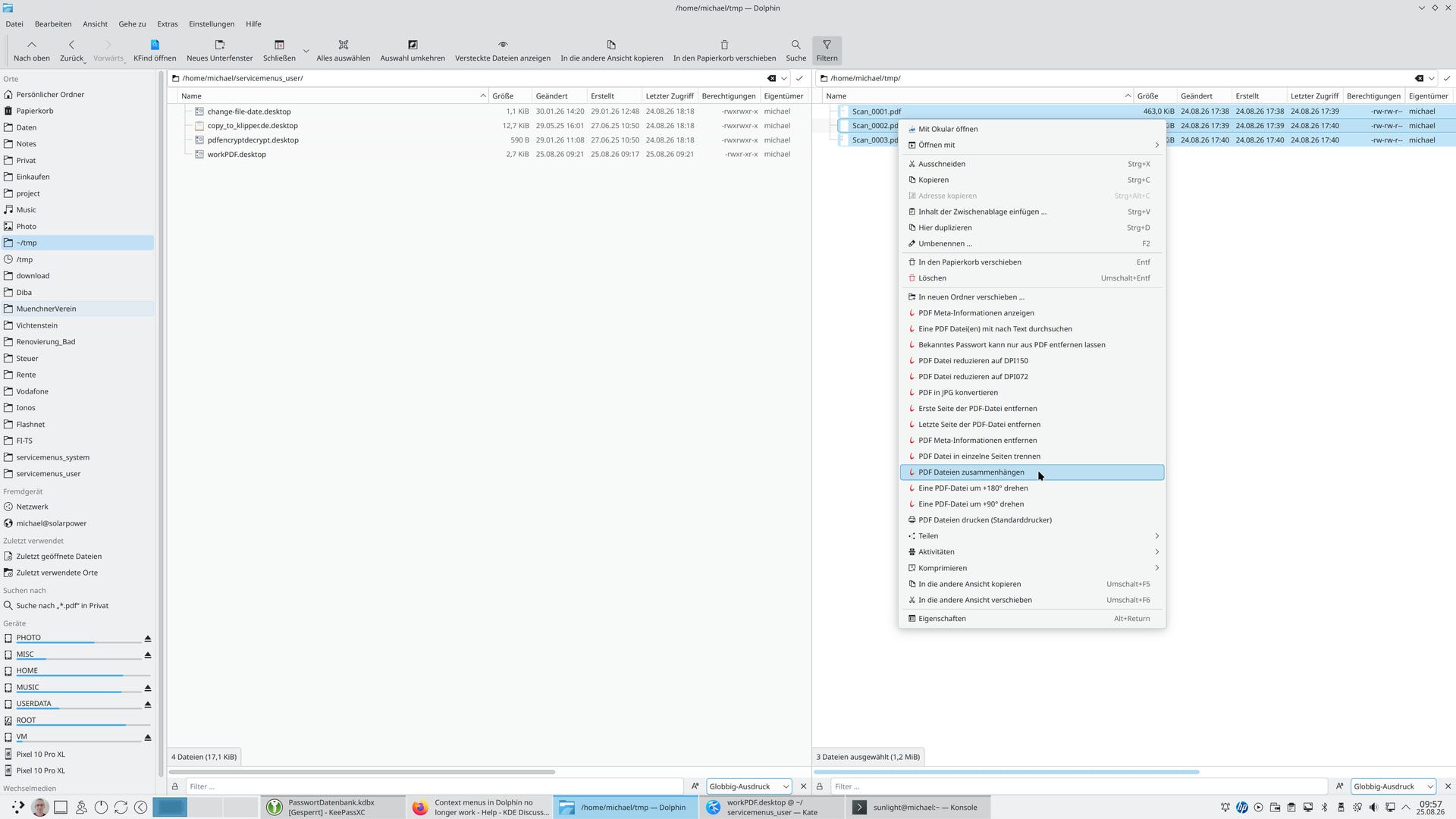
The action menus (*.desktop files I created myself), for example for PDF files, are no longer displayed in the context menu in Dolphin. They haven’t been displayed since the 6.7.4 update. All context menus were working fine until now.
How can I fix the problem with the context menus?
Regards
Michael
Info:
Operating system: KDE neon User Edition
KDE Plasma version: 6.7.4
KDE Frameworks version: 6.29.0
Qt version: 6.11.1
Kernel version: 7.0.0-30-generic (64-bit)
Graphics platform: Wayland
Processors: 20 × Intel® Core™ i5-14600
RAM: 64 GiB (62.4 GiB usable)
Graphics processor: Intel® Graphics
Manufacturer: LENOVO
Product name: 30H0005TGE
System version: ThinkStation P3 Tiny
did you check in ctrl+shift+, settings under the context menu tab to make sure the ones you want are still checked?
or perhaps uncheck them, save the settings, and then check them again, and save again… just to make sure that dolphin has saved your setting.
you can run this in a terminal to watch for the file change to roll past while you do this
function what-changed() {
    find -type d \( -name .cache -o -path */snap/firefox/common \) -prune -o \
    -type f -mmin -1 -printf "%T+ kate %P\n" | sort -n | tail
};
export -f what-changed && watch -x bash -c what-changed
I don’t remember where I saw this fix (probably on this very forum), but the temporary fix is to comment out the submenu line in your custom service menu.
Change this:
X-KDE-Submenu=Convert Image(s) To...
To this:
#X-KDE-Submenu=Convert Image(s) To...
On Arch Linux, there was a recent update to KIO that fixes this issue (kio 6.29.0-1 -> 6.29.0-2), but as a KDE Neon user, you may have to wait a bit.
Open all your service menu files in Kate all at once
Go to “Edit” > “Find in Files”
Select/Copy “X-KDE-Submenu” to the “Find” box
Add “#X-KDE-Submenu ” to the “Replace” box
meven
August 24, 2026, 6:23pm
4
That’s likely bug https://bugs.kde.org/show_bug.cgi?id=524239 is fixed for next release of KDE Frameworks, 6.30 second Friday of next month (that’s when KDE Frameworks are released).
There is a workaround above Context menus in Dolphin no longer work - #3 by ddnnacheta
Pretty sure this has already been address, cause I noticed earlier that rootactions is back in my context menu.
In case you haven’t noticed, this is the KDE Desktop and apps forum - not a distro forum.
Hi all,
I can make do with this workaround until the bug is fixed in KDE Frameworks version 6.29.0.
I commented out the X-KDE submenu (see the screenshot).
#X-KDE-Submenu=PDF Dateien bearbeiten
Here, for example, is the workPDF.desktop file.
[Desktop Entry]
Type=Service
ServiceTypes=KonqPopupMenu/Plugin
MimeType=application/pdf;
Actions=ALLTOP_searchinpdf;ALLTOP_infopdf;CHG_burst4pdf;CHG_merge4pdf;CHG_rotate90pdf;CHG_rotate180pdf;CHG_DeleteFirstSide;CHG_DeleteLastSide;CHG_ConvertToJPG;CHG_ClearAllPasswort;CHG_DeleteMetaPDF;CHG_CompToDPI150PDF;CHG_CompToDPI72PDF;MISC_PrintPDF;
Encoding=UTF-8
X-KDE-Priority=TopLevel
#X-KDE-Submenu=PDF Dateien bearbeiten


# Aktionen die oben stehen (ALLTOP_*)
[Desktop Action ALLTOP_infopdf]
Name=PDF Meta-Informationen anzeigen
Icon=application-pdf
Exec=/usr/local/scripts/kpdfinfo.sh %F

[Desktop Action ALLTOP_searchinpdf]
Name=Eine PDF Datei(en) mit nach Text durchsuchen
Icon=application-pdf
Terminal=true
Exec=konsole -e "/usr/local/scripts/searchinpdf.sh %U"


# Aktionen die Dateien verändern (CHG_*)
[Desktop Action CHG_CompToDPI72PDF]
Name=PDF Datei reduzieren auf DPI072
Icon=application-pdf
Exec=ps2pdf -dPDFSETTINGS=/screen %n %n_DPI072

[Desktop Action CHG_CompToDPI150PDF]
Name=PDF Datei reduzieren auf DPI150
Icon=application-pdf
Exec=ps2pdf -dPDFSETTINGS=/ebook %n %n_DPI150

[Desktop Action CHG_burst4pdf]
Name=PDF Datei in einzelne Seiten trennen
Icon=application-pdf
Terminal=true
Exec=konsole -e "/usr/local/scripts/burst4pdf.sh %U"

[Desktop Action CHG_merge4pdf]
Name=PDF Dateien zusammenhängen
Icon=application-pdf
Terminal=true
Exec=konsole -e "/usr/local/scripts/merge4pdf.sh %U"

[Desktop Action CHG_rotate90pdf]
Name=Eine PDF-Datei um +90° drehen
Icon=application-pdf
Exec=pdftk %n cat 1-endeast output rotate+90_%n

[Desktop Action CHG_rotate180pdf]
Name=Eine PDF-Datei um +180° drehen
Icon=application-pdf
Exec=pdftk %n cat 1-endsouth output rotate+180_%n

[Desktop Action CHG_DeleteFirstSide]
Name=Erste Seite der PDF-Datei entfernen
Icon=application-pdf
Exec=pdftk %n cat 2-end output DelFirstSide_%n

[Desktop Action CHG_DeleteLastSide]
Name=Letzte Seite der PDF-Datei entfernen
Icon=application-pdf
Exec=SEITEN=$(pdfinfo %n | grep ^Pages | awk '{print $2-1}'); pdftk %n cat 1-$SEITEN output DelLastSide_%n

[Desktop Action CHG_ConvertToJPG]
Name=PDF in JPG konvertieren
Icon=application-pdf
Exec=convert -quality 100 %n %n.jpg

[Desktop Action CHG_DeleteMetaPDF]
Name=PDF Meta-Informationen entfernen
Icon=application-pdf
Exec=exiftool -all:all= %F && qpdf --replace-input --linearize %F

[Desktop Action CHG_ClearAllPasswort]
Name=Bekanntes Passwort kann nur aus PDF entfernen lassen
Icon=application-pdf
Terminal=false
#Exec=/usr/bin/uxterm -e "/home/michael/project/run_remove_pwd_from_all_pdf.sh %F"
Exec=/usr/local/scripts/run_remove_pwd_from_all_pdf.sh %F

# Verschiedene Aktionen
[Desktop Action MISC_PrintPDF]
Name=PDF Dateien drucken (Standarddrucker)
Icon=printer
Exec=lp -d HP_Color_LaserJet_Pro_MFP_4302 %F
Regards
Michael (bluelupo)
meven
August 25, 2026, 8:43am
9
Only Arch backported the fix as far as I can tell: upgpkg: 6.29.0-2: Fix service menus
Other distro users will get the fix with KF 6.30 in September.
Edit: adding the destination page real title.