Thanks. In my case using Linux the Crow Translate app window has only one mode: light.
I can’t change it in any way. It’s a pity because in the evening it is too bright which makes using the application uncomfortable.
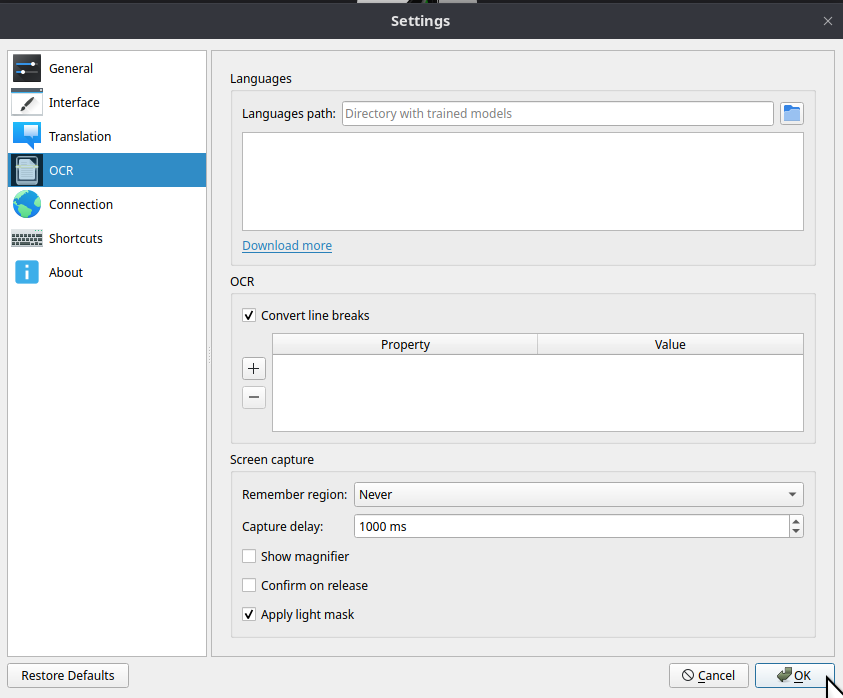
Trained model is a *.traineddata file.
eng.traineddata is for english ocr. jpn_vert.traineddata is for vertical written japanese ocr, and so on.
You can get trained models from tesseract-ocr/tessdata on github(dot)com.
Then extract it to the location you want. If you extract it at your home directory, there should be a directory(/home/taco/tessdata-4.1.0) contains a lot of traineddata files.
The directory path is Languages path in settings. After setting languages path, the box under languages path will lists all trained models with checkboxes. Toggle the models you want.
About Pipers TTS, it’s same.
You can create a directory for piper voices. ex. /home/taco/piper-voices
This is the piper voices path in settings.
Then download model from rhasspy/piper-voices on huggingface(dot)co.
It’s an onnx file and a paired json file. For example, en/en_US/amy/medium/en_US-amy-medium.onnx and en/en_US/amy/medium/en_US-amy-medium.onnx.json .
You have to create a matched directory path /home/taco/piper-voices/en/en_US/amy/medium for the onnx file and the json file, and put those files in.