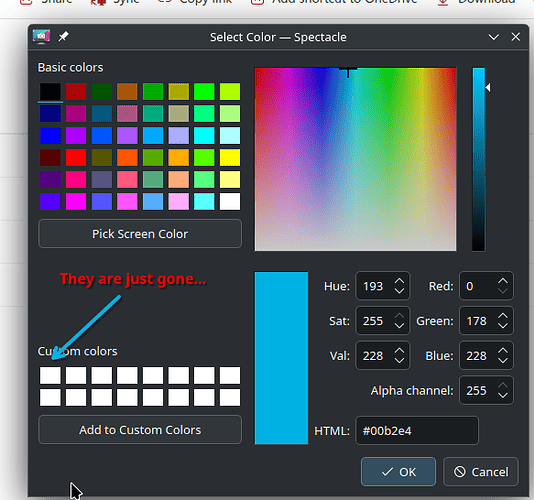
I had two colors saved. I loved this feature as it makes branding things really easy (my logo colors).
Since may, the colors don’t save anymore. The two I had saved just disappeared.
It’s August now and the problem is still present. I use Spectacle often, and that is where i had the colors saved. It’s enough to just open and close spectacle for a color to disappear.
Here are my specs:
Operating System: openSUSE Tumbleweed 20250820
KDE Plasma Version: 6.4.4
KDE Frameworks Version: 6.17.0
Qt Version: 6.9.1
Kernel Version: 6.16.1-1-default (64-bit)
Graphics Platform: Wayland
Processors: 12 × 13th Gen Intel® Core™ i7-1355U
Memory: 16 GiB of RAM (15.3 GiB usable)
Graphics Processor: Intel® Iris® Xe Graphics
Manufacturer: HP
Product Name: HP Envy x360 2-in-1 Laptop 14-es0xxx
System Version: Type1ProductConfigId


Spectacle: 6.4.4
KDE Frameworks: 6.17.0
Qt: Using 6.9.1 and built against 6.9.1
openSUSE Tumbleweed (Wayland)
Build ABI: x86_64-little_endian-lp64
Kernel: linux 6.16.1-1-default