I appreciate the help, but it seems something about our configs are fundamentally different.
I’m using:
Version 2.8.0 “A New Day”
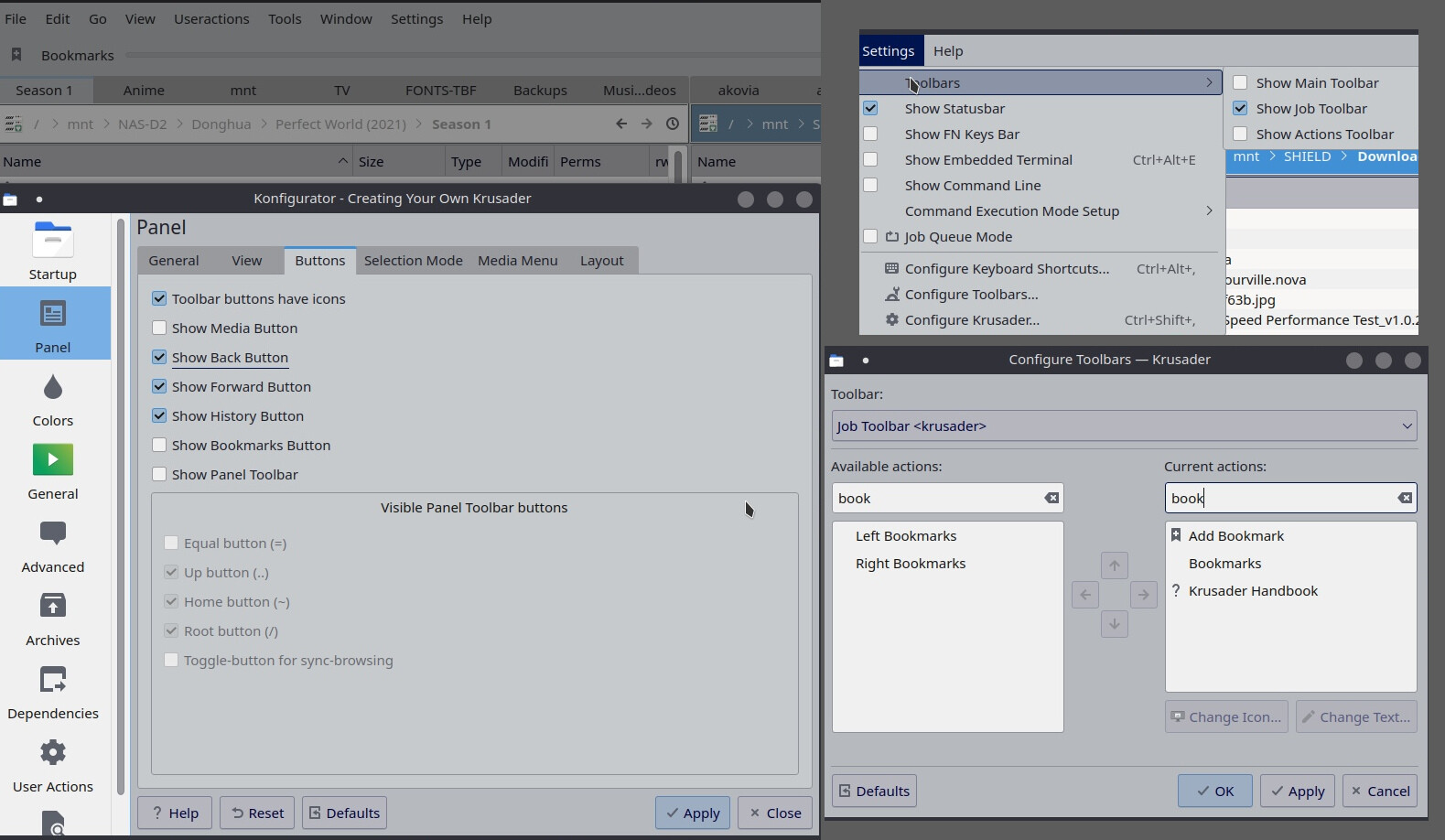
For instance, I don’t have the same menu structure. Mine is Settings > Panels > Buttons. There is not a Configure > Windows option that I see. I’ve included screens of the menu dropdown, and the actual Settings window.
I’ve also enabled and disabled every bookmark button I could find. You can see in the toolbar config that there are 4 total options for me. The Left Bookmarks and Right Bookmarks options appear the same as just the Bookmark option AFAICT. Maybe they can be configured independantly?
Even if I disable the the Bookmark Button option under Settings > Panels > Buttons, you can still see that the Bookmark button I’m trying to edit still exists in the left part of the path bar. The Show Media Button option removed the other button from the left, but the Show Bookmark Button is for the Bookman II menu in the right side of the path bar, which is the one you pointed out.
I’m about to give up. Just thought this might be the place to get help with this. I didn’t consider it a bug, so didn’t want to bother the devs on git. 
Thanks for trying!