I am sitting on this issue for hours (looking over multiple weeks). For some reason dead keys as caret are not recognized as in-app shortcut. The stange thing, depending on the application it can be different dead keys that are not working, but caret does never work as it should (which btw is the key I want to bin it nearly everywhere).
I am running Debian Trixie with KDE 6.3.6. Wayland or X11 → doesn’t matter.
It happens on all games and on Unreal Engine 5, so it affects me on spare time and work time. I cannot push it away any longer, I need to get it fixed.
Since I am already here to ask for keyboard related issues, I have another, less important question:
I tried to create a .XCompose file to change the behavior of dead keys (after hitting it twice, I want to get them typed twice), but this file seems to be completely ignored on Wayland. Is there any known solution? The file itself should be fine, I followed Debians documentation.
shortcuts are not ISO shift sensitive so unless your keyboard layout has the deadkey assigned to the first or second keysym then it wont get picked up by the shortcuts thing.
you may have to switch layouts to have the key recognized. (shortcuts do not respect keyboard layouts).
edit: corrected misstatement about shifted characters and updated layout comment
They are the first keysym on the layout, without shift or any other layer.
I switched to to US-layout where on the same key is ` without the accent wait behavior (where it waits for another key stroke to create è for example) and it could be registered as shortcut, but when actually using it, it became ignored again. The caret could not even be registered on Unreal Engine (and some games).
Switching layouts do not help to get them recognized.
can confirm that switching layouts has no effect on shortcuts… that was wrong info.
just added English (programmer dvorak) to my layouts which puts a $ on the ` grave key (back tick, i call it) … upper left most key just under Esc.
tried to alter the shortcut for kwin, walk thru windows which is alt+` and it would not recognize the $ even tho that was the character typed when i hit that key.
also tried it with the [ character which is assigned to the 2 key in that layout, but to no avail.. had to use the actual [ key over by enter to get that shortcut to work.
so the shortcut key binding must be based on some other keyboard mapping, perhaps it is tied to your default found in /etc/X11/xorg.conf.d/00-keyboard.conf
but be careful if you mess with that because you might get yourself into a situation where you can’t enter your login credentials.
if you go to settings > keyboard > layouts you can choose Add and browse the different layouts and see a Preview of them in a window.
I checked this file, but there is nothing special about. It just tells me that I am using what I choose to use. The issue has to be something else. I switched the layout to one without accents (so that ^ and e does not create ê) and on Unreal Engine hitting ^ was creating a Caret shortcut, which still was not functional, but at least better than the none entry. [Edit: When I start UE5 with non-accent layout caret is working there, but it becomes dysfunctional when switching layouts while the editor is running.]
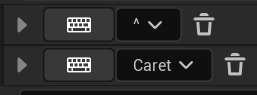
I am using a setup on my project where I configured the ^-shortcut on Windows 10 and so I still have the dysfunctional ^-shortcut applied. See following picture. It is something that stopped working on Linux.
On games it becomes even more strange. My layout without accent creates backquote instead of caret in one game, ö in another game and in a third game it becomes gravis. That is a total mess. In chat windows or any other text related thing, there is never such an issue.
Edit: It looks like some games recognize some kind of QWERTZ-US-layout for shortcuts, as strange as it sounds.
yup, switching my layout to ge (dead acute) gives me the ^ symbol on the corner key and ß on the minus key … and neither of them were accepted by the shortcuts GUI
in fact, just as with my experiment earlier with the $ symbol the shortcut input box will take the input but the box has a red outline which, which must mean that it will not be recognized, and therefore won’t work.
the [ symbol worked and gave me a blue outline because i guess that symbol is on whatever definition of a keyboard it is using.
Maybe these are two issues. One with dead key and how Linux is handling them and one with layouts not being correctly recognized (probably on WINE/Proton software?).
Why is this such a heavy issue on Linux? I can’t belief that it was never recognized over so many years. Input methods are such a central aspect of any computing device.
this is why i think it must be tied to your language selection rather than your keyboard layout.
all evidence of shortcut creation seems to be limited to the keys on my US English key board, regardless of what layout i have active.
so i can’t make shortcuts with any other keys than what come with a standard 104 key US English keyboard in the first character position.
i’m not going to try this because i might get tangled up, but if i changed my language to german and took the default german language keyboard layout and looked at the preview of the characters in the first position on the key caps… i would be willing to bet those could be used as shortcuts.
My language selection is the same as my keyboard selection. There is really nothing special about - especially since it is one of the main supported languages in general.
ok , investigating further, i was wrong when i said that shortcuts are not case sensitive
when a shifted charter is assigned to a shortcut the shift key press is not recorded, but instead the shifted character is assigned to the shortcut.
so on my 104 US keyboard i can assign shifted characters to shortcuts like ~ < ) and they are recognized, however i cannot do this for ISO shifted characters such as ° § ²
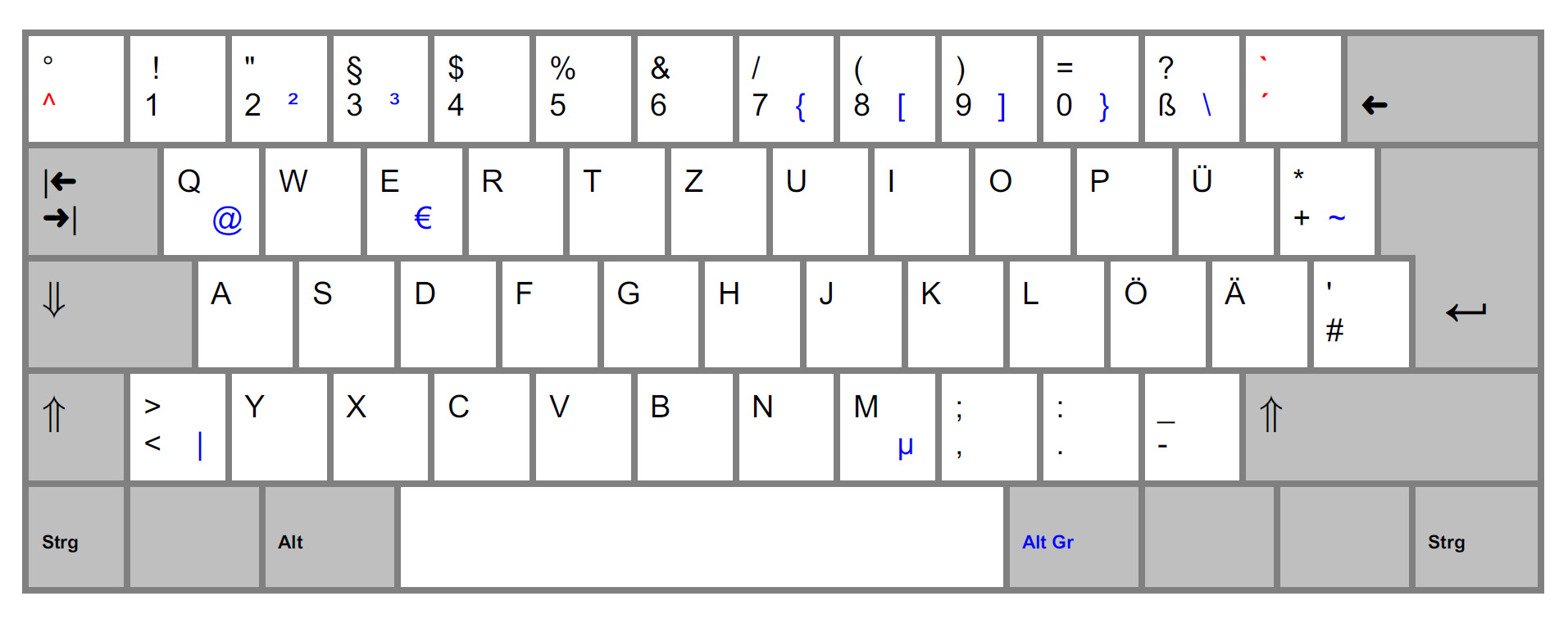
does your physical keyboard and key caps look like this image?
do you have your keyboard > device set to to generic 105key?
you should be able to assign shortcuts to either ^ or ° and have them recognized just like can have shortcuts that recognize ` ~ in that same key position.
Both yes. The ^ only works on German (no dead keys) on Unreal Engine 5, but the default Layout does not work. It is waiting for another sign I guess and even when double tap the key nothing is recognized. Currently I am using both layouts (with and without dead keys) and switch when required, but I really don’t like it.
But games still mismatch the keyboard somehow. At least with “no dead key” the layout has a chance to make a shortcut, which is another sign then. Probably WINE/Proton related.
well if you find a combination of layouts that work, you can combine them into your own custom layout so they all exist at the same time without having to switch, but it’s kind of meticulous tinkering with root files.
I don’t think it works this way. My layout with and without dead keys are exactly the same, just with the difference that one layout waits for an additional input while the other layout just prints the key.
Otherwise I have a keyboard with free firmware and can modify it in any way I want (but it is limited to the keysym any keyboard is using, so it doesn’t help for this specific issue).
i would try a different keyboard and make sure it’s not a hardware issue.
you mention software for the keyboard, have you tried going into that software and resetting all the keys to factory defaults to see if that changes anything?
It can’t be a hardware or firmware issue, otherwise the issues would be completely different. With such an issue the layout without dead key wouldn’t even be functional.

 My layout with and without dead keys are exactly the same, just with the difference that one layout waits for an additional input while the other layout just prints the key.