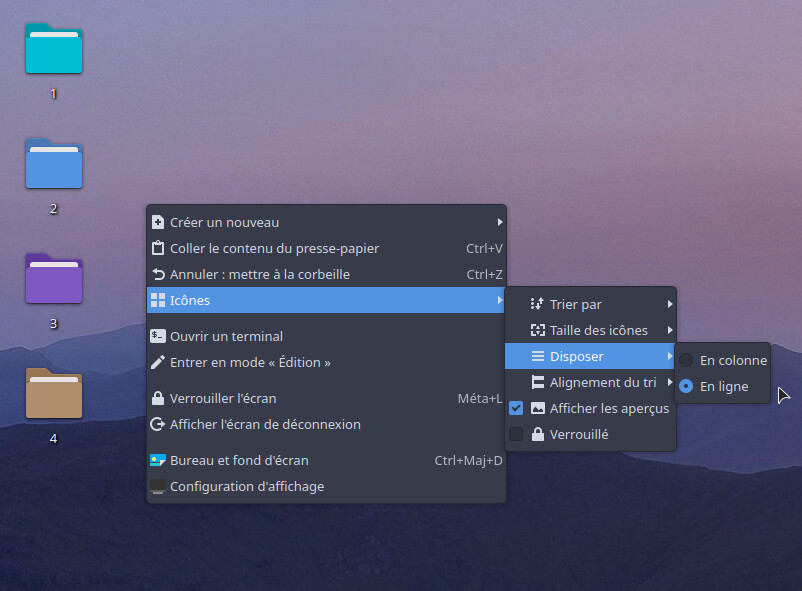
Desktop sorting: Rows and columns are reversed

Hello, I’m new to Fedora 43 KDE, and this is a small detail I noticed from the start, but it hasn’t been fixed. I’d like to know if this is a shared and documented issue: On the desktop, when I right-click > Icons > Arrange > “In line” and “Column” are reversed.

“Column” should be vertical, and “In line” should be horizontal, but for me, I get the opposite.

for me the first option is “left to right” which i guess would form columns if you added enough items to the desktop.

the second option is “top to bottom” which would stack the items and eventually form rows if enough items were added to the desktop.

i think it may just be a translation issue as i don’t think “in columns” or “in line” are adequate descriptions.

In English, it is “In columns” and “In rows”.

However, I see why the OP is confused. That has too vague of a meaning. i.e. You could argue in columns means they should be arranged horizontally because each icon is placed in a separate column. You could just as easily argue that in rows means they should be arranged horizontally since they should be aligned into a row.

I agree that “Horizontally” or “Vertically” would be a lot more descriptive.

I think you’re referring to the following section: ~sort alignment

no, i’m referring to the menu option you have highlighted… the words on my screen are just more appropriate rather than misleading.

the order of the two placement options are the same…

the first one is “left to right” or places the icons horizontally.

the second one is “top to bottom” which places icons vertically.

just as they do for you, only your menu titles are misleading.

this sounds like another plasma 6 “improvement” gone awry

if the words needed to be changed, it should have been changed to “horizontally” and “vertically” respectively for the two options.