Disk usage widget displays partially absurd values - why?

I am currently setting up new hardware with Kubuntu 25.10 (Plasma 6.4.5, Wayland). In addition to the partition for Kubuntu (Btrfs), the SSD has one partition for Windows (NTFS) and one for data (ext4). So far, the data partition only contains an empty lost+found directory. According to KDE partition management, only 2.03 MiB of 2.02 TiB are occupied.

Now I have installed the Disk Usage widget (by Marco Martin). The values for the Kubuntu partition (32 GiB of 118 GiB used) are similar to those in partition management (25.15 GiB of 150 GiB used). However, the used value for the data partition displayed in the widget is simply absurd: 103.7 GiB of 1.9 TiB used.

What could be the reason for this?
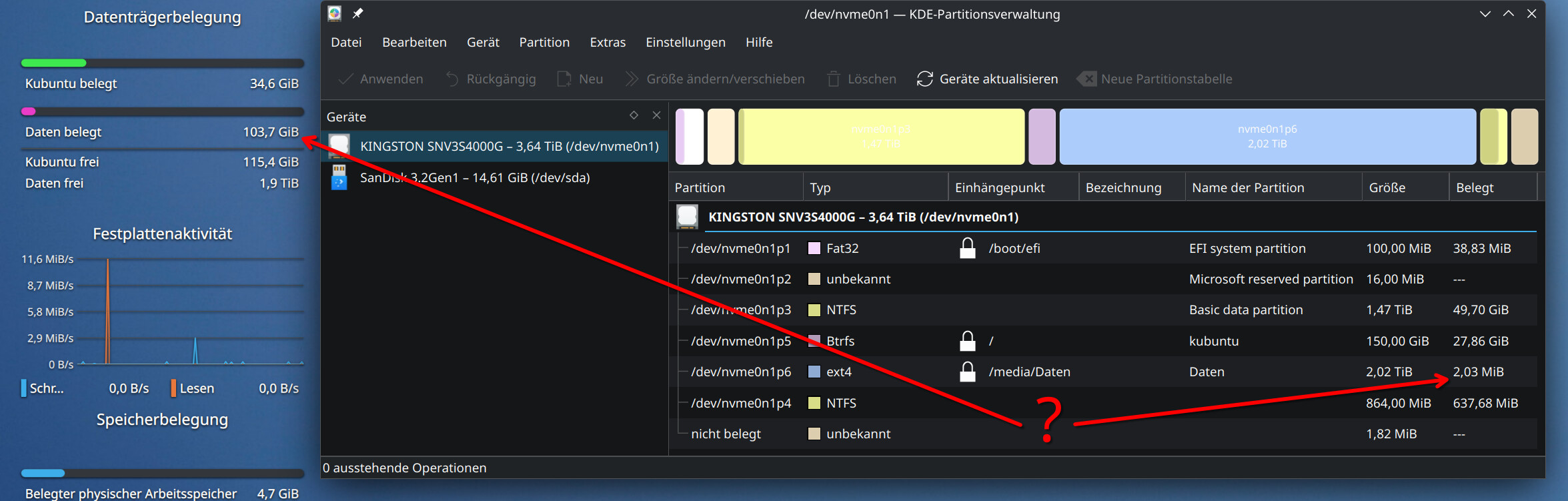
Is there a widget with realistic information for the data partition?

It may be accounting for the space reserved by ext4. By default, ext4 reserves 5% of the space so that would be pretty close to what you are seeing there.

…and what does that mean for the partition’s storage space? Is the partition manager or the widget wrong?

Will the partition still have 100 GiB free if the widget believes it is full, or will the widget and the partition manager agree if more than 100 GiB is used?

By the way, Dolpin also says that 1.9 TiB of 2.0 TiB is free - 5% occupied.

Arguably, they are both right depending on how you look at it.

You only have a few MB in use. However, there is 100GB that is reserved and not available for use.

Partition manager isn’t telling you what is free. I have never tested it but I suspect it would tell you that 1.9 of 2 TB was in use.

The two tools have different purposes.

It could be just a difference in how each tool reports things, and neither of them are wrong…?

I think the one tool is looking at the reserved disk space as a whole, and the KDE widget is looking at the used space on each partition.

So like, you have your single drive broken down into several segments, and the one tool is saying, ok 100 Gigs are reserved for this segment. The KDE tool is saying, of this reserved space, this is how much is actually occupied.