I have just updated some of my machines. Previously, the “action” option was a menu from which options would fly out. Now they are all listed without the menu (I hope that makes sense) - picture below. I like this, and would like to enable it on the other machines but can’t find the setting. Any ideas please?
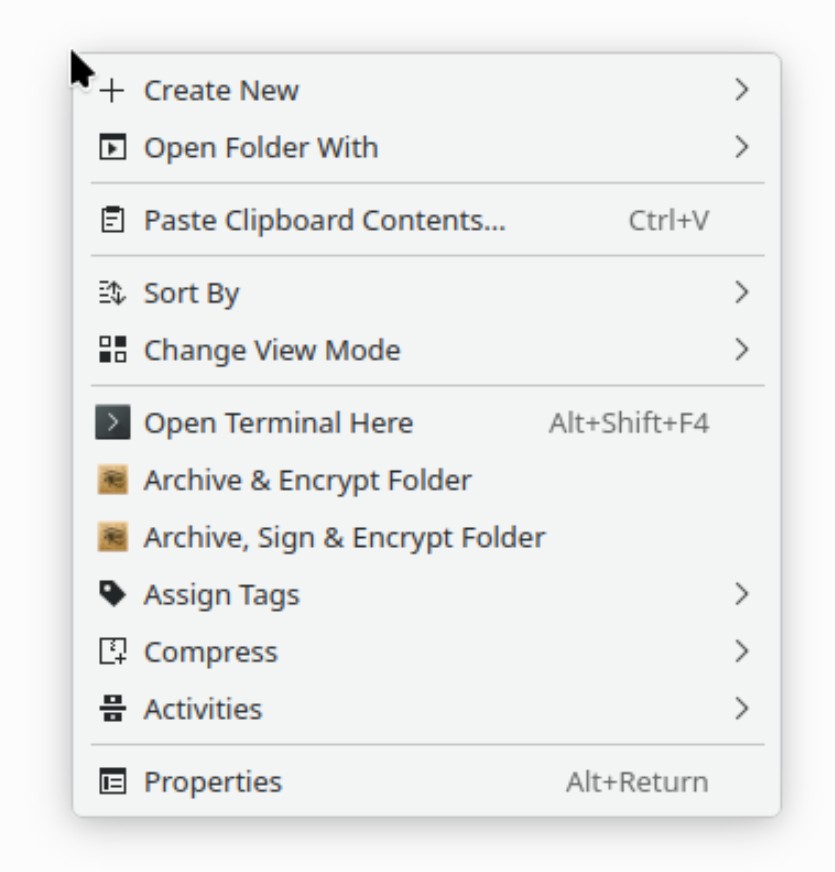
With no information?
I ran an update yesterday and I still have my Actions menu… but then, maybe I’m running a different OS (with Dolphin Version 25.08.3) than you are…
I registered literally 5 minutes ago to post / ask about this. I thought I was going crazy
On my machine that was upgraded from fedora 42 → 43 the context menu looks the same as yours, however I also have a fresh install of fedora 43 where the actions menu is intact and the ‘open terminal here’ / ‘archive..’ options reside inside it properly
Both machines have the same version of fedora, kernel, plasma, and dolphin and I’ve been searching for hours trying to see if I’ve configured something somewhere and forgotten about it
It’s perhaps a bug with version migration? I’m not sure where the config files reside for this context menu
the actions menu depends on the service menus that are active in dolphin.
depending on how the service menus are set up by the developer they can either be top priority and show up at the root level of the context menu, or some lower priority where they get tucked into an actions menu.
there is also the variable of whether or not the service menu has a subfolder.
there is no toggle for that i’m aware of, it’s just something that gets triggered or it doesn’t depending on what the user has turned on in the dolphin context menu settings.
As far as I know, the context menu gets menu items from the Services enabled in Settings, and their configuration files can be in folders like ~/.local/share/kio/servicemenus, ~/.local/share/kservices5/ServiceMenus or ~/.local/share/kservices6/servicemenus , if installed at user level, or in similar folders under /usr/share if installed system-wide, and they can have entries like the following in the top section “[Desktop Entry]”:
Actions=<action1>;<action2>;
X-KDE-Priority=TopLevel
X-KDE-Submenu=Image Actions
In the example above, each and every entry described below the top section (each under a different “[Desktop Action «name»]” as listed in the “Actions” entry at the top) are displayed in a submenu defined above. Otherwise, they are displayed in the root menu, if no such “submenu” entry exists at the top.
Unfortunately, there’s no GUI utility to manage all these, and user have to edit configuration files manually if they want to make some changes regarding these.
But the context menu adds this sub-menu only when necessary, that is when there is more than X non X-KDE-Priority=TopLevel actions, and move those actions there.
I can’t remember the threshold I think it is 5.
Edit: it is 4, src/widgets/kfileitemactions.cpp · master · Frameworks / KIO · GitLab
the “issue” / only difference between my 2 machines then is that for some reason the files in:
/usr/share/kio/servicemenus/
are different between installs, even though the context menu settings for dolphin are exactly the same and no new services have been downloaded
on the machine where everything is top level, I have desktop files for:
filelight, installfont, kgpgp_encryptfile, kgpgp_encryptfolder, kgpgp_viewdecrypted, konsolerun
yet on the machine (where the actions menu is visible and seems to be working properly) I have:
filelight, installfont, kleopatra_decryptverifyfiles, kleopatraa_signencryptfiles, kleopatra_signencryptfolders, konsolerun
no other files reside in the servicemenu folder locations mentioned, so I am not sure why they are different in the first place given they were installed a few weeks apart and I don’t think anything novel has been installed onto either of them
the Actions menu is triggered automatically by a certain number of service menus, my guess is you crossed that threshold.
also sometimes you need to close and re-open dolphin for the context menu changes to take proper effect.
yeah, so everything is working as expected when I switch the files around. the question now is why the new machine has kleopatra service menu files INSTEAD OF gpg, given that everything’s still set to default with the same dolphin context menu settings
I think fedora 43 expects kleopatra to be installed, since right clicking a file and pressing ‘decrypt/verify file’ gives a “could not find kleopatra” error. My fresh install of fedora 43 has kleopatra installed but my fedora 42 → 43 migration does not
I think the confusion around this whole issue is that the gpg servicemenu files (I guess they came with fedora 42) produce a right click menu (e.g. in an empty folder) where there is no “actions” menu, yet the kleopatra ones (that came with fedora 43) add both “archive + encrypt folder” and “archive, sign + encrypt folder” to the right click menu, thus pushing the extra actions on the top level menu into the “actions” folder
The “fix” for my installation has just been to grab the 3 kleopatra desktop files and replace the gpg ones, as well as a “dnf install kleopatra”. Everything now looks and works the same way as a fresh fedora 43 install
it really does sound like some kind of migration bug - I hope this helps others
Thank you for all the posts. I can confirm that it down to the number of entries, over three and they are added to a new actions menu. This is a pity as it would be nice to choose - for instance “open terminal here” I find very useful and could do without another click to open it.
I have looked in the directories Sadi mentioned. Some I do not have on my system (Opensuse Leap16) and those I do, don’t seem to correspond to what I am seeing on the Dolphin context menu. Also I do haev kservices5, despite running Plasma 6… is that not rather odd?
you can copy the .desktop file into one of your /home folders and modify it so that is always shown at the root level by adding the line X-KDE-Priority=TopLevel to the [Desktop Entry] category.
if you want to control the order of how they appear you can use numerical values between 1-999 to sort them above those with the priority TopLevel
~/.local/share/kio/servicemenus is where they should go but ~/.local/share/kservices5/ is also supported for backward compatibility.
these are your personal directories… there are also sister versions of these in /usr/share/ for stuff that is installed by root or installed by a program the user installed using sudo
Can you show an example for this, please? I’d love to make a few changes in the order of items that appear in the root menu as well as submenu, although there has been a huge improvement regarding this in Plasma 6.
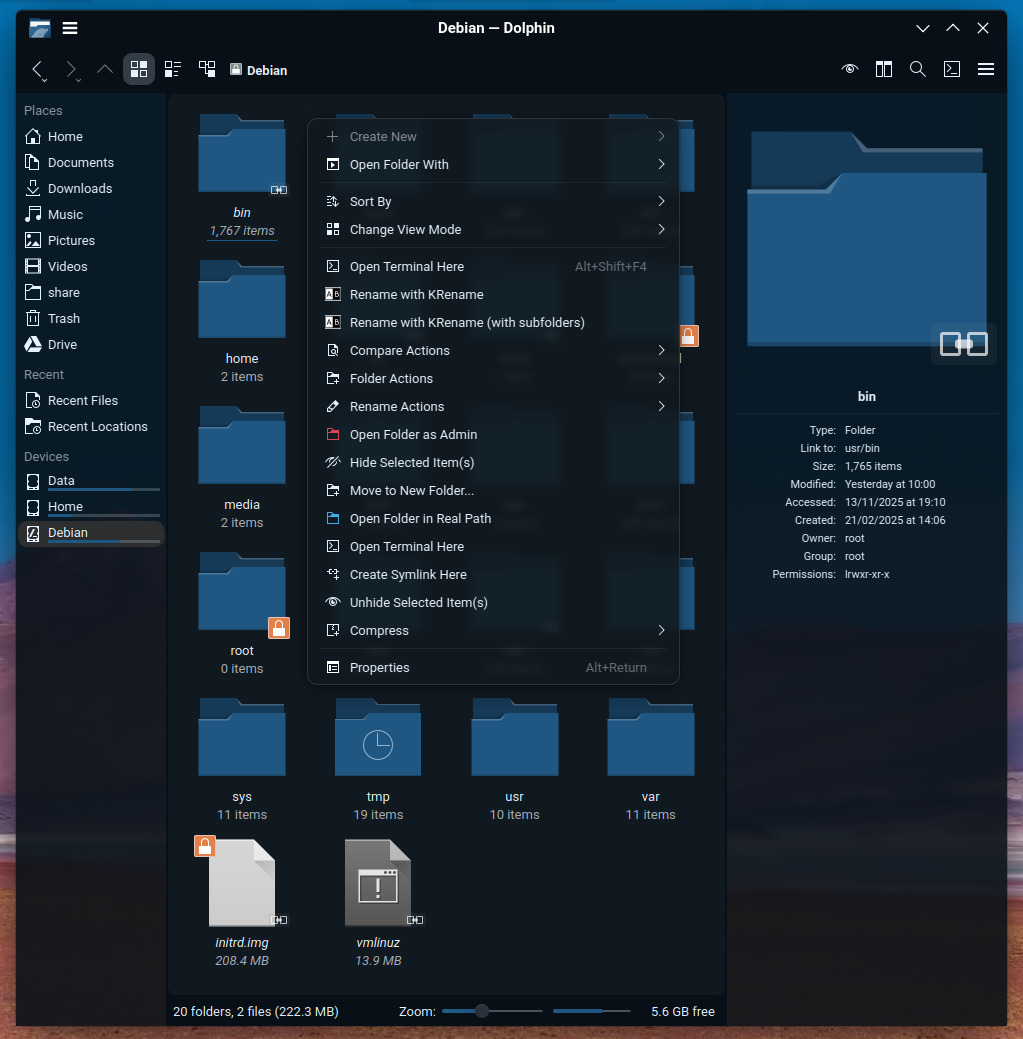
Below is the context menu I get when I click an empty place in Dolphin (i.e. current folder).
I have 2 instances of “Open terminal here” which do exactly the same! I’ll be happy to give away one of them! 
I’ve also managed to use all monochrome icons with a little customization, with only one exception: “Reformat or Edit with Partition Manager”, which appears for Devices in the side panel on the panel.
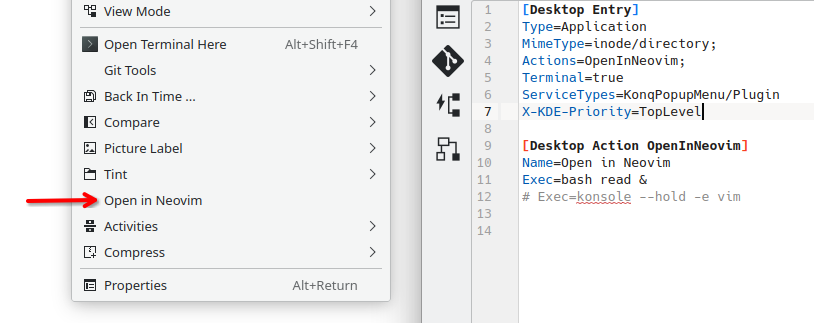

This is looking promising, but I cannot find a .desktop file corresponding to “open terminal here” in any of the locations you mention? Do you know what this entry might be called?
the preinstall service menus should be in /usr/share/kio/servicemenus/konsolerun.desktop but i would not modify that file, i would copy it to your ~/.local/share/kio/servicemenus/konsolerun.desktop and then make changes to it.
that’s “run in konsole” when you click on (for example) a script. “open terminal here” doesn’t appear to have its own service file in those locations
Thanks, I didn’t know this.
Although it only affects top-level menu items which are configured via a single-item *.desktop files, or sub-menus, this at least enables users to manage top-level items in the context menu. I guess it would be too complicated to go further than this.
beyond this, the sorting is just alphanumeric all the way down to individual Action key value pairs in the submenus.
I really wish I could set this to something higher :-).