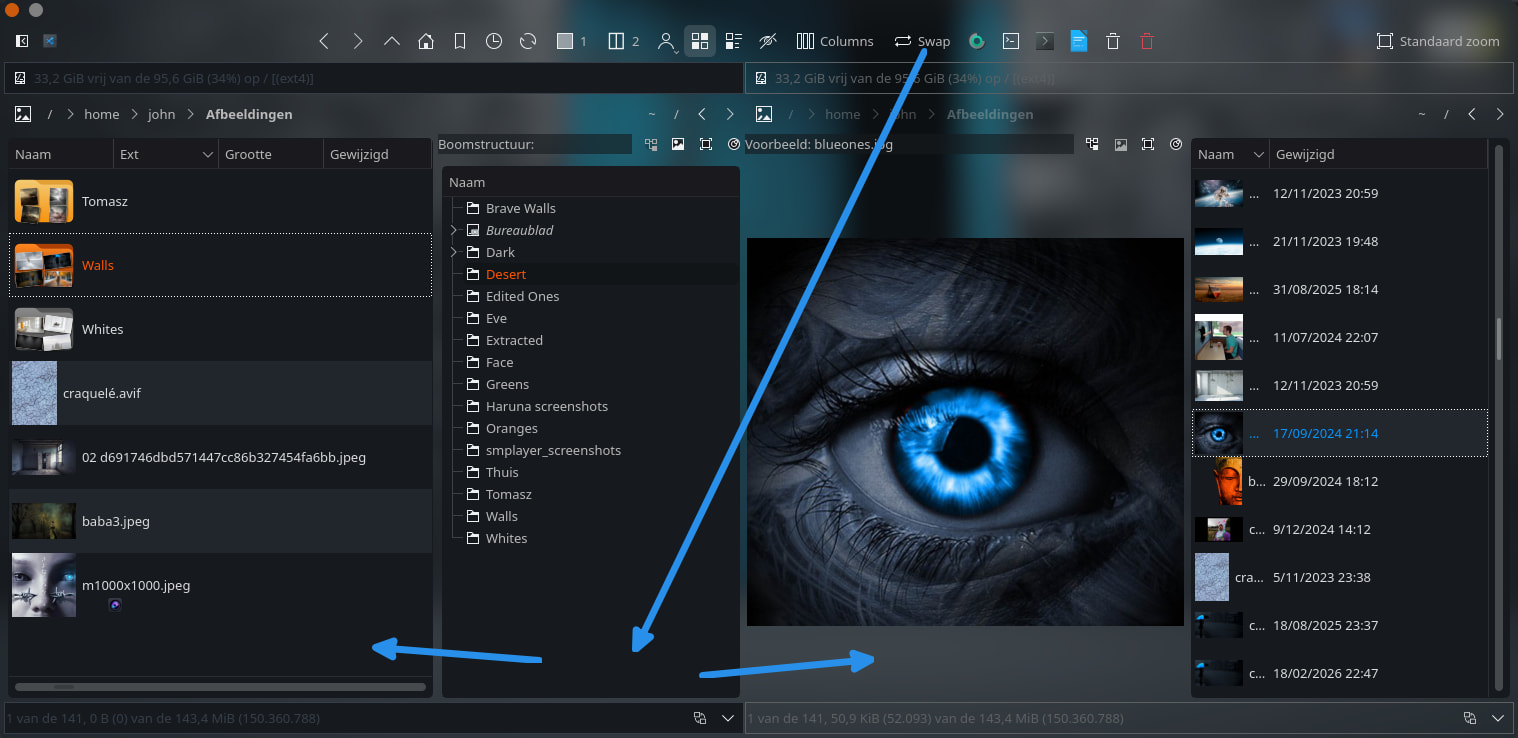
Coming from Windows and having used Directory Opus for months, having Dual File Tree is something worth of having in Dolphin when using the Split mode.
1 Like
What is “Dual File Tree”. Some of us have not used Windows in decades.
Hi,
Something looking like this, with a go back arrow and go forward arrow will be nice 
EDIT : see below Dolphin split with a dual file tree…

that’s basically F3 (split view)
you can navigate each view separately.
Yes, but I think the OP wants to have the side pane show twice for some “navigational efficiency” type of reason, I’m guessing.
This would, of course, be impractical on a small, non-widescreen display, as it would just take up way too much space.
Or you can just open two Dolphin windows. (Except “move/copy to the other pane” won’t work.)
2 Likes
I know about that. My idea was each window having its own file tree. However others are right. This will take a lot of room, making the file manager hard to use on lower resolutions. But in the end such option would be optional so you can choose between the old way of doing things (2 windows, single file tree) and 2 windows, dual file tree so I don’t see a problem concept-wise.
1 Like
not sure why you want the places panel to appear twice.
what is the use case for this?
the navigation arrows still work in whichever pane is the active one, so you don’t need duplicates of those either to navigate each pane separately.
I find it way more convenient when you work with a lot of folders. With one folder tree, you have to constantly scroll up and down to open different folders on both panes… Moreover opening lot of folders on the single pane becomes messy afterwards having to collapse em. Dunno if you get my point. 
1 Like
F3 gives you everything in your screen shot except the duplicate places panel.
i understand the utility of split view for the folder tree, but i don’t understand the need for places to be shown twice.
that was my question.

Kind of related, I was also looking for a way to have independent split panes in Dolphin, but I’d be content with the Placs bar appearing only once. Now what we get with the split view is a tab that contains the split view, not a split view that contains tabs in both panes. So in that sense, Krusader could be closer to what I’d like, but Krusader has a worse Places panel than Dolphin (iirc from my testing, it doesn’t allow for Middle-Click open in new tab). Then there’s then not updated Konqueror, which I used extensively under TDE on some HPC servers in the past, but that also has some issues, most glaring one for me is the new blank tab flashbanging with the white background, and I didn’t find a way around that other than possibly cahnging something in its source code and building it myself.
All this to say I am looking for a file manager as great as OneCommander on Windows (possibly the only actually great thing about Windows). You can see some pictures here, but I attached the main thing too: onecommander.com

1 Like
Yeah I don’t know. IMO having two “Places” panes just takes up a lot of room for nothing I wouldn’t really use. If I need two Places panes, I just open two Dolphin sessions. You can also right click a folder and select “Open in Split View” which is also pretty useful.
But as someone else suggested, maybe Krusader might be a better option for you? There’s also plenty of other file managers available in Linux like Double Commander, muCommander, XFE.
You’re not stuck to just the default that came with your distro or desktop.
Thanks for the app suggestions. Krusader definitely is worth a shot.
The thing has tons of settings. It’ll take a while to figure it out but me think it’s the closest to what you want ( except for some terminal or gtk ones)

Guys, I found something: pcmanfm-qt GitHub - lxqt/pcmanfm-qt: File manager and desktop icon manager (Qt port of PCManFM and libfm) · GitHub
https://manual.lubuntu.me/master/2/2.4/2.4.4/pcmanfm-qt.html
This is the default file manager in Lubuntu, it seems, but more importantly, it is written in Qt and has independent panes. I will be testing this thoroughly. So far, it seems that KDE’s way of storing “Places” differs from the “Bookmarks” used by pcmanfm-qt (and by a bunch of other file managers), so the integration might not be the absolute best.