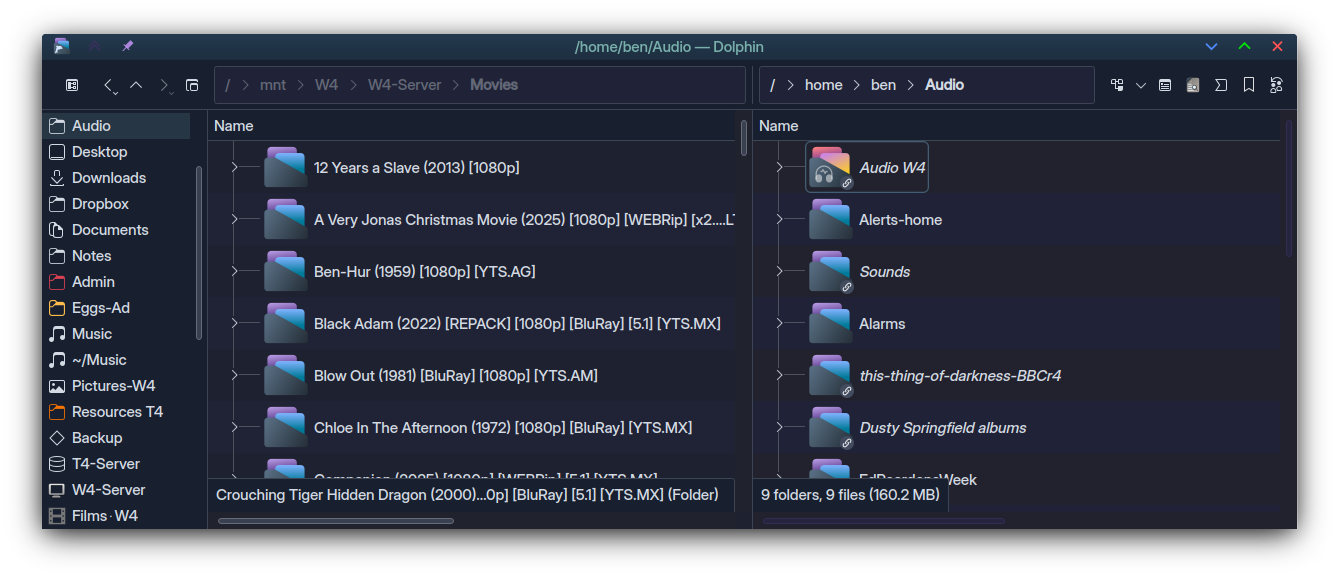
Operating System: Kubuntu 25.10 / recently upgraded kubuntu 24.04 to 25.10
KDE Plasma Version: 6.4.5
KDE Frameworks Version: 6.17.0
Qt Version: 6.9.2
Kernel Version: 6.17.0-14-generic (64-bit)
Graphics Platform: Wayland
Dolphin split view
In kubuntu 24.04 by clicking in a pane once, the focus changed entirely to that pane, and using a places shortcut would change the directory of the pane in focus.
In Kubuntu 25.10 I am finding that does not work as before.
Example: Three tabs are open in split view. From third tab, click on second tab. focus changes to second tab. click in right pane and then click on a places shortcut (with intention of changing the directory of the right pane) instead the left pane directory changes. clicking again on the same places shortcut changes the directory of the right pane.
The changes do not reflect the last click on the left or right pane, they seem to be working independent of where the user has clicked. Sometimes becomes confusing and have to click an number of times to get the panes directories correct. Although after clicking a number of times in the required pane, eventually it seems the panes get the focus required regarding using the places shortcuts.
In Kubuntu 24.04 it was simple - the pane you clicked on was the pane in focus and a change of directory happened in that pane alone. This was efficient and simple. The new behaviour is frustrating.
How can the behaviour be changed. So that the pane clicked on, is the pane in focus and only that pane changes directory if a places shortcut is used (or whatever other command).
Using tab to change panes does not change this behaviour.
Confusing… Split view occurs inside the tab, you can’t open tabs inside split view.
You might have three tabs, each with a split view…
So, playing along - I opened Home, then selected Audio and hit F3 for the split.
Then Alerts|Swish, then Films|Crouch…
From the third tab, click on second tab.
Wow, ok, so I’ll select the third tab and then I’ll select the second tab (not sure how that’s relevant). So, selected (Alerts)|Swish.
Click in the right pane and then click on a places shortcut.
Ok, clicked on the right pane background, it is selected - then clicked ‘Downloads’ in Places.
Result: Now I have Alerts|Downloads as expected.
So I suspect something weird is going on, but your post gives little to go on - I suggest creating a new USER to see if the same happens there… I suspect it will not.
Hitting TAB is a better way of toggling the selected pane (often, it’s not convenient to click on a folder containing folders and files unless you want to open those items).
I may not have explained very well. By three tabs I meant three pairs of split views (2 folders open in each split view).
Another example of how it is behaving (which is different to the past):
starting dolphin (configured to open previously used folders and in split view)
Example
Open dolphin that brings up previously opened folders with split view.
Left pane and right pane show two different directories.
In the left pane click with mouse cursor and select a file.
press delete key on the keyboard to deleted the selected file.
Result:
Instead of deleting selected file in the left pane,
The right pane goes into selection mode.
Nothing happens in the left pane.
In the above situation the fields showing the folder paths at top of the panes are not lite up i.e. as if neither of the two panes are actively selected, despite having clicked on a file in the left pane.
After the above operation and cancelling the right pane selection mode, clicking somewhere else in the left pane, activates the left pane shown by the change in colour intensity of the folder path in the field above (I am using dark mode).
In the past by clicking any where in a pane including on a file that pane would have been the selected pane for any operation either by mouse clicks or keyboard.
Selecting panes with tab sometimes still produces the same confused result but other times it is better (don’t know why). In the past I never used the tab key to change panes and there were no issues, but now I am often using the tab to change focus from pane to anther as it is less likely to show confused behaviour.
There is a fix for the bug. It is in pane activation on tab switch. If it will land, the issue will be gone (see merge request #1171 for Dolphin in Invent – can not post links here).
Thank you. Looked it up in Invent. Applying the fix needs coding knowledge that I don’t have and help from AI often lands me into more trouble as they readily give wrong answers.
But the issue is not limited to the activation of the panes. For example in past versions of Dolpin I could right click a folder name in the folder path and open it in a new tab or new window, but now, it sometimes goes back to the folder further back or to the root. e.g. if the current path is
/media/user/xx1/xx2/xx3/xx4/xx5 and I right click on xx2 to open it, sometimes it opens xx2 but often it may open media and or another folder in its path.
Activation of panes is a root for many seemingly unrelated issues as signal listeners get connected to wrong elements or not connected at all (e.g. mouse right click does nothing, navigation buttons act on inactive pane etc.). Thus quite possibly many strange problems will go away.
I understand that applying a patch is not an ideal situation, but at least you can track progress there – when it will be merged, it will be on its way to you (release→package→upgrade your system). Currently compiling from 0 takes almost full day and a mountain of disk space, thus I don’t expect non-developers to do testing. My message was more of “heads-up“, there is a work in progress to remove your pain.
Thank god there is a fix in the works. I’ve been experiencing this dolphin incorrectly tracking what pane should be in focus, i.e., what pane should be the target for keyboard shortcuts since towards the end of last year.
Nightmare issue. Will double my annual donation to kde this year.
 Hitting TAB is a better way of toggling the selected pane (often, it’s not convenient to click on a folder containing folders and files unless you want to open those items).