tried asking about this on kubuntu forums but no one seems to have any ideas.
a recent update (possibly from kernel 6.17-29 to 6.17-35) has introduced a new plasma settings package (for mobile) that seems to have brought along with it an instability in the privilege escalation (perhaps conflicting dependency/environment?)


since this package has showed up, whenever i try to open the driver manager from within system settings, i get this error
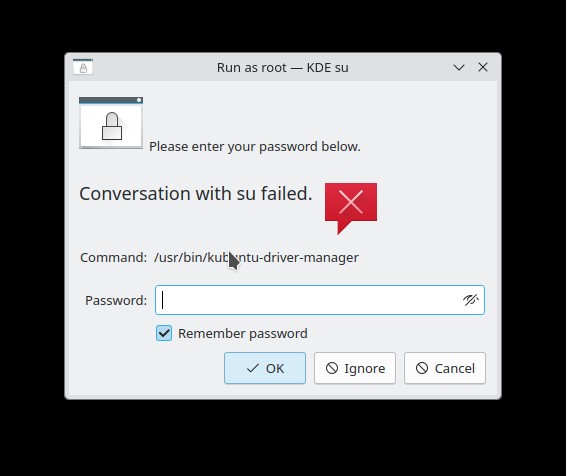
running either sudo kubuntu-driver-manager or sudo software-properties-qt from the command line does not cause this error and escalation works as intended.
further, i can keep hitting OK on the error window and sometimes it will work after a random number of tries, and sometimes the dialog will just disappear but nothing else happens.
other background:
when i tired to remove the new plasma-settings package, then for some reason my kup backups stopped working and i had to roll the whole OS back to a prior snapshot to regain functionality… either way the SU failure persists.
when i run systemsettings in a terminal, i get this output from it starting up.
kf.coreaddons: "Could not load plugin from /usr/share/kservices5/kcm_driver_manager.desktop: '/usr/share/kservices5/kcm_driver_man
ager.desktop' is not an ELF object"
kf.coreaddons.desktopparser: Error: Failed to open  "kcms//usr/share/kservices5/kcm_driver_manager.desktop"
QFileDevice::seek: IODevice is not open
kf.coreaddons: "Could not load plugin from /home/goo/kcms/usr/share/kservices5/kcm_driver_manager.desktop: The shared library was
not found."
file:///usr/lib/x86_64-linux-gnu/qt5/qml/org/kde/kirigami.2/ScrollablePage.qml:200:9: QML MouseArea: Binding loop detected for pro
perty "width"
file:///usr/lib/x86_64-linux-gnu/qt5/qml/org/kde/kirigami.2/ScrollablePage.qml:200:9: QML MouseArea: Binding loop detected for pro
perty "width"
QQmlEngine::setContextForObject(): Object already has a QQmlContext
kinfo
Operating System: Kubuntu 24.04
KDE Plasma Version: 5.27.12
KDE Frameworks Version: 5.115.0
Qt Version: 5.15.13
Kernel Version: 6.17.0-35-generic (64-bit)
Graphics Platform: offscreen
Processors: 28 × Intel® Core™ i7-14700K
Memory: 62.5 GiB of RAM
Graphics Processor: AMD Radeon RX 6800
any insights would be appreciated… i would not like to upgrade to plasma 6 while this issue is unresolved.