I have a Philips 245E1 monitor. It doesn’t seem to send the correct edid or something, so it was a struggle to get it to work properly on Linux when I bought it some years ago (I’m currently using Manjaro). In system settings, I can only choose resolutions up to 1920x1080, but it supports a resolution of 2560x1440 at 60 Hz, as I was using it like that on X11 with this custom modeline in /etc/X11/xorg.conf.d/10-monitor.conf
Can you share the output of the command kscreen-doctor -o
And maybe also the output of drm_info -j
Please tell us your distro and Plasma version (just to complete the context).
KWin does add common modes (that’s resolution+frequency) for screen that miss it obviously in their edid. I know about 1920x1080@60, if we can guess your screen is supposed to support 2560x1440, we might be able to adjust this.
KWin does add common modes (that’s resolution+frequency) for screen that miss it obviously in their edid. I know about 1920x1080@60, if we can guess your screen is supposed to support 2560x1440, we might be able to adjust this.
According to the page www [dot] edid [dot] tv/edid/1959/ (I can’t post links, sorry), the maximum available for this screen is 2560x1440@74.97Hz, but my laptop only support up to 60 Hz, so I cannot check. In that page you can also download the edid provided for the TV (allegedly), in case it helps.
Please report a bug for KWin on with the details I asked.
OK, I’m on it now, but I’ll leave also the details here just in case it helps someone.
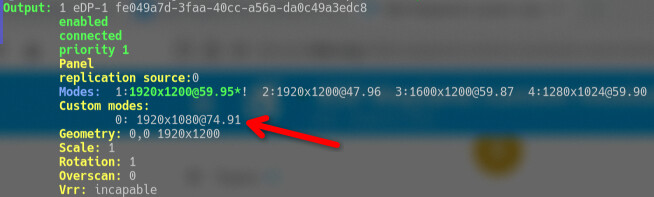
Update: as reported in bug 456697 (not the one linked above, the one linked from that), as of December 2025 (in git) and Plasma 6.6 (released), KDE supports custom modelines that will let you add custom resolutions and refresh rates to the ones reported by your display.
(The refresh rate is “not accurate” because things like actual display bandwidth, etc)
You can remove such custom mode by using the index number of the custom mode (the first one is 0, as can be seen in the screenshot) like so:
kscreen-doctor output.1.removeCustomMode.0
The full at the end of the addCustomMode command means that the new mode is stretched to fit the screen. The other option is reduced which will leave black bars on the aspect that doesn’t fit when kwin matches resolution and aspect ratio for your screen - this could be top and bottom black bars if you set the height “too low” or right and left black bars if you set the resolution not wide enough.
 :
: