This post came about from installing and playing with jdDesktopEntryEdit , which is a much more feature-rich editor of .desktop files than the KDE “Properties” dialog.
Specifically, I would like a more straightforward way to open jdDesktopEntryEdit on the .desktop file when I right-click on a panel launcher icon (but I have also wanted these enhancements in the past in other contexts, but never got around to an enhancement request.)
1 - In the file “Properties” dialog, “General” tab, in the “Open with” line, say next to the Change button, add an “Open” button that opens the file with the application in the “Open with” box. With my current configuration, this would launch jdDesktopEntryEdit on a .desktop file.
2 - In the General tab, “Location” line, add a simple way to open dolphin on that location. In the past, when I’ve wanted to do this, I just paste that into the dolphin address bar, which is kind of a pain.
your post is kind of a jumble, so it’s not clear to me (at least) what you are asking for.
for item 1, are you having an issue with file associations that you can’t open a .desktop file with your application of choice?
are you saying you want to be able to do this from the task manager context menu? for which you could add an action to that .desktop file.
for item 2, is also confusing because if you already have the properties dialog open, how did you get there if you didn’t right click on the file in dolphin, which would mean you already have dolphin open to the file location.
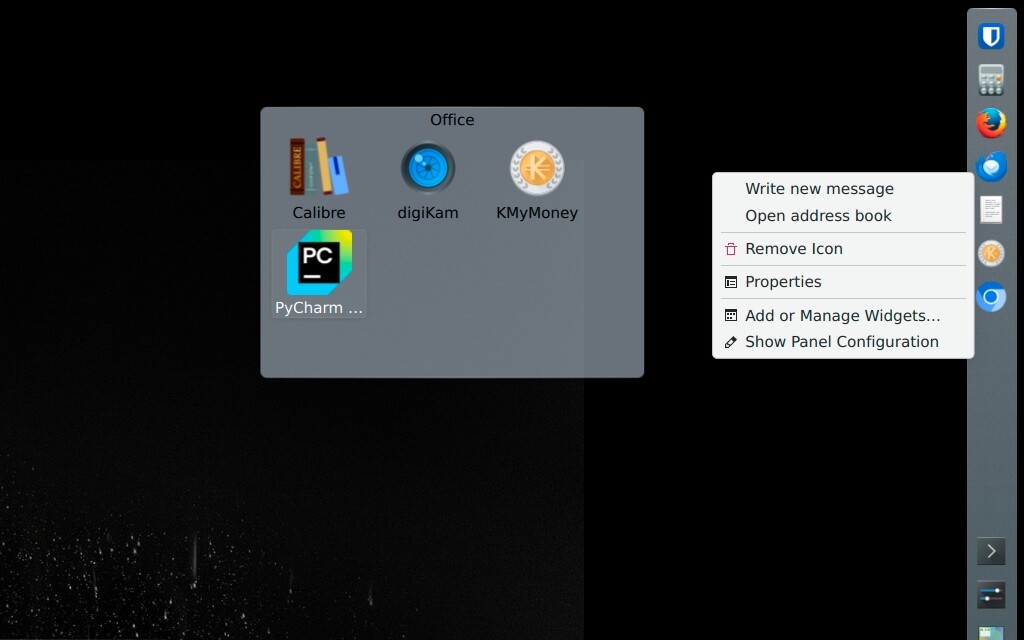
I am talking mainly about right-clicking on an icon (.desktop file) that has been dropped into a KDE panel - which is where I usually launch applications from, and where I usually want to edit .desktop files.
The right-click menu there is much smaller than the one you see when right-clicking on a .desktop file in dolphin. You don’t have a menu entry there to open the .desktop file in its default application (see screenshot of a corner of my screen with the right-click panel menu for thunderbird.desktop).
Ultimately, I want to make it easier to invoke the .desktop file editor of my choice from there (or alternatively, open dolphin on the folder where the .desktop file is).
you can customize the .desktop file to add additional Actions which will appear in that context menu when you right click on the application (at least it works that way from icons in the icons only task manager).
you can even use your tool to add the actions if you want, it seems to support the function.
Yes, I know. In the past, I have created [Desktop Action] entries with kwrite, which is pretty tedious - that is the main reason I installed this tool.
I think your idea could work, but it would require adding a desktop action to each individual entry in my panel. Also, I don’t think there are any field codes for the .desktop file or path name, so it would require hard coding that in the command - so this would break if the .desktop file were copied or moved. All of this would be more trouble than it’s worth.
i agree that it seems to be going out of your way to enable a context menu on a .desktop file you may only ever need once.
what i would suggest is a that you make a file association with .desktop files that puts your editor at the top of the list, so whenever you right click on a .desktop file in dolphin it will allow you to easily edit it.
the icons shown in the panels are only copies of the ones in dolphin, so if you make the changes in dolphin they will be reflected in the panels and task managers automatically.
there are only two folders where these things live and really only one you need to access because if you make any kind of change to any of the root owned .desktop files, it will immediately copy them to your home directory.