Say you have a slim panel with a height of 24-26 at the top having the pager, the date in the middle and other stuff to the right, a la MacOS, Elementary OS, etc and your Application Launcher at the bottom. You predefine 7 Virtual Desktops:
The icons of the individual applications are distinguishable without much effort and you can work with the Desktops, i.e. you can click the individual Desktop to access it, you can (even) move the windows from/to another desktop.
But: Having Grid View coupled to the Pager you get this view when using the Grid View (Meta+G)
But you can’t really do much with the icons in the panel being extremely small. The pointer of the arrow must be placed very precisely on each Desktop in order to access the desired one. (Imagine -or test it- having 3 rows and/or with windows that are not maximized).
Thus (as proven in both cases) Pager and Grid View must be decoupled;
in this case, one can have 7 Desktops in a row in the Pager, and 7 Desktops in 2 rows in the Grid View.
Right, agree with @krake the “default” configuration should be exactly the same as what I’ve configured in the switcher applet. If a feature is to be added, the grid configuration should be user-adjustable to override the default.
You are right I wasn’t accurate enough, I need to rephrase it. This needs to be actually decoupled from the pager, because if you have a small panel with a height of 24, 26 and let’s say 8 Virtual Desktops, they are shown ok in that panel and you can work with them by clicking on them, but they are extremely small in the Desktop View (in a single row). If you do 2 rows in the pager they are being shown ok in the Grid View, but you can’t work with them (on the panel), being so tiny.
the grid view should show you exactly what you have specified as the arrangement in virtual desktop settings, that is the point of grid view.
however, i think what you are asking for is to be able to configure pager to have its’ own arrangement settings so you can rearrange the pager view differently from how your virtual desktops are arranged in settings.
so you could, have a virtual desktop array of that is 4 x 2 which would show that way in grid view , but you could choose to arrange pager to be all on a single row in your panel.
i would support such an addition the pager widget.
Inversely yes, the Pager widget could also benefit from the option to present it’s layout apart from the global setting. However, this is specifically regarding the Overview effect’s Grid View and how it interacts with Overview’s Present Windows, and other effects (Pager, Slide, etc).
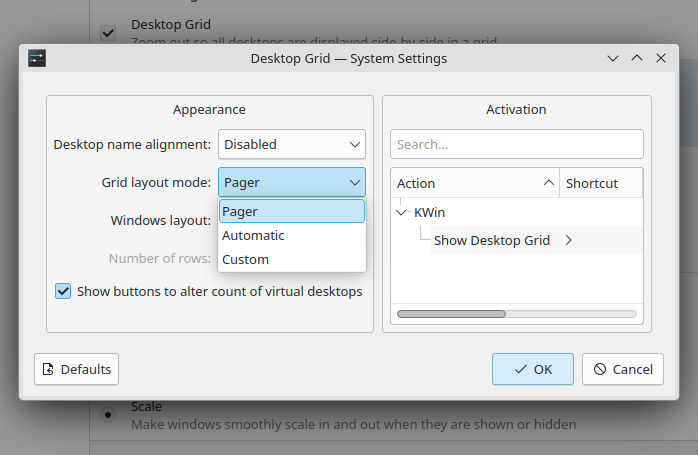
Previously, the Desktop Grid allowed for the option to follow the pager layout or use a custom tiled layout. During the initial rewrite of Present Windows and Desktop Grid into Overview, this option was skipped. This simply restores that behavior.
Sorry for deleted post, was replying and it didn’t seem to link properly at first.
I do miss the implementation from Plasma 5. The effect in your screenshot was developed into Overview and then removed in Plasma 6, where Overview lacks several productivity features that the former effects (Present Windows/Desktop Grid) were built around, specific arrangements being one of these features.
If the goal for feature parity from those effects to the modern Overview effect were respected, there wouldn’t be a thread here
i would respectfully submit that that grid view was not “developed” or “merged” with overview, but rather grid view was murdered, and overview absorbed the name but none of what made grid view what it was.
so i go back to my original assertion that pager needs to pick up where gridview left off and continue the legacy of users having control of their desktop, and the whoever murdered gridview now has to work with the pager person to make it right.
Definitely overstating things!
The Grid View feature is completely usable, however in the past it was capable of being configured separately from the system/global VD layout.
That extra option was a benefit for those that use multiple Virtual Desktop widgets and effects, to isolate the Desktop Grid’s arrangement behavior.
Again, the Pager could benefit from a similar option, but let’s not get lost in weeds and words. To my knowledge, the pager has never had this feature, while it was taken away from former Desktop Grid users without an alternative.
The Grid’s feature is restored here. I’m afraid discussions like this don’t reach developers/maintainers, so those interested and affected should please interact with the Merge Request to make your voice heard:
while the MR cited seems to be on the right track to bring back some of the functionality lost by the untimely demise (that better?) of gridview, it does not bring back the level of control you were used to.
it would need to allow the user to specify the options as they were able to do under “custom”
Yes, this only allows Grid View to “decouple” from the 6.x spatial layout and tile automatically on it’s own. It’s a middle ground in the absence of the standalone Desktop Grid effect, and presents as a clean refactor/refinement of the original option.
Unfortunately while i’d love to implement a custom row value that satisfies 100% of cases, the maintainers will certainly shoot it down for being too granular. I’m taking hard notes on what the community wants in this feature, so thank you for the feedback!
Slightly off-topic, but are you using Plasma 5.x? As far as I know, Debian was one of the last distributions to ship 5, and they’ve updated in the last few months.
I’d forgotten about Kubuntu! SteamOS still uses Plasma 5 in Desktop Mode as well, IIRC.
Ancedotally, moving from 5.27 to 6.0 last year was near-seamless. I’ve never encountered a crash that was Plasma’s fault, and most features and custom scripts have been ported from 5 to 6’s libraries.
There are edge cases for sure though, like this one. Personally, the only issue that still stands for me across the entire Plasma stack, is the Overview’s lack of customization.

 But: Having Grid View coupled to the Pager you get this view when using the Grid View (Meta+G)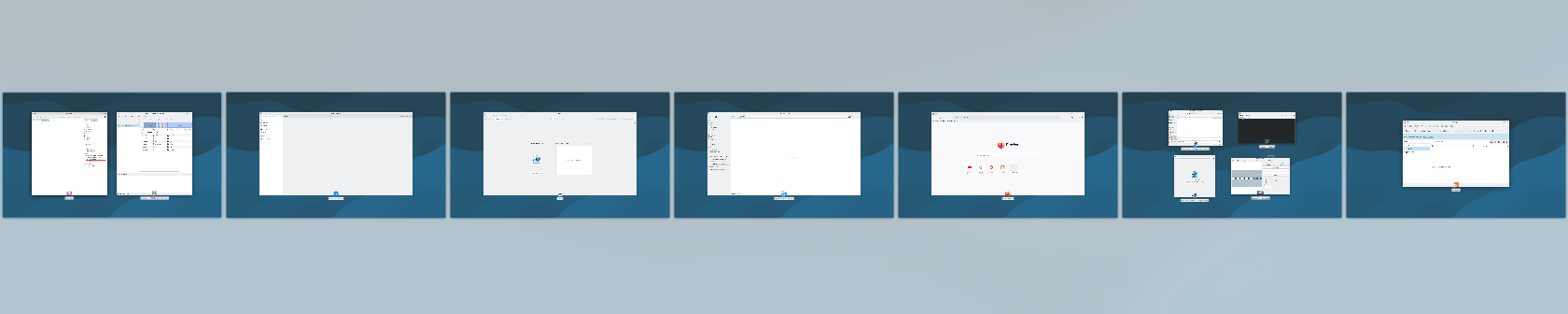
 It is very difficult to distinguish what is what (see for example Desktop 6 with 4 windows).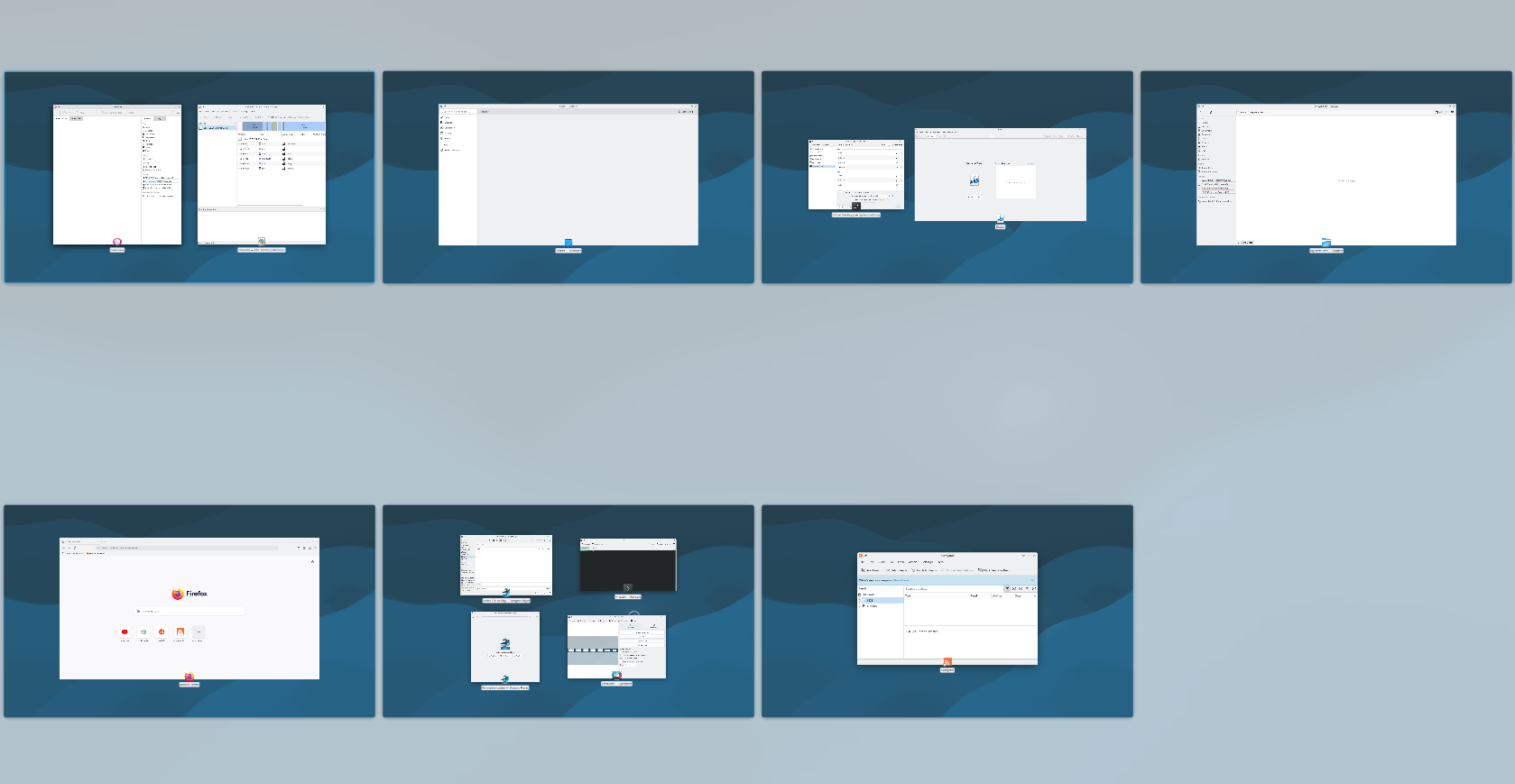




 SteamOS still uses Plasma 5 in Desktop Mode as well, IIRC.