First thing first:
I finally got me my one of those fancy OLED monitor. its this the MO27Q28G from gigabyte. Got an AMD gpu and running plasma 6.5 Everything just worked! great job @Zamundaaa thx you for that!
I just have a few questions regarding the calibration wizard that shows up in the KDE display settings when activating HDR.
For the first page that calibrates max brightness. Is that to calibrate 1% APL max peak brightness? If so, is that not too big of a white square? or does kwin expect a 10% APL here?
For the 2nd page where the 100% brightness slider is configured, is my understanding correct that (for the brightest HDR picture without washing colors) that is supposed to be the 100% APL of the panel (aka paperwhite) ?For my monitor that would be around 335nits but are the slider values even in nits (cd/m²) or just different scales?
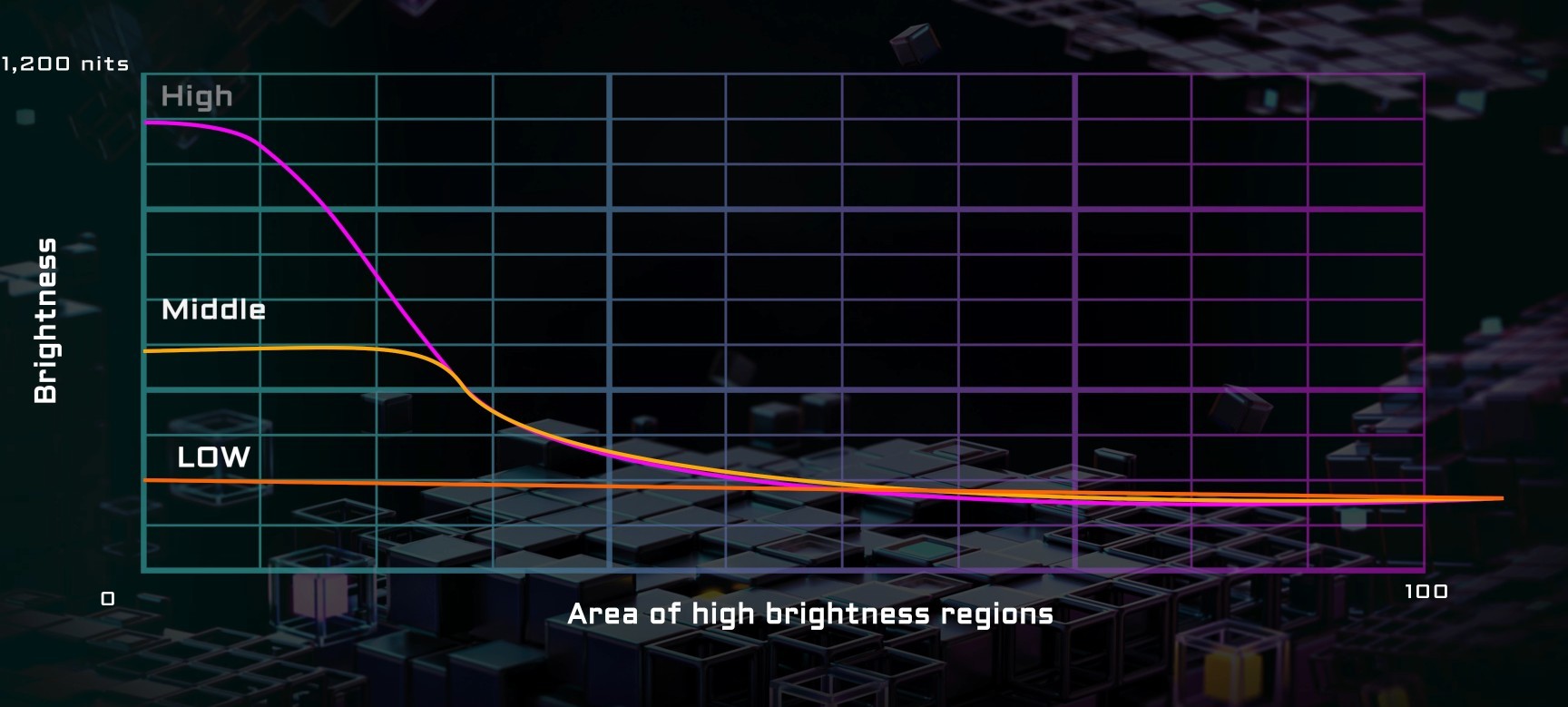
What is very confusing to me is the fact that the monitor has an ABL stabilize setting with 3 modes (Low|Middle|High) and only on the high value the panel should reach 1500nits 1% APL. yet in the KDE calibration tool the max brightness (when the logo becomes invisible) stays exactly the same (1100nits) in all 3 modes. monitor brightness is all at 100% and all OLED care features are off. the monitor is noticably darker when changing the setting to middle or low so it must have less max brightness yet the calibration seems unaffected - which leads me to believe there is there something wrong with either my setup or the calibration wizard or my understanding of it.
The square is 10%, yes. Reducing its size may be a good idea though.
Yeah, 100% frame average is the highest value you should generally set it to. I’ve seen screens where you might want to go above it though, as their advertised 100% is for what they can push for like 30 minutes before dimming.
Plasma 6.6 also adds a full frame average page + some text recommending you stay below it.
Not sure what’s going on there either, but it’s pretty common for screens to do something weird or unexpected, especially with HDR. I could even imagine that ABL intentionally doesn’t affect such small region tests, so that calibration tools like this work better, in Windows and in games.
thx for the quick answer so my limited understanding was basically correct and i should set the max Brightness to the 1% APL max of the panel then?
meaning even if i do not see the logo for the last 400nits i should trust the reviewers that all claim it can reach the advertised 1500nits and set it to that value?
As for the oled care feature is called “APL stabilize” and works like this when you open a white window and resize it becomes noticibly brighter the smaller it gets, on low it stays same max brightness regardless of 1% or 100% APL while on medium max brightness is still limited and only on high the full panel power is used: this pic (APL Stabilizte Chart) explains it i hope.
Back to my point. the feature most definitly works for small region tests, the 10% square of the calibration wizard noticably gets brighter or darker when changing modes, problem is also the logo gets brighter or darker so the value when u can’t see it anymore stays same - leading me to question what is actually calibrated here.
Fiddling around with monitor settings it worth mentioning that when changing the contrast slider in the OSD the logo in the test becomes more (on lower contrast) or less (on higher contrast) visable, i dont really wanna change contrast as its recommended to stay on 50 but should that affect a brightness test?
@Zamundaaa After reading some more HDR (including your blog posts) in a foolish attempt to understand how it works i am currently at this understanding:
The monitor (like every HDR cabable monitor mb?) does its own sort of tone-mapping and the reason the calibration value doesnt change with the different apl stabilize settings is because it maps the 0-1100 nits back to what its currently capable of, so for middle that would roughly be actual 0-600nits (if review can be trusted) and in high it maps the 1100nits to the full 1500nits.
This probably oversimplified as it also depends on window size (1500 nits is only reached in <=2% APL) but fact is the monitor does its own tone mapping so now in order to not clip anything i set the max brightness to the 1100nits from the calibration wizard as that just means that anything from that point on gets mapped to the max brightness available (1500nits in with APL stabilize high).
TLDR: the value calculated in the calibration wizard is correct even though its not actually the max nits that will be produced in the final output.
Now how this affects the 2nd calibration for the 100% brightness slider idk, im still testing different values here, review states the panel can reach over 370nits in 100% window so i guess thats the max, but if the calibration wizard value is also affected by the monitors tonemapping how do i know what value will end up producing the actual 370nits on the screen?