Help me fix Baloo

I want to search in Dolphin, but the search doesn’t work. I looked online and tried some suggestions without luck. At this point, I’m not sure what to do. I use Fedora 42 with Plasma 6.4.3.

If there are better UI search alternatives, please let me know.

More info:

$ balooctl6 status
Baloo Index could not be opened
$
$ balooctl6 disable
Disabling and stopping the File Indexer
$ balooctl6 purge
Deleted the index database
$ balooctl6 enable
Enabling and starting the File Indexer
$ balooctl6 status
Baloo Index could not be opened
$
$ balooctl6 --version
baloo 6.16.0
$
$ systemctl --user status plasma-baloorunner.service
○ plasma-baloorunner.service - KRunner provider for baloo file indexer
     Loaded: loaded (/usr/lib/systemd/user/plasma-baloorunner.service; static)
    Drop-In: /usr/lib/systemd/user/service.d
             └─10-timeout-abort.conf
     Active: inactive (dead)
$ systemctl --user enable plasma-baloorunner.service
The unit files have no installation config (WantedBy=, RequiredBy=, UpheldBy=,
Also=, or Alias= settings in the [Install] section, and DefaultInstance= for
template units). This means they are not meant to be enabled or disabled using systemctl.
...
$ ls -l ~/.local/share/baloo/
total 0
$ ls ~/.config | grep baloo
baloofileinformationrc
baloofilerc
$
$ cat ~/.config/baloofilerc 
[General]
dbVersion=2
exclude filters=*~,*.part,*.o,*.la,*.lo,*.loT,*.moc,moc_*.cpp,qrc_*.cpp,ui_*.h,cmake_install.cmake,CMakeCache.txt,CTestTestfile.cmake,libtool,config.status,confdefs.h,autom4te,conftest,confstat,Makefile.am,*.gcode,.ninja_deps,.ninja_log,build.ninja,*.csproj,*.m4,*.rej,*.gmo,*.pc,*.omf,*.aux,*.tmp,*.po,*.vm*,*.nvram,*.rcore,*.swp,*.swap,lzo,litmain.sh,*.orig,.histfile.*,.xsession-errors*,*.map,*.so,*.a,*.db,*.qrc,*.ini,*.init,*.img,*.vdi,*.vbox*,vbox.log,*.qcow2,*.vmdk,*.vhd,*.vhdx,*.sql,*.sql.gz,*.ytdl,*.class,*.pyc,*.pyo,*.elc,*.qmlc,*.jsc,*.fastq,*.fq,*.gb,*.fasta,*.fna,*.gbff,*.faa,po,CVS,.svn,.git,_darcs,.bzr,.hg,CMakeFiles,CMakeTmp,CMakeTmpQmake,.moc,.obj,.pch,.uic,.npm,.yarn,.yarn-cache,__pycache__,node_modules,node_packages,nbproject,.venv,venv,core-dumps,lost+found
exclude filters version=8
exclude folders[$d]
folders[$e]=$HOME/
index hidden folders=true
only basic indexing=true
$ cat ~/.config/baloofileinformationrc 
[Misc]
version=13

[Show]
channels=false
comment=false
contentCreated=false
contentSize=false
created=false
depends=false
embeddedRating=false
fileName=false
fileSize=false
height=false
kfileitem#group=false
kfileitem#owner=false
kfileitem#permissions=false
lastModified=false
lyrics=false
mimeType=false
photoGpsLatitude=false
photoGpsLongitude=false
photoMeteringMode=false
photoPixelXDimension=false
photoPixelYDimension=false
photoSaturation=false
photoSharpness=false
photoWhiteBalance=false
replayGainAlbumGain=false
replayGainAlbumPeak=false
replayGainTrackGain=false
replayGainTrackPeak=false
url=false
width=false
@friendly-boomerang:

Did you check the following:

> systemctl --user list-unit-files | grep -i 'baloo'

Unless something has drastically changed with Plasma 6, the “STATE” of the “plasma-baloorunner” service should be “static” …

  • Documentation describing the “static” systemd service STATE is almost impossible to find but, it seems that:

Static units are simply those without an [Install] section.

Which is what the message you got when you attempted to enable the thing, means

 > cat /usr/lib/systemd/user/plasma-baloorunner.service
[Unit]
Description=KRunner provider for baloo file indexer
PartOf=graphical-session.target

[Service]
ExecStart=/usr/lib/baloorunner
Type=dbus
BusName=org.kde.runners.baloo
TimeoutSec=5sec
Slice=background.slice
# as we're dbus activated anyway
Restart=no
 >
  • N.B.: “as we’re dbus activated anyway

From the man 5 systemd.unit man page:

[INSTALL] SECTION OPTIONS
       Unit files may include an [Install] section, which carries installation information for the unit. This section
       is not interpreted by systemd(1) during runtime; it is used by the enable and disable commands of the
       systemctl(1) tool during installation of a unit.

Therefore, if a systemd Unit file is marked as being “static”, do not attempt to enable or disable the thing – it’ll be called by whatever needs the thing …

 > grep -Ri 'baloorunner' /usr/lib/systemd/*
/usr/lib/systemd/user/plasma-baloorunner.service:ExecStart=/usr/lib/baloorunner
 >

So, what’s wrong?

You could take a look at the “balooctl” configuration command –

 > LANG=C balooctl config list
The following configuration options may be listed:

  hidden                   Controls if Baloo indexes hidden files and folders
  contentIndexing          Controls if Baloo indexes file content
  includeFolders           The list of folders which Baloo indexes
  excludeFolders           The list of folders which Baloo will never index
  excludeFilters           The list of filters which are used to exclude files
  excludeMimetypes         The list of mimetypes which are used to exclude files
 >

What I suspect a cause for Baloo not starting could be, are the following entries on your ‘baloofilerc’ configuration file:

exclude folders[$d]
folders[$e]=$HOME/
index hidden folders=true
only basic indexing=true

The KDE Plasma documentation for Baloo is here – <https://docs.kde.org/stable5/en/plasma-desktop/kcontrol/baloo/index.html>

  • Basically, you should setup and start Baloo via the KDE System Settings – simply search for “Baloo” or, look in the “Search” section of the System Settings.
  • You could also check the directory file protection of ‘~/.local/share/baloo’

have you tried turning it on in the the GUI

type “file search” onto the desktop and go to the settings page in the search results

make sure it’s enabled and and if you want to search contents check the box

i do not recommend checking the hidden files box as that has only negative effects.

your /home folder should already be set up and unalterable, but any additional folders in say media/.... you want to explicitly index should be added there

and any folders in /home you want to excluded like say ~/snap should be added as "not indexed’.

let it run for a couple days to see the results

you can use the command line stuff to check on the index size or purge if you need to start over.

The unit is static:

$ systemctl --user list-unit-files | grep -i 'baloo'
plasma-baloorunner.service                                                 static    -

I tried the balooctl6 configuration command (config list/add/remove, then disable-purge-enable). It edits ~/.config/baloofilerc just fine, but the issue remains:

$ balooctl6 status
Baloo Index could not be opened

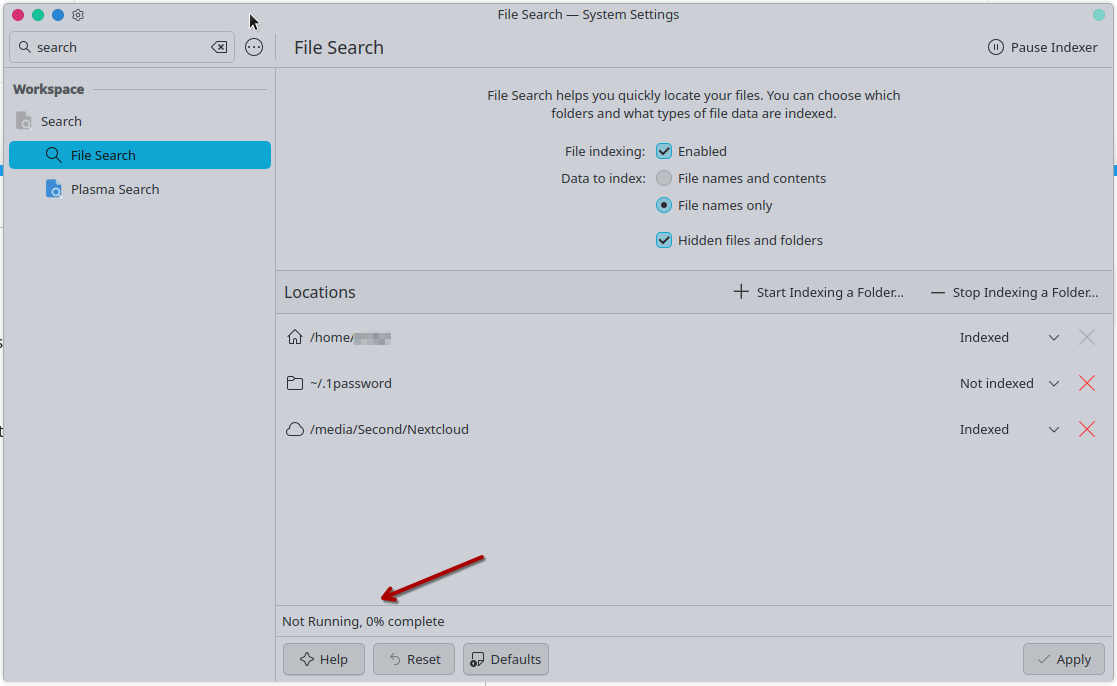
Here’s a screenshot of settings screen (after I’ve done some after I’ve done some additions and removals, it matches the config file, baloofilerc):

You could also check the directory file protection of ‘~/.local/share/baloo’

Not sure what you mean exactly, here’s what it looks like:

$ ls -l ~/.local/share/ | grep baloo
drwxr-xr-x. 1 myuser myuser      0 Jul 29 17:44 baloo

I tried $ chmod 700 ~/.local/share/baloo/ with disable-purge-enable, no effect.

File Search in System Settings was the first thing that I checked and tried changing, see screenshot above.
“Hidden files” checkbox doesn’t seem to have any effect on whether the service runs (however, I like to be able to search through hidden files too).
It all sounds good, yet Baloo still doesn’t do anything. I let it “run” for a couple of years at this point, I think it might’ve died after one of the updates; I think it used to work a few months ago. I just finally decided to look into this annoying issue after it didn’t fix itself.

in my experience, hidden files bogs down baloo to the point of uselessness, which is why i recommend you do not enable it.

for that kind of search i would just use kfind as it’s much faster

1 Like

@friendly-boomerang:

On this Plasma 5 system, the .local Baloo directory looks like this –

 > l -d ~/.local/share/baloo
drwxr-xr-x 2 xxx users 37 31. Jul 10:18 /home/xxx/.local/share/baloo/
 > 
 > l -h ~/.local/share/baloo/
insgesamt 39M
drwxr-xr-x  2 xxx users   37 31. Jul 10:18 ./
drwx------ 86 xxx users 4,0K 31. Jul 16:50 ../
-rw-r--r--  1 xxx users  39M 31. Jul 16:04 index
-rw-r--r--  1 xxx users 8,0K 31. Jul 16:50 index-lock
 > 

What you could try is, to temporarily remove the indexing of the Cloud mounted on /media and also, the indexing of ‘.1password’ and then, simply initialise a new Baloo database for your Home directory,

The key to living happily with Baloo is to not have it do pointless work.

If you know that you have a bunch of git repos or huge VM images, exclude the folders where you keep them.

If you manually mount a network share using /etc/fstab/ (not recommended for other reasons too), exclude it.

If you have a folder with five million tiny text files full of technical gibberish leftover from some database project, exclude it (or just delete it).

Consider not enabling the “index hidden files” feature. It’s probably not doing you any favors.

And so on.

Thanks for the pointers. My problem with Baloo is not that it’s slow, it simply doesn’t work at all. It cannot create an index file, the indexer says it’s “not running” and that “0% complete”. When I leave 1 (one) folder with ~10 files in it to be indexed (with my home folder excluded), it cannot index them.