High Memory Usage from Plasmashell. Is it a memory leak?

Then gdb --pid "$(pidof plasmashell)" and the same process as described as High Memory Usage from Plasmashell. Is it a memory leak? - #19 by meven, this will freeze plasma until you exit gdb.

echo 0 | sudo tee /proc/sys/kernel/yama/ptrace_scope can be used to allow gdb to work properly.

It downloaded massive amounts of stuff, then I ran the command as yesterday and it froze the desktop. I’ll monitor the mem usage via ssh and kill the process and upload the file once the mem usage is high.

edit:
it said

NOTE: heaptrack detected DEBUGINFOD_URLS but will disable it to prevent
unintended network delays during recording
If you really want to use DEBUGINFOD, export HEAPTRACK_ENABLE_DEBUGINFOD=1
injection finished

so I ran it like this:

╭─sammael@viglen in ~ took 31s
[🧱] Ɨ HEAPTRACK_ENABLE_DEBUGINFOD=1 heaptrack -p "$(pidof plasmashell)"

heaptrack output will be written to "/home/sammael/heaptrack.plasmashell.865542.zst"
injecting heaptrack into application via GDB, this might take some time...
injection finished

but the desktop now works so I hope all is good

1 Like

Told you in in my previous post.

ht tps://o.o5.ddns.net/plasma

HEAPTRACK_ENABLE_DEBUGINFOD was a better option.

Can you share some screenshot, of the previous file re-opende with this option enabled. This should improve the situation.

Yeah I realized later it was the gdb freezing the desktop, not the heaptrack.

I ran HEAPTRACK_ENABLE_DEBUGINFOD=1 heaptrack_gui and opened the file from yesterday, but it’s still called undefined function.

I got heaptrack running at the moment since previous post, will the output from that be more useful maybe?

Maybe, i am not sure worth checking.

It has been running ~hour, plasmashell is at 792M atm. Do you want the file now or should I let it run longer?

Should be already useful.

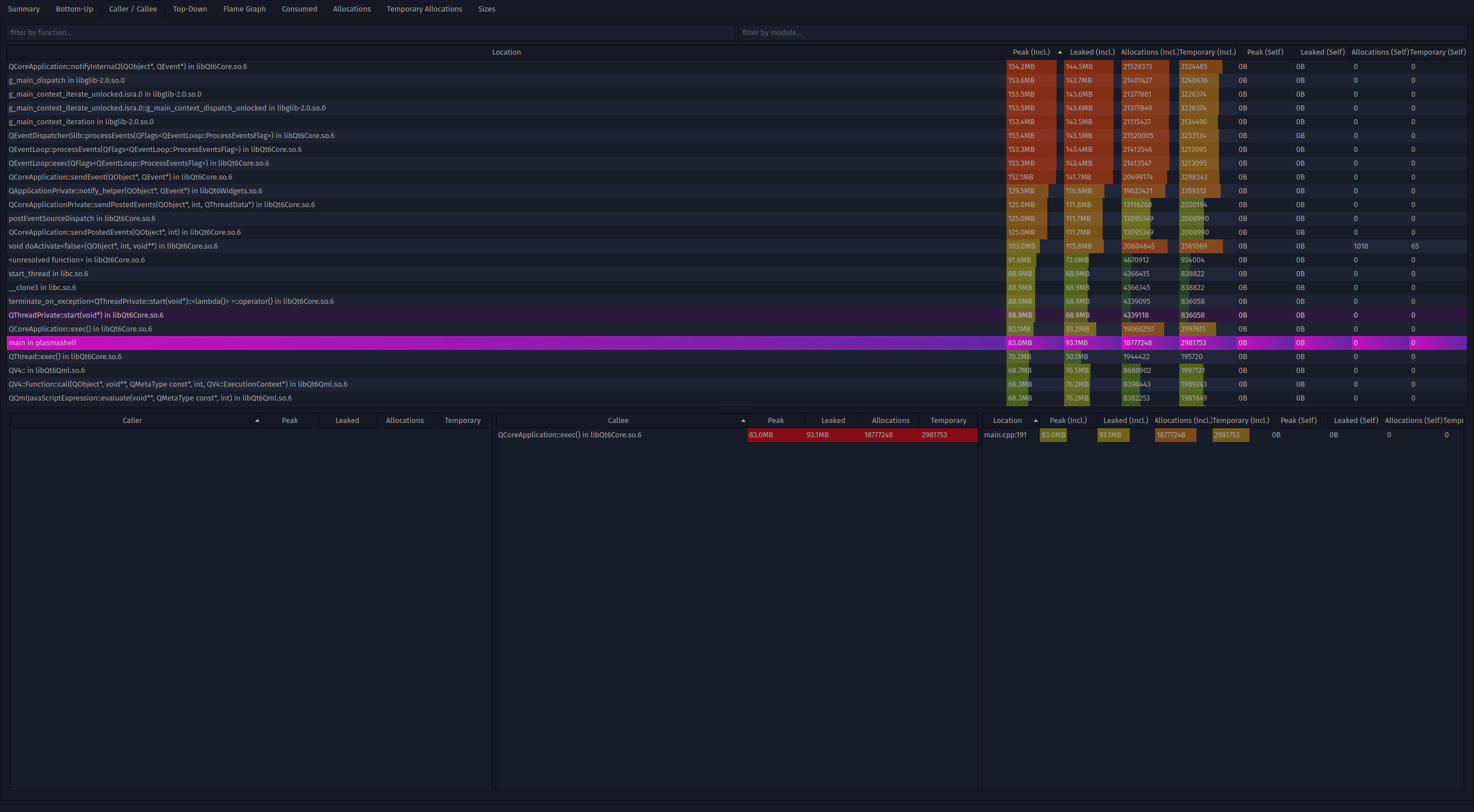
Try to take the same screenshot as you did High Memory Usage from Plasmashell. Is it a memory leak? - #18 by hugalafutro

ok, here’s the pic:

and here’s the file: htt ps://o.o5.ddns.net/plasma2

Thank you so much for the help and the effort.

Thank to it, I have identified a memory leak, and I have sent a patch.

2 Likes

Glad to be of any help! Out of curiosity (and if it’s easyt-ish to explain) what was causing it? It seems noone else using the distro has the issue so I was just wondering.

Thanks for your assistance!

What’s the output of

grep plugin= ~/.config/plasma-org.kde.plasma.desktop-appletsrc

It is very technical. Some memory wasn’t cleaned after use, the definition of a memleak.
This concerned new library code that arrived in Plasma 6.3.

It seems to be in use only in task manager code.
Basically if you have the habit of hovering over tasks in the task manager to pick at windows, each time it would leak memory.
It seems.

1 Like
plugin=org.kde.plasma.folder
wallpaperplugin=a2n.blur
plugin=org.kde.plasma.folder
wallpaperplugin=org.kde.image
plugin=org.kde.panel
wallpaperplugin=org.kde.image
plugin=luisbocanegra.panel.colorizer
plugin=org.kde.plasma.icontasks
plugin=org.kde.panel
wallpaperplugin=org.kde.image
plugin=org.kde.plasma.kickoff
plugin=org.kde.windowtitle
plugin=org.kde.plasma.appmenu
plugin=org.kde.plasma.panelspacer
plugin=luisbocanegra.panel.colorizer
plugin=org.kde.plasma.systemtray
plugin=org.kde.windowbuttons
plugin=org.kde.netspeedWidget
plugin=org.kde.plasma.catwalk
plugin=org.kde.plasma.digitalclock
plugin=org.kde.plasma.private.systemtray
wallpaperplugin=org.kde.image
plugin=org.kde.kdeconnect
plugin=org.kde.kscreen
plugin=org.kde.plasma.cameraindicator
plugin=org.kde.plasma.clipboard
plugin=org.kde.plasma.devicenotifier
plugin=org.kde.plasma.keyboardindicator
plugin=org.kde.plasma.keyboardlayout
plugin=org.kde.plasma.manage-inputmethod
plugin=org.kde.plasma.notifications
plugin=org.kde.plasma.volume
plugin=org.kde.plasma.battery
plugin=org.kde.plasma.brightness
plugin=org.kde.plasma.bluetooth
plugin=org.kde.plasma.networkmanagement
plugin=org.kde.plasma.mediacontroller

Indeed my assumption the leak was in plasma was wrong because @hugalafutro wasn’t correct in

Both use arch and kde 6.3.2 with just the default systray applets and icon only taskbar, no plasmoids, no widgets.

plugin=luisbocanegra.panel.colorizer

This one uses DBus Connection and is likely the leakage.

@hugalafutro try deactivating it, if this fixes your issue, you can report it to the plasmoid author at his github GitHub - luisbocanegra/plasma-panel-colorizer: Latte-Dock and WM status bar customization features for the default KDE Plasma panel

Sorry about my wrong assumption, I’m not that technical :smiley:

I will report at the Panel Colorizer!

We are already discussing with the plasmoid author on matrix btw.
We saw the issue in its code and potential improvement to make in our documentation so avoid it in the future (or code).

2 Likes

image

Slightly on the same topic, Plasmashell keeps eating VRAM, this has been going on since forever it feels like, both with AMD and Nvidia.

However I think this is the worst i’ve seen so far. Running plasmashell —replace reduces the VRAM usage temporarily, down to 160-190Mb.

One way to trigger it is to change wallpapers a few times, VRAM goes up but never really frees, other than that I haven’t figured out what makes it increase, it’s not like I change wallpapers every day, or month for that matter.

āÆ grep plugin= ~/.config/plasma-org.kde.plasma.desktop-appletsrc
plugin=org.kde.plasma.folder
wallpaperplugin=org.kde.image
plugin=org.kde.plasma.folder
wallpaperplugin=org.kde.image
plugin=org.kde.panel
wallpaperplugin=org.kde.image
plugin=org.kde.plasma.kickoff
plugin=org.kde.plasma.icontasks
plugin=org.kde.plasma.marginsseparator
plugin=org.kde.plasma.systemtray
wallpaperplugin=org.kde.image
plugin=org.kde.plasma.keyboardlayout
plugin=org.kde.kdeconnect
plugin=org.kde.plasma.manage-inputmethod
plugin=org.kde.plasma.clipboard
plugin=org.kde.plasma.notifications
plugin=org.kde.kscreen
plugin=org.kde.plasma.cameraindicator
plugin=org.kde.plasma.devicenotifier
plugin=org.kde.plasma.volume
plugin=org.kde.plasma.battery
plugin=org.kde.plasma.brightness
plugin=org.kde.plasma.networkmanagement
plugin=org.kde.plasma.mediacontroller
plugin=org.kde.plasma.digitalclock
plugin=org.kde.plasma.pager
plugin=org.kde.plasma.showdesktop

First that’s normal that programs use more memory after some time, it just loaded more data or code that it needs later on, UI data, fetched data, code, plugins, thumbnails, icons, etc.

Down to 190MB from 314MB ? Which isn’t bad in the first place rest assured.

On my system, Chromium uses 192MB without a webpage opened for comparison, and plasmashell 372MB, GIMP with a small image loaded 348MB. KWin uses 67MB (two screen, 2K and 4K)

Wouldn’t you say that’s an efficient use of memory, for a whole desktop (this excludes the compositor still) compared to two webpages, or an image editor ?

As long as it doesn’t grow indefinitely over time, that’s not a memory leak.

If you really want you can try to use heaptrack or gammaray to pin-point where there could be superfluous memory being used. But that’s a very tedious work where dozens or hundred of places do contribute to this additional memory being used, each very small.

Check again, VRAM is down to 190 from 844….

Hello i saw it didnt get merged was it fixed somewhere else or is this memory leek still an issue?

i am also having this issue but much worse it usually goes up by about a gb for each hour of usage and the rate also seems to at least tripple while running heavy games sutch as heavily modded minecraft. the biggest i have seen it go is 33gib after playing minecraft for a few hours straight.

if it would help i can also run that tool and provide the dumps as hugalafutro did.

first time posting so sorry if i did something wrong