So I have this service menu for Dolphin
[Desktop Entry]
Type=Service
ServiceTypes=KonqPopupMenu/Plugin,image/*
Actions=Rsize0800;Rsize1024
Encoding=UTF-8
X-KDE-Submenu=Kim – Compress and Resize

[Desktop Action Rsize0800]
Name=Resize (800x600 pixels)
Icon=transform-scale
Exec=kim_resize 800x800 %D %U

[Desktop Action Rsize1024]
Name=Resize (1024x0768 pixels)
Icon=transform-scale
Exec=kim_resize 1024x1024 %D %U
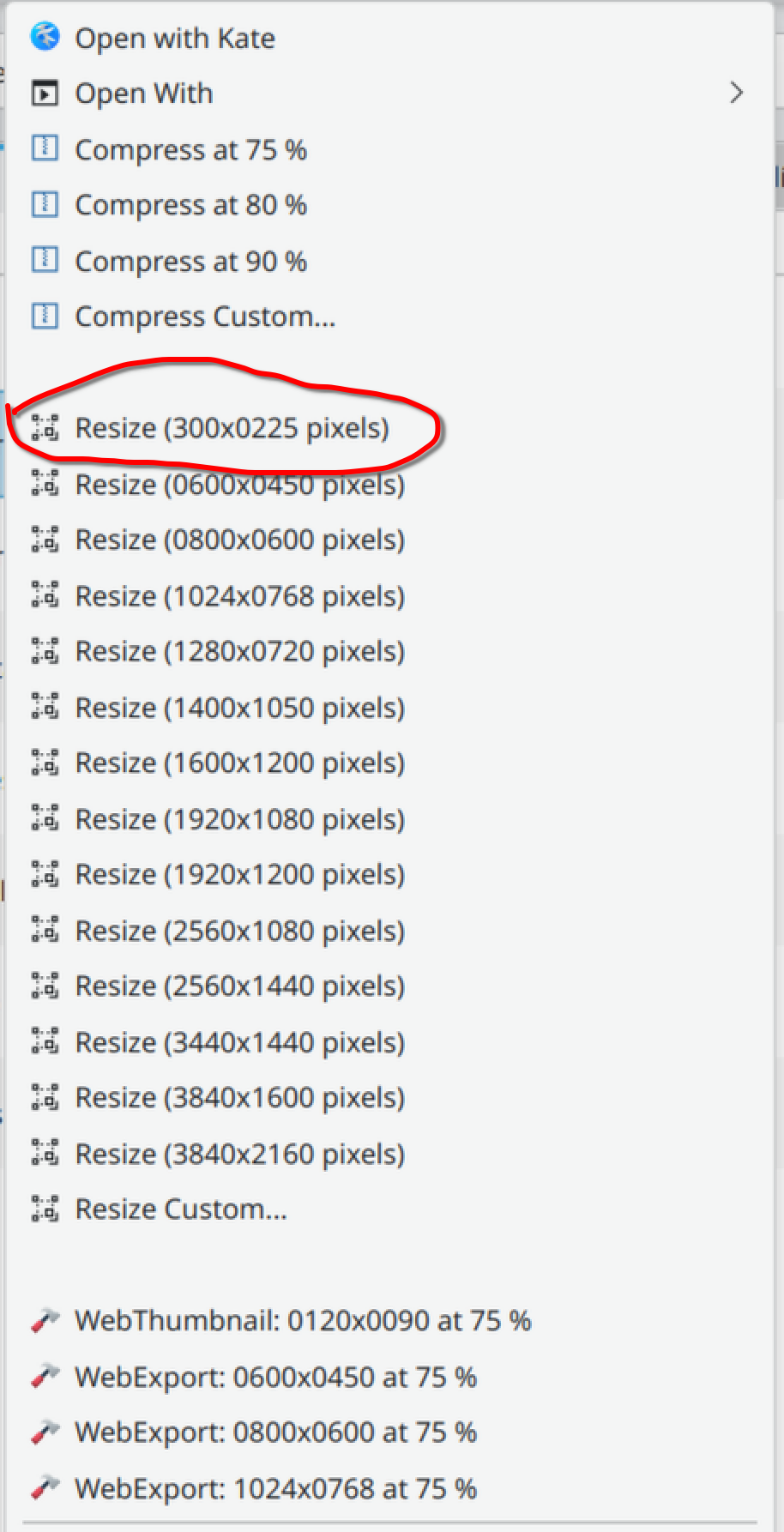
In a Dolphin’s context menu, the first appears second, because the menus appear to be sorted alphabetically based on Name, which is what user sees. The only way to reverse the order is to Change the name to Resize (0800x600 pixels). That is ugly, because the user sees this. Is there a way around this? I looked into the Desktop entry specification and there seems to be nothing about it.
I am aware of this thread: right menu order? Always alphabet sorted (InitialPreference) • KDE Community Forums
but despite it suggesting the ordering is based on action name in the brackets, it does not seem to be the case.
the menu items are sorted alphanumeric by the Actions label, not by Name.
what i usually do is just number the Actions in the order i want them to appear, so
Actions=Rsize0800;Rsize1024
would become
Actions=1-Rsize0800;2-Rsize1024
But Rsize1024 is before Rsize0800, so they should be ordered alphanumerically, but they are not.
Actually, there is a difference. When rightclicking the desktop file in ~/.local/share/kio/servicemenus/, the ordering gets applied:
But when I right click an image, the ordering is by name:
Does it happen differently on your machine?
This is the actual file I work with:
# Servicemenu — Compress and resize actions images
#
# Copyright (C) 2005, 2006  Charles Bouveyron <charles.bouveyron@free.fr>
# Copyright (C) 2025  Tomáš Hnyk <tomashnyk@gmail.com>
#
# This program is free software: you can redistribute it and/or modify
# it under the terms of the GNU General Public License as published by
# the Free Software Foundation, either version 3 of the License, or
# (at your option) any later version.
#
# This program is distributed in the hope that it will be useful,
# but WITHOUT ANY WARRANTY; without even the implied warranty of
# MERCHANTABILITY or FITNESS FOR A PARTICULAR PURPOSE.  See the
# GNU General Public License for more details.
#
# You should have received a copy of the GNU General Public License
# along with this program.  If not, see <http://www.gnu.org/licenses/>.

[Desktop Entry]
Type=Service
ServiceTypes=KonqPopupMenu/Plugin,image/*
Actions=Rcprs75;Rcprs80;Rcprs90;RcprsCustom;_SEPARATOR_;Rsize0300;Rsize0600;Rsize0800;Rsize1024;Rsize1280;Rsize1400;Rsize1600;Rsize1920x1080;Rsize1920x1200;Rsize2560x1080;Rsize2560x1440;Rsize3440x1440;Rsize3840x1600;Rsize3840x2160;RsizeCustom;_SEPARATOR_;WebThumb75120;WebExp75640;WebExp75800;WebExp751024;
Encoding=UTF-8
X-KDE-Submenu=Kim – Compress and Resize
X-KDE-Submenu[es]=Kim – Comprimir y redimensionar
X-KDE-Submenu[fr]=Kim – Compresser et redimensionner
X-KDE-Submenu[nl]=Kim – Comprimeren en grootte aanpassen
X-KDE-Submenu[zh_TW]=Kim – 壓縮與調整大小

[Desktop Action Rcprs75]
Name=Compress at 75 %
Name[es]=Comprimir al 75 %
Name[fr]=Compresser à 75 %
Name[nl]=75% comprimeren
Name[zh_TW]=壓縮到 75%
Icon=application-x-compress
Exec='/home/drew/.local/share/kio/servicemenus/kim6/bin/kim'_compress 75 %D %U
X-KDE-InitialPreference=01
SortOrder=50

[Desktop Action Rcprs80]
Name=Compress at 80 %
Name[es]=Comprimir al 80 %
Name[fr]=Compresser à 80 %
Name[nl]=80% comprimeren
Name[zh_TW]=壓縮到 80%
Icon=application-x-compress
Exec='/home/drew/.local/share/kio/servicemenus/kim6/bin/kim'_compress 80 %D %U
X-KDE-InitialPreference=98
SortOrder=40

[Desktop Action Rcprs90]
Name=Compress at 90 %
Name[es]=Comprimir al 90 %
Name[fr]=Compresser à 90 %
Name[nl]=90% comprimeren
Name[zh_TW]=壓縮到 90%
Icon=application-x-compress
Exec='/home/drew/.local/share/kio/servicemenus/kim6/bin/kim'_compress 90 %D %U
X-KDE-InitialPreference=97
SortOrder=60

[Desktop Action RcprsCustom]
Name=Compress Custom...
Name[es]=Comprimir personalizado...
Name[fr]=Compression personnalisée
Name[nl]=Geavanceerd…
Name[zh_TW]=自訂壓縮比例
Icon=application-x-compress
Exec='/home/drew/.local/share/kio/servicemenus/kim6/bin/kim'_compress `kdialog --inputbox "Compression rate:" 60` %D %U
X-KDE-InitialPreference=96

[Desktop Action Rsize0300]
Name=Resize (300x0225 pixels)
Icon=transform-scale
Exec='/home/drew/.local/share/kio/servicemenus/kim6/bin/kim'_resize 300x300 %D %U
X-KDE-InitialPreference=95

[Desktop Action Rsize0600]
Name=Resize (0600x0450 pixels)
Icon=transform-scale
Exec='/home/drew/.local/share/kio/servicemenus/kim6/bin/kim'_resize 600x600 %D %U
X-KDE-InitialPreference=94

[Desktop Action Rsize0800]
Name=Resize (0800x0600 pixels)
Icon=transform-scale
Exec='/home/drew/.local/share/kio/servicemenus/kim6/bin/kim'_resize 800x800 %D %U

[Desktop Action Rsize1024]
Name=Resize (1024x0768 pixels)
Icon=transform-scale
Exec='/home/drew/.local/share/kio/servicemenus/kim6/bin/kim'_resize 1024x1024 %D %U

[Desktop Action Rsize1280]
Name=Resize (1280x0720 pixels)
Icon=transform-scale
Exec='/home/drew/.local/share/kio/servicemenus/kim6/bin/kim'_resize 1280x1280 %D %U

[Desktop Action Rsize1400]
Name=Resize (1400x1050 pixels)
Name[es]=Redimensionar (1400x1050 píxeles)
Name[fr]=Redimensionner (1400x1050 pixels)
Name[nl]=Grootte aanpassen (1400x1050 pixels)
Name[zh_TW]=調整大小(1400x1050 像素)
Icon=transform-scale
Exec='/home/drew/.local/share/kio/servicemenus/kim6/bin/kim'_resize 1400x1400 %D %U

[Desktop Action Rsize1600]
Name=Resize (1600x1200 pixels)
Name[es]=Redimensionar (1600x1200 píxeles)
Icon=transform-scale
Exec='/home/drew/.local/share/kio/servicemenus/kim6/bin/kim'_resize 1600x1600 %D %U

[Desktop Action Rsize1920x1080]
Name=Resize (1920x1080 pixels)
Name[es]=Redimensionar (1920x1080 píxeles)
Icon=transform-scale
Exec='/home/drew/.local/share/kio/servicemenus/kim6/bin/kim'_resize 1920x1900 %D %U

[Desktop Action Rsize1920x1200]
Name=Resize (1920x1200 pixels)
Icon=transform-scale
Exec='/home/drew/.local/share/kio/servicemenus/kim6/bin/kim'_resize 1920x1920 %D %U

[Desktop Action Rsize2560x1080]
Name=Resize (2560x1080 pixels)
Icon=transform-scale
Exec='/home/drew/.local/share/kio/servicemenus/kim6/bin/kim'_resize 2560x1080 %D %U

[Desktop Action Rsize2560x1440]
Name=Resize (2560x1440 pixels)
Icon=transform-scale
Exec='/home/drew/.local/share/kio/servicemenus/kim6/bin/kim'_resize 2560x1440 %D %U

[Desktop Action Rsize3440x1440]
Name=Resize (3440x1440 pixels)
Icon=transform-scale
Exec='/home/drew/.local/share/kio/servicemenus/kim6/bin/kim'_resize 3440x1440 %D %U

[Desktop Action Rsize3840x1600]
Name=Resize (3840x1600 pixels)
Icon=transform-scale
Exec='/home/drew/.local/share/kio/servicemenus/kim6/bin/kim'_resize 3840x1600 %D %U

[Desktop Action Rsize3840x2160]
Name=Resize (3840x2160 pixels)
Icon=transform-scale
Exec='/home/drew/.local/share/kio/servicemenus/kim6/bin/kim'_resize 3840x2160 %D %U

[Desktop Action RsizeCustom]
Name=Resize Custom...
Name[fr]=Redimensionnement personnalisé
Name[nl]=Geavanceerd…
Name[zh_TW]=自訂調整大小
Icon=transform-scale
Exec='/home/drew/.local/share/kio/servicemenus/kim6/bin/kim'_resize `kdialog --inputbox "Resize dimension (max width x max height):" 300x300` %D %U

[Desktop Action WebThumb75120]
Name=WebThumbnail: 0120x0090 at 75 %
Icon=applications-development-web
Exec='/home/drew/.local/share/kio/servicemenus/kim6/bin/kim'_webexport 120x90 %D %U

[Desktop Action WebExp75640]
Name=WebExport: 0600x0450 at 75 %
Icon=applications-development-web
Exec='/home/drew/.local/share/kio/servicemenus/kim6/bin/kim'_webexport 600x600 %D %U

[Desktop Action WebExp75800]
Name=WebExport: 0800x0600 at 75 %
Icon=applications-development-web
Exec='/home/drew/.local/share/kio/servicemenus/kim6/bin/kim'_webexport 800x800 %D %U

[Desktop Action WebExp751024]
Name=WebExport: 1024x0768 at 75 %
Icon=applications-development-web
Exec='/home/drew/.local/share/kio/servicemenus/kim6/bin/kim'_webexport 1024x1024 %D %U
you may need to relog to ensure all parts of your plasmashell are on the same version of your .desktop file, there is sometimes a disconnect.
also, i would not rely on the alphanumeric for the entire Action label, but rather i would force the order i wanted using the first 1 or 2 characters of the label (hence my numbering suggestion).
if you have more than 10 actions (0-9) you can start using (A-Z) as i’ve done in this service menu
Dolphin Servicemen for accessing common git commands
dzon
October 9, 2025, 5:56pm
5
Try giving them a number. Instead of A, make it 1 and so on.
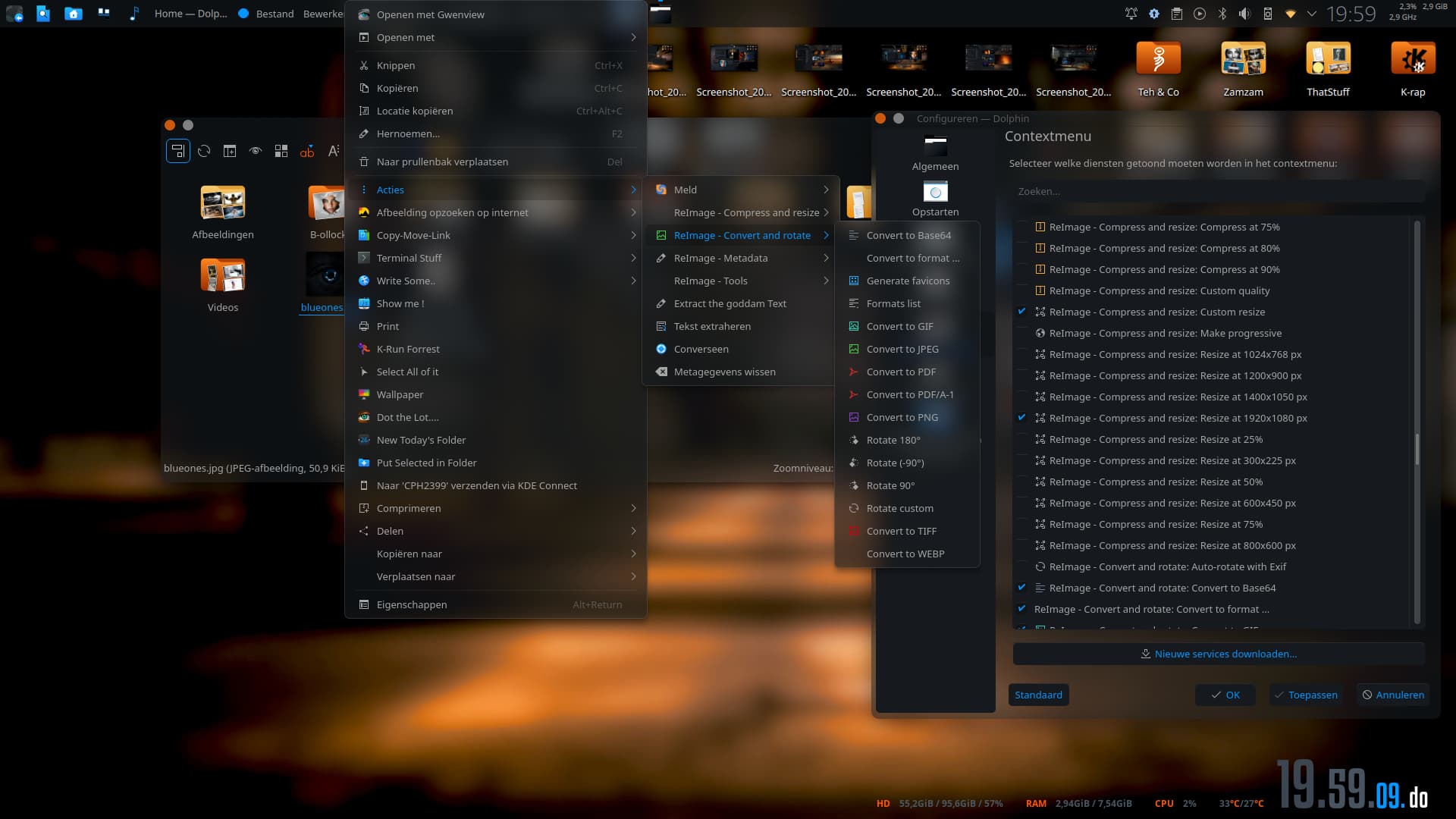
On a sidenote, have you considered the Reimage servicemenu?
You mean like this:
[Desktop Entry]
Type=Service
ServiceTypes=KonqPopupMenu/Plugin,image/*
Actions=a-Rcprs75;b-Rcprs80;c-Rcprs90;d-RcprsCustom;_SEPARATOR_;e-Rsize0300;f-Rsize0600
Encoding=UTF-8
X-KDE-Submenu=Kim – Compress and Resize
X-KDE-Submenu[es]=Kim – Comprimir y redimensionar
X-KDE-Submenu[fr]=Kim – Compresser et redimensionner
X-KDE-Submenu[nl]=Kim – Comprimeren en grootte aanpassen
X-KDE-Submenu[zh_TW]=Kim – 壓縮與調整大小

[Desktop Action a-Rcprs75]
Name=Compress at 75 %
Name[es]=Comprimir al 75 %
Name[fr]=Compresser à 75 %
Name[nl]=75% comprimeren
Name[zh_TW]=壓縮到 75%
Icon=application-x-compress
Exec='/home/drew/.local/share/kio/servicemenus/kim6/bin/kim'_compress 75 %D %U
X-KDE-InitialPreference=01

[Desktop Action b-Rcprs80]
Name=Compress at 80 %
Name[es]=Comprimir al 80 %
Name[fr]=Compresser à 80 %
Name[nl]=80% comprimeren
Name[zh_TW]=壓縮到 80%
Icon=application-x-compress
Exec='/home/drew/.local/share/kio/servicemenus/kim6/bin/kim'_compress 80 %D %U
X-KDE-InitialPreference=98

[Desktop Action c-Rcprs90]
Name=Compress at 90 %
Name[es]=Comprimir al 90 %
Name[fr]=Compresser à 90 %
Name[nl]=90% comprimeren
Name[zh_TW]=壓縮到 90%
Icon=application-x-compress
Exec='/home/drew/.local/share/kio/servicemenus/kim6/bin/kim'_compress 90 %D %U
X-KDE-InitialPreference=97

[Desktop Action d-RcprsCustom]
Name=Compress Custom...
Name[es]=Comprimir personalizado...
Name[fr]=Compression personnalisée
Name[nl]=Geavanceerd…
Name[zh_TW]=自訂壓縮比例
Icon=application-x-compress
Exec='/home/drew/.local/share/kio/servicemenus/kim6/bin/kim'_compress `kdialog --inputbox "Compression rate:" 60` %D %U
X-KDE-InitialPreference=96

[Desktop Action e-Rsize0300]
Name=Resize (300x0225 pixels)
Icon=transform-scale
Exec='/home/drew/.local/share/kio/servicemenus/kim6/bin/kim'_resize 300x300 %D %U
X-KDE-InitialPreference=95

[Desktop Action f-Rsize0600]
Name=Resize (0600x0450 pixels)
Icon=transform-scale
Exec='/home/drew/.local/share/kio/servicemenus/kim6/bin/kim'_resize 600x600 %D %U
X-KDE-InitialPreference=94
It still puts 300 after 600 (after logging too). When you put it into ~/.local/share/kio/servicemenus/, does it display in order for you?
@dzon I, I wish I found this fork of KIM two months ago before I started to revive it. There are at least three instances of KIM on KDE store and two github repositories but none linked this. And it is clearly a fork of KIM too.
Edit: Though I am not sure it is a fork. The code is quite different, just the icons and this menu in general look kind of similar.
dzon
October 9, 2025, 8:14pm
7
Give the actions a number.
For example:
Actions=1a-Rcprs75;
[Desktop Action 1a-Rcprs75]
As for Reimage, it has a lot more options. For example a custom resize ( it has a bunch which I have unchecked):
PS: As far as I remember, there’s a 5-ish and 6-ish version.
Have you actually tried it?
This file:
[Desktop Entry]
Type=Service
ServiceTypes=KonqPopupMenu/Plugin,image/*
Actions=1a-Rcprs75;2b-Rcprs80;3c-Rcprs90;4d-RcprsCustom;5e-Rsize0300;6f-Rsize0600
Encoding=UTF-8
X-KDE-Submenu=Kim – Compress and Resize
X-KDE-Submenu[es]=Kim – Comprimir y redimensionar
X-KDE-Submenu[fr]=Kim – Compresser et redimensionner
X-KDE-Submenu[nl]=Kim – Comprimeren en grootte aanpassen
X-KDE-Submenu[zh_TW]=Kim – 壓縮與調整大小

[Desktop Action 1a-Rcprs75]
Name=Compress at 75 %
Name[es]=Comprimir al 75 %
Name[fr]=Compresser à 75 %
Name[nl]=75% comprimeren
Name[zh_TW]=壓縮到 75%
Icon=application-x-compress
Exec='/home/drew/.local/share/kio/servicemenus/kim6/bin/kim'_compress 75 %D %U

[Desktop Action 2b-Rcprs80]
Name=Compress at 80 %
Name[es]=Comprimir al 80 %
Name[fr]=Compresser à 80 %
Name[nl]=80% comprimeren
Name[zh_TW]=壓縮到 80%
Icon=application-x-compress
Exec='/home/drew/.local/share/kio/servicemenus/kim6/bin/kim'_compress 80 %D %U

[Desktop Action 3c-Rcprs90]
Name=Compress at 90 %
Name[es]=Comprimir al 90 %
Name[fr]=Compresser à 90 %
Name[nl]=90% comprimeren
Name[zh_TW]=壓縮到 90%
Icon=application-x-compress
Exec='/home/drew/.local/share/kio/servicemenus/kim6/bin/kim'_compress 90 %D %U

[Desktop Action 4d-RcprsCustom]
Name=Compress Custom...
Name[es]=Comprimir personalizado...
Name[fr]=Compression personnalisée
Name[nl]=Geavanceerd…
Name[zh_TW]=自訂壓縮比例
Icon=application-x-compress
Exec='/home/drew/.local/share/kio/servicemenus/kim6/bin/kim'_compress `kdialog --inputbox "Compression rate:" 60` %D %U

[Desktop Action 5e-Rsize0300]
Name=Resize (300x0225 pixels)
Icon=transform-scale
Exec='/home/drew/.local/share/kio/servicemenus/kim6/bin/kim'_resize 300x300 %D %U

[Desktop Action 6f-Rsize0600]
Name=Resize (0600x0450 pixels)
Icon=transform-scale
Exec='/home/drew/.local/share/kio/servicemenus/kim6/bin/kim'_resize 600x600 %D %U
On my machine, sorting only happens according to the Name field. Could you please confirm (ideally by a screenshot) ,please , what it does on your machine?
KIM also has custom resize. I am pasting here a reduced desktop file.
couple things:
ServiceTypes=KonqPopupMenu/Plugin,image/*
Actions=a-Rcprs75;b-Rcprs80;c-Rcprs90;d-RcprsCustom;_SEPARATOR_;e-Rsize0300;f-Rsize0600
you are missing a MimeType= key and for some reason have it’s value tacked onto the ServiceTypes=value after a comma… you must have deleted a chuck of text by accident.
it should read:
ServiceTypes=KonqPopupMenu/Plugin
MimeType=image/*;
Actions=a-Rcprs75;b-Rcprs80;c-Rcprs90;d-RcprsCustom;_SEPARATOR_;e-Rsize0300;f-Rsize0600;
as for the order, i used numbers first, then CAP letters if need be as it’s just easier to look at, but it might matter and also, its standard practice to close a list of values with a ; at the end just for completeness in case that matters.
I think those are largely from almost twenty years ago when this originated, MimeType= was I think added only later and the older syntax still works. But I will correct that. However, would please somebody try and put the file below in their ~/.local/share/kio/servicemenus/ and report if it is ordered as you suggest? Because on my machine, the ordering is wrong despite all your suggestions. It seems to me it is just not true that the sorting is done by Action name and not by Name.
[Desktop Entry]
Type=Service
ServiceTypes=KonqPopupMenu/Plugin
MimeType=image/*;
Actions=1A-Rcprs75;2B-Rcprs80;3C-Rcprs90;4D-RcprsCustom;5E-Rsize0300;6F-Rsize0600;
Encoding=UTF-8
X-KDE-Submenu=Kim – Compress and Resize

[Desktop Action 1A-Rcprs75]
Name=Compress at 75 %
Icon=application-x-compress
Exec='/home/drew/.local/share/kio/servicemenus/kim6/bin/kim'_compress 75 %D %U

[Desktop Action 2B-Rcprs80]
Name=Compress at 80 %
Icon=application-x-compress
Exec='/home/drew/.local/share/kio/servicemenus/kim6/bin/kim'_compress 80 %D %U

[Desktop Action 3C-Rcprs90]
Name=Compress at 90 %
Icon=application-x-compress
Exec='/home/drew/.local/share/kio/servicemenus/kim6/bin/kim'_compress 90 %D %U

[Desktop Action 4D-RcprsCustom]
Name=Compress Custom...
Icon=application-x-compress
Exec='/home/drew/.local/share/kio/servicemenus/kim6/bin/kim'_compress `kdialog --inputbox "Compression rate:" 60` %D %U

[Desktop Action 5E-Rsize0300]
Name=Resize (300x0225 pixels)
Icon=transform-scale
Exec='/home/drew/.local/share/kio/servicemenus/kim6/bin/kim'_resize 300x300 %D %U

[Desktop Action 6F-Rsize0600]
Name=Resize (0600x0450 pixels)
Icon=transform-scale
Exec='/home/drew/.local/share/kio/servicemenus/kim6/bin/kim'_resize 600x600 %D %U
When I try Git Tools, I also get my menu sorted alphabetically. Does it really sort as you claim it sorts on your machine? Could I please see a screenshot? It is not that I do not believe you, just I do not understand how could it work differently on my system and on your. I am on 6.4.5, I assume you are on something as recent as well?
the screen shot on the git page is how it looks on my machine because i took that screenshot from my machine.
i’m running plasma 5 tho (kubuntu LTS)
the service menu is installed in ~/.local/share/kio/servicemenus/per the install.sh script.
this is how your latest service menu looks on my machine, the order is in agreement with the Actions naming as you have them named.
if you are getting something different on plasma 6.4.5 then it’s something borked about your install or it’s a regression in plasmashell and should be reported to bugs.kde.org
Yeah, ti sounds like a bug.
@dzon What Plasma are you on?
jus as a shot in the dark, what is the output of locale
mine is
LANG=en_US.UTF-8
LANGUAGE=en_US
LC_CTYPE="en_US.UTF-8"
LC_NUMERIC=en_US.UTF-8
LC_TIME=en_US.UTF-8
LC_COLLATE="en_US.UTF-8"
LC_MONETARY=en_US.UTF-8
LC_MESSAGES="en_US.UTF-8"
LC_PAPER=en_US.UTF-8
LC_NAME=en_US.UTF-8
LC_ADDRESS=en_US.UTF-8
LC_TELEPHONE=en_US.UTF-8
LC_MEASUREMENT=en_US.UTF-8
LC_IDENTIFICATION=en_US.UTF-8
LC_ALL=
I have a mixture:
LANG=en_US.UTF-8
LC_CTYPE="en_US.UTF-8"
LC_NUMERIC=cs_CZ.UTF-8
LC_TIME=cs_CZ.UTF-8
LC_COLLATE="en_US.UTF-8"
LC_MONETARY=cs_CZ.UTF-8
LC_MESSAGES="en_US.UTF-8"
LC_PAPER=C
LC_NAME=cs_CZ.UTF-8
LC_ADDRESS=cs_CZ.UTF-8
LC_TELEPHONE=cs_CZ.UTF-8
LC_MEASUREMENT=C
LC_IDENTIFICATION="en_US.UTF-8"
LC_ALL=
1 Like
interesting.
as a completely wild ass guess, i would suspect it’s something to do with
LC_NUMERIC=cs_CZ.UTF-8
being in there.
No, this is a bug. I reported it: https://bugs.kde.org/show_bug.cgi?id=510470
Though I am not sure anybody is really looking at Dolphin’s bugs, there are so many :-(.
1 Like
And now the bug was fixed, it was indeed a regression, so no it agains sorts based on internal name:
1 Like