How do i delete apps!?

The question might sound dumb, but ive been using KDE for months and when i want to delete an app, sometimes there is no discover page for it (because it was sideloaded) or if there is sometimes (like rn) the delete button doesnt work.

Case 1 : sideloaded apps

when i install an app via apt or browser, and then tried to delete it, discover didn’t show a delete button. (this is an old issue which i cant check rn because i just installed fedora kde and cant reproduce it rn)

Case 2 : deleting normal apps (on fedora KDE)

after i installed the os, i tried to delete some bloat but when i tried to delete it, it didnt work as shown in the screencast below

cant paste videos

the video is on https://ibadullah.itch.io/kde-delete-button-not-working-in-discovery

password 123 to view the download page for the video.

i assure you that the link and the files are both safe.

wish we could post videos here

If you installed software with apt (or ran a .deb file) then remove it with apt too:

sudo apt remove softwareame

then to remove unneeded leftovers:

sudo apt autoremove

What do you mean “installed with browser”? AppImages, tarballs or .run files? Then you need to figure out where they have been placed and remove them from there. This depends on your distro but many apps get installed in /opt on Debian based distros or into a subdirectory in your home directory, it may be a hidden dot directory. If this is an AppImage then simply delete it.

If the app icon still lingers in the Plasma “start menu” then use the edit feature to remove it from there.

And the weird Remove button behavior in your videos seems like a bug or something is broken.

Oh, and be careful with “bloat removal”, unless you know 100% what you’re doing. Linux has very little bloat and what’s there may be needed. You can easily break something by removing stuff.

1 Like

dont worry, i am only replacing kmail and kwrite with thunderbird and kate. maybe also removing the office stuff aswell

Quite the opposite… I find that GUI package managers are actually dumb, your question hits one nail on the head.

You have to try to work out how something’s installed… so if you installed something with apt, or pacman, or yay, or dnf - then you’d remove it with that tool… but what are we talking about?

Let’s imagine you have Kitty terminal installed, and you’re not sure what’s the story with that… your best tool might be the terminal, but you can maybe look at (if it has…) a launcher.

Once you got the name, you can search for it in the package manager, if it’s not there - if you installed manually or if you copied it yourself, then you must remove it the same way.

‘Sideloaded’ means what, though? If you merely downloaded a tar.gz and extracted that, you can just remove that folder…

Otherwise there should be a method involved… and you’d do better to describe a specific issue than a general umbrella ‘how do I uninstall something?’ with no target.

  1. If you install via apt, then you must apt remove it.
  2. You cannot install an app via a browser, you can only download an app with a browser… downloads can be deleted.
  3. With fedora, you should use dnf instead of apt :wink:
  • What is a ‘normal’ app, and what is an ‘abnormal’ app?

  • ‘Bloat’ also isn’t a thing… if you want true streamlined bloat-free computer, install Arch - otherwise try to roll with it.

Those are very unspecific terms, so no answer can be given.

You don’t need to paste videos, just SAY WHAT IS HAPPENING.

e.g. ‘After installing Fedora, I installed mpv and tried to uninstall vlc, but some vlc libraries can’t be removed’.

This was a genuine case, someone started hopping into any folder they could find, and sudo rm anything with VLC in the name, and ended up with a couple of things breaking.

I’m curious - later on you mention:

dont worry, i am only replacing kmail and kwrite with thunderbird and kate. maybe also removing the office stuff aswell

Ok, so you have chosen a distribution bundling stuff you don’t like… that’s not ‘bloat’ it’s just ‘a few things I don’t need’. You only need to remove things to save space (Office takes up a fair bit).

To remove the repository office stuff you use your package manager.

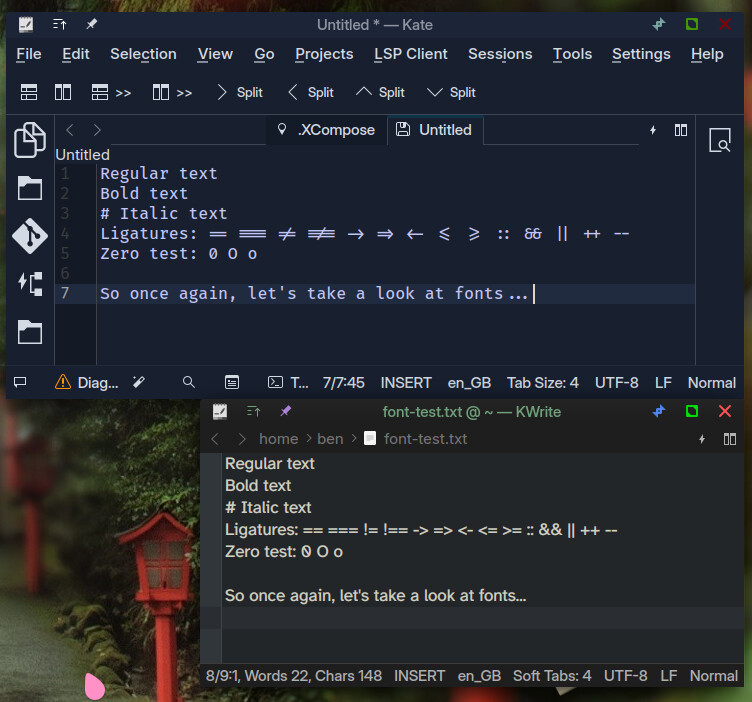
Trying to remove kwrite is pointless, because kwrite and kate are a complimentary pair - they overlap and are actually really cool, because you can use kate for a heavy duty IDE environment with a good ‘code’ font, and kwrite can be set up with a different font and be used more like a minimal notepad whilst kate will always be a bit heavier for some tasks in terms of the GUI looking too busy… so don’t bother trying to separate them… they’re ‘one’ already, mostly just a different frontend.
2 Likes

True. The more I tinker with Linux on the desktop the more I find myself using APT or DNF to manage software rather than Discover. Just like on my Debian servers, it just works. I generally favor GUI tools on desktops, but in this case cmd just works better.

I even install Flatpaks using the terminal as this offers far more details on what is being installed and proper progress info.

I also like AppImages, and yeah Flatpaks work mostly well with some caveats, but I always prefer software that is available from the native repo and use Flatpaks and AppImages if I don’t have that option. The only exceptions are Thunderbird and Firefox which I install manually from Mozilla’s tarballs as many distros only offer LTS versions and I got used to doing this on every distro I’m playing with.

Right. Bloat is IMHO blatantly unnecessary stuff that runs in the background unwanted and takes up memory and CPU resources. Just few apps sitting idly on the disk without bothering me isn’t really “bloat”.

2 Likes

My preference for installation, updates and removal is Synaptic Package Manager. There is also Stacer application which includes an uninstaller.

Yeah, I heard many people saying they miss Synaptic. I used Synaptic a very long time ago, can’t remember how it was. Can it be installed on Fedora, do you know?

Synaptic is the graphical front end for apt - and it does actually offer advantages over a purely terminal based interface…

However, Stacer isn’t going to fix OP’s issues… partly that ‘sideloading’ is too fuzzy a term inferring that we have NO idea how the packages were ‘installed’.

  • Installing a .deb file with dpkg will register the package, so this doesn’t count… apt can remove it just as Stacer can.

  • Snap or Flatpak will be traced by Snap and Flatpak, and should be removable in Discover too.

  • Compiling from source does NOT register the software with any package manager - basically it just copies files to system directories and there’s no easy way to track them - so apt won’t know about those, and neither will Stacer.

Stacer simply interacts with package managers - so it can’t do more than apt/snap/flatpak… so unless ‘sideload’ includes packages still installed with dpkg/apt it’s going to be out of luck.

So really, what you have to do is to do some searching and work out how you installed something - like if you previously did a manual installation of Calibre - then you go back to that website and get the script, look at what it did and undo that (though Calibre isn’t a valid example, because it does have an ‘uninstall’ script too).

1 Like

ok im back,

btw im really sorry, my system was acting all wierd and i had been fasting all day and just came from a 3 hour long umrah and then my system blanked.

i was meant to come back to fill in the details in the morning but as i just mentioned my screen was stuck on a blank black image and refused to work.

im no proffessional in linux but ik that it should have been solvable but i couldnt do it even with a restart, and i cant access this site with a blank screen. so i decided to just do it and went on to reinstall fedora today (blank screen isnt problem anymore btw lets just ignore it)

now i can clear things up a bit:

i had no idea theres so many installation mediums on linux, so case 1 from the question is solved, not case 2 yet

sorry mb, but whatever it is, i still cant delete it from the discrover store because when i do, nothing happens (i showed that in the video because i couldn’t word it back then, sorry!)

basically when i click remove, the remove button disappears for like 2 miliseconds and returns,

i think i installed them with apt, .deb and .appimages

but most of the hard stuff were the Cmake files, they are pure sorcery, if the install guides didnt help me i wouldnt be able to install wifi drivers and stuff with cmake

Ohh! like i can find when i apt installed it and just remove it instead. thanks

still begs the question, how do i delete the preinstalled (non-bloat but not needed) apps when discover is doing nothing when i click delet

btw thanks for helping me, sorry if i was vague when i made the topic, and also that i dissapeared for 12 hours,

also i am not afraid of CLIs since back when i was on KDE neon, my plasma shell crashed every few hours so i had to alt+space to bring krunner and search up console and manually type in the command to fix it.

and i just tried deleting kmail with sudo and it worked. but discover still should work and i wont jst abandon it like that, and also many non tech ppl are coming over to linux after microsoft did what they did. and if such a problem happens to them, they will wanna go back

1 Like

Not my speciality, using Arch-like Manjaro we don’t use Discover for installing or removing anything…

So I would always use the appropriate package manager for the task in hand…

We do have pamac, which encompasses the repository and also includes AUR (which is basically package-build scripts that pull in and install stuff), and flatpak (I don’t have snapd).

I like pamac for searching software across plugged-in repos (which is what Discover is supposed to do - but Discover hides more of the ‘workings’ making it more obscure… it either works or we have no idea what’s going on).

So - stop ‘clicking’ and learn to type… learn commands like ‘purge’ and ‘remove’ relating to your package manager.

For Debian base, I prefer ‘nala’ to ‘apt’ - but inexperience means that my analysis is purely subjective and superficial.

1 Like

@Ibadullah, sorry I don’t know what causes that weird button behavior, so I won’t have any more advice here. Perhaps someone else will figure this out.

I’ll just reiterate that GUI software managers are just a front ends to APT or DNF or whatever else lies under the hood and they can sometimes get weird and then using the actual APT or DNF from the terminal is usually the solution.

You don’t have to abandon Discover entirely, it works fine most of the time. Keep using it. Just be prepared for the times when it does not work and know how to use APT from the terminal.

Good luck!

1 Like

I just realised after i try deleting the app, if i restart my system the app is actually deleted by discover.

why do i need to restart? idk

but below is what i was typing before i realised this:-


the arch user repo has everything, i might have to switch to arch atp

but then again i want my family to be able to use the home linux computer, if they cant install stuff via gui, they will wanna go back to windows. isnt there a very user friendly GUI-based installation method use?

i can get arch nix or manjaro for my personal computer but the issue might persist over there if i get kde,


i have no issue in that except that this might be an issue for others, how come KDE’s own default app store be so inconsistent in working that long time users avoid it?

@anonnetuser also said he prefers GUI when available except in this case:

is there really no consistent alternative? as you mentioned, pamac is for manjaro (i think) and synapse and spacer are for debian but im on fedora now so its not an option for me.

i guess i will be using CLI rather than discover, but thats avoiding the issue rather than fixing it which i dont feel happy abt

@anonnetuser, you mentioned kde on fedora isnt that stable in a different topic:

should i use some other distro instead? since i am also having problems on fedora (i had to reinstall it due to it) i still have time i just got it like yesterday so i wont lose that much work if i switch now. i keep hearing kubuntu is very stable but i js dont like the name tbh

It’s hard to say, really… I’m sure Kubuntu is polished, but ‘Stable’ actually means that once it’s built, that’s what you live with for a couple of years before you get to update.

So repo items get old - you need to find ppa’s or flatpaks to get newer stuff, which is why I prefer Manjaro.

If you follow the update threads, manage snapshots and backups (I have incremental backups every 4 hours to my HDD) then complete hardware failure isn’t too hard to fix…

Mine’s been stable now for over 8 years (on Testing branch) though that does include one complete computer rebuild during COVID when my i3-4130 system had a PSU failure - so a new motherboard, ryzen 5600G and 16GB RAM…

I like the forum too - and that’s a huge deal for me… I had guys sitting with me for a couple of hours trying to recover a messed up BTRFS setup, moving my snapshot to an external drive, setting up again and recovering that snapshot - it was impressive.