Using Kubuntu LTE 24.04 on a Thinkpad T440p. I’ve had multiple issues with erroneous middle-mouse-button inputs on the touchpad/trackpoint buttons (a clicky section of the touchpad that’s close to the spacebar and intended for use with both touchpad and trackpoint input)– the intended input is often left-click, not middle-click. Is there any way to make the zone the laptop detects as “middle mouse button” smaller, or disable it entirely– so I don’t randomly close Firefox tabs I meant to select, or paste random unintended text from clipboard?
Yep, check the checkbox near the top of the page that says, “Press left and right buttons to middle-click”. That’ll disable the virtual middle-click button.
Alternatively, if you use “integrated right-click: press touchpad with two fingers” setting at the bottom of the page, all of the virtual buttons will be removed. Then you can right-click by pressing anywhere with two fingers (or by pressing with your thumb near the bottom, while two fingers are anywhere else) and middle-click by pressing anywhere with three fingers (or by pressing with your thumb near the bottom, while three fingers are anywhere else).
This did not solve the issue.
My settings look like this:

and while on any other region of the touchpad, they work as expected (i.e. click anywhere with one finger to left click, with two fingers to right click, with three fingers to middle click); if I use the TOP of the touchpad, as close to the spacebar/trackpoint as possible–
here, here’s a mockup of what my touchpad looks like that I made in Krita
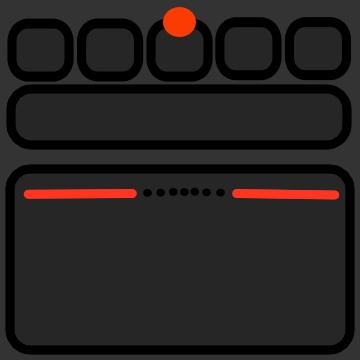
The region that I’ve circled in yellow down here SEEMS to be the software-enabled “buttons” added by KDE; the region at the top circled in blue, however, is where my thumb gravitates to to click, partially because it’s using the red thing above the B key (the trackpoint) as the mouse rather than the touchpad itself:
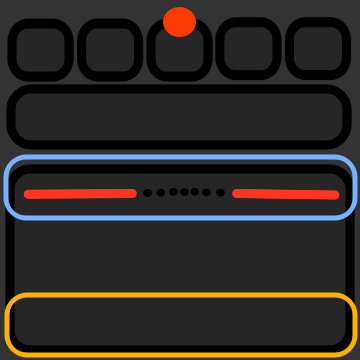
Given it was completely unaffected by changing the settings, it seems to be some sort of hardware enabled setup; which makes sense considering other, older Thinkpad models I’ve used where they were, indeed, separate discrete buttons:

Ah, I thought you were talking about virtual touchpad buttons added by the libinput driver, not virtual buttons for the physical trackpoint. My bad.
I’m not aware of how to do what you want or if it’s possible, sorry.