How do we have full path of the document, as opposed to only document name, in window title?
What application are you referring to?
1 Like
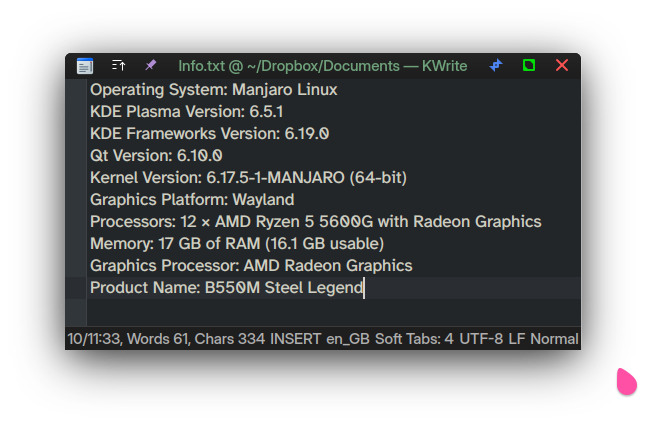
I can’t even remember how this was achieved, generally by looking in SETTINGS…
Look for the text ‘Show Path in Titlebar’ in Settings.
Settings can be found in the menu, the menu can be toggled with MetaM
You can also show the pathbar instead.
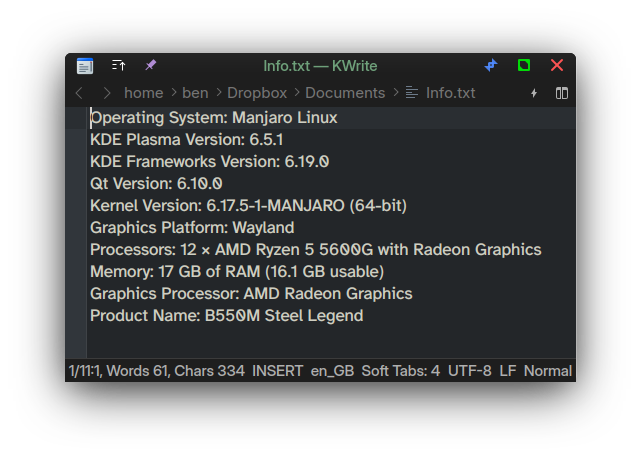
It’s really quite shocking how terribly difficult it is to discover these things for oneself.
Something you might not be aware of is that F10 is the ‘default’ now for opening the Menu - it works sometimes even when you cannot see a menu.
The exact same applies to kwrite - and any other software that has the words ‘show path’ or ‘show Navigation’ in it’s menu.
So we must conclude that you’re just trolling here…
The reason that question was being asked is possibly that the DEV couldn’t imagine anyone having an issue with Kate or KWrite, assuming it was something else - maybe ghostwriter, or Writer, or a thousand other possible document editor software.
If the question was answered, then mark it solved:
Got it not too straight, on:
Main menu → Setting → Show path in title bar
The real problem is it will not work, affect unless close then restart the KATE text editor
So why did you mark your own reply as the solution, when the solution was given to you in both of my last posts???
You got to it because:
- You read my post
- You ignored everyone and found it yourself?
[quote=“abd, post:6, topic:41152”]
The real problem is it will not work, affect unless close then restart the KATE text editor
[/quote]
No, that’s not the ‘real problem’, but for sure it’s an issue that changing the setting cannot immediately apply it.