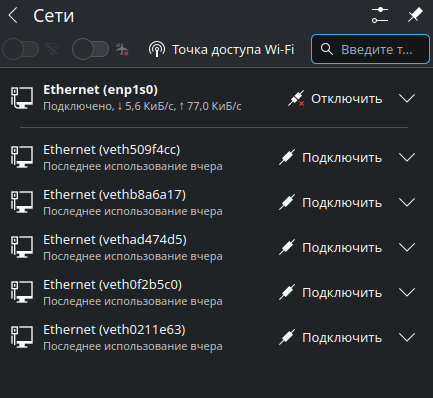
Example on the picture. After last KDE Neon autoupdate yesterday all docker network bridges (“veth”) becames visible and spams me with notifications every time containers launches. IDK why this happens, I didn’t do anything with network.
Is there in KDE Neon some setting which helps network applet to filtering network interfaces?
AFAIK there isn’t a setting in KDE to “hide” docker networks from network applet, but you can ignore them in NetworkManager configuration:
1. Edit
/etc/NetworkManager/NetworkManager.conf
2. At the bottom add:
[keyfile]
unmanaged-devices=interface-name:veth*
3. Save the file
4. Restart NetworkManager
sudo systemctl restart NetworkManager
or reboot the machine.
Can confirm this works (on Kubuntu 25.10).
The NetworkManager.conf documentation hints the keyfile section might not be able to be used in all cases (as I understand it?) and the unmanaged-devices section is quite strict (“A device unmanaged due to this option is strictly unmanaged and cannot be overruled by using the API“), mentions device*.managed to maybe be a better suited option.
So maybe something like this might work as well (did not test it) :
[device-veth]
match-device=interface-name:veth*
managed=0
(based on this question on reddit)
And I wonder if this might warrant opening a featuring request?
To add an option in plasma-nm somewhere to configure this.
But maybe it is a bit too niche and people using docker can just use this solution here?
This works. In my case (or in 2026) the names of the docker bridge start with br- so the entry in /etc/NetworkManager/NetworkManager.conf becomes
[keyfile]
unmanaged-devices=interface-name:br-*
Ofcourse you have to make sure that any bridge you make yourself does not start with br-. In most tutorials for for instance QEMU/KVM it is suggested to call this br0