How to Know What Has Changed Between KMyMoney Build Releases and When One Has Occured

I have fairly recently started using KMyMoney, and tried it on 3 different OSs, Windows 10, Windows 11, and an AppImage on Ubuntu 2024.04.

The Windows version installed was from the file: kmymoney-5.2-4910-windows-cl-msvc2022-x86_64.exe, which inside KMyMoney was reported as version 5.2.1-6774de7. This worked very well on Windows 10, but on Windows 11 had font and font hightlighting issues. For example see bug 510312.

The very good news is that I spotted, by chance, that a new build version had appeared that resolved these issues. This was the file: kmymoney-5.2-4984-windows-cl-msvc2022-x86_64.exe, which inside KMyMoney was reported as version 5.2.1-2d11d6.

Are there any release notes for these build changes? How can one know when a new build release has occured? Is it correct that you can only seem to access the latest build release, and not any previously released ones?

Thank-you very much for the build release that resolved the issues.

Formal releases would be 5.2.x where the current version is 5.2.1 and the next will be 5.2.2 (not yet scheduled. The versions you have mentioned are compiled from the head of the 5.2 git branch, which includes bug fixes. New features are only added to master branch, until rolled into the 5.2 branch for the next release. Release notes are only created for formal releases. The automatic build system creates a new package when there are any changes to the git branch (5.2 branch for “stable” versions, and master branch for “developer” versions) and unfortunately only the most recently built version is maintained for download. These can be done as often as daily, if there has been any commit made to the relevant git branch. For further information, in kmymoney-5.2-4984-windows-cl-msvc2022-x86_64.exe the 4984 is just a sequential number of the build, and in the version 5.2.1-2d11d6 the 2d11d6 refers to the most recent git commit included in that build. You would have to look at the git log to see what fixes have been added since the previous version.

@pc101 , the git log is here:

in these pages, you can find the commit ids as described by @ostroffjh

Thank-you for the replies. I had assumed that reading that once a release had been made there were no further changes to that release. Unless you wished to use development builds, you had to wait until the next release to be announced on the News page, which in some cases appears to be quite a long time.

From your replies it appears I was mistaken and a release is updated to fix bugs without any “news” notification. Looking through the 5.2 git branch as you suggested I am guessing that it was one or both of 2a5c8a64 and 16fae797 that resolved the issues I was previously seeing.

So thank you again for the updates, but I do wonder if people may try a version, see an issue, and then just assume they have to wait for a new release to be announced? Or they look in the release news at the sometimes “large” time gaps between release announcements and assumed that there is not much active development?

Is the information you have kindly provided to me in an FAQ that I have missed?

This is true in general. If you see today a bug and assuming the next major release is in 3 years, you may wait 3 years and see that the bug is fixed then :slight_smile: . If you look closer, you may see that is has been solved earlier, let’s say 6 months after detection.

The next release should contains bug fixes and new features. These are listed on the News page as you say.
Though, there is a middle-layer between
a) “major releases”
and
c)“development builds”,
which is
b)“stable version”.

The stable version is (or should be) stable and receives the recent bug fixes or small new features.
After a given time, which is always relative and defined by the development team, a new major release is created.

for example, the two last official releases are:

  • KMyMoney 5.2.1 released on 2025-08-04
  • KMyMoney 5.2.0 released on 2025-06-21

and in between those you have several stable and development builds. They have a version number 5.2.0. ###### where ###### is the commit ID of the respective software branch (either stable or development).

The cutover between a), b) and c) stays the decision of development team. They decide whether a version number goes from 5.2.0 to 5.2.1 or stays a few months longer under 5.2.0.

My advice is, if you see a bug, is to

  1. check if another user has already detected it. Use this URL https://bugs.kde.org for this.
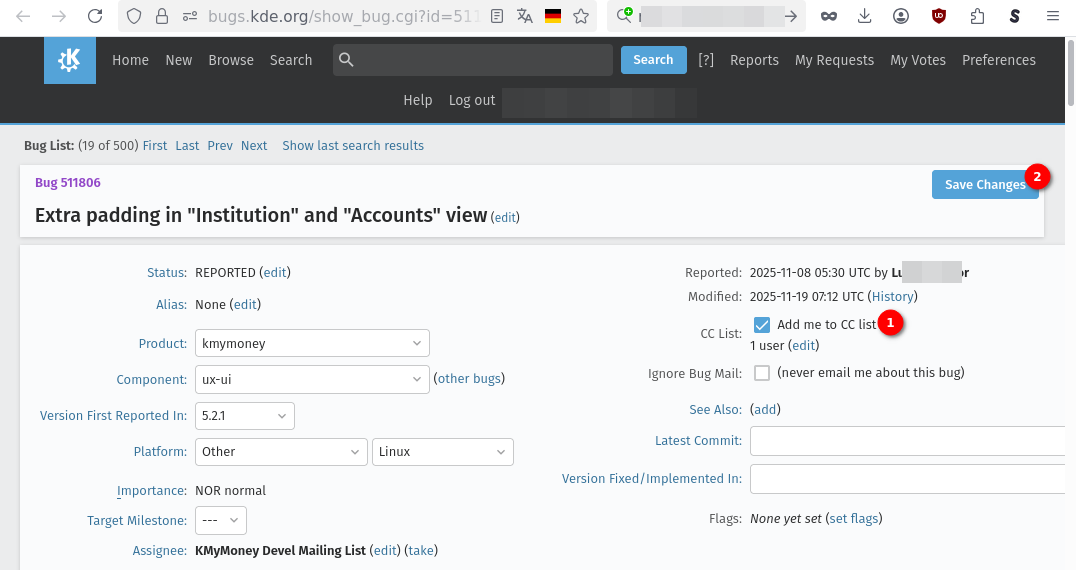
  2. if someone created a bug, add yourself to the Cc list, (it costs 1 e-mail adress+password to create your user). You must press “save changes” (even if you wrote no comment into the bug) . Later you will receive automatically all updates of this specific bug and ultimately the one saying “bug fixed in version ABC”.
  3. if no one did it, create the bug yourself. Again, you’ll get all updates of the bug automatically.

I guess it is not the case at the moment.
The official FAQ is here https://userbase.kde.org/KMyMoney/FAQ and the good point is, everyone is allowed to improve it. You need to create a KDE account (it costs 1 e-mail adress+password) and then can start helping others.

Ok, having reviewed your feedback, and looked at what binary releases are available, from my point of view the two don’t quite seem to agree. I have been using both the Windows binaries and the Linux AppImage format. You said:

Though, there is a middle-layer between
a) “major releases”
and
c)“development builds”,
which is
b)“stable version”.

The stable version is (or should be) stable and receives the recent bug fixes or small new features.
After a given time, which is always relative and defined by the development team, a new major release is created.

for example, the two last official releases are:

  • KMyMoney 5.2.1 released on 2025-08-04

  • KMyMoney 5.2.0 released on 2025-06-21

and in between those you have several stable and development builds. They have a version number 5.2.0. ###### where ###### is the commit ID of the respective software branch (either stable or development).

Which makes a great deal of sense. What I was expecting to find as binaries was as a minimum something like:

  • v5.1.3 (with final stable updates)
  • v5.2.0 (with final stable updates)
  • v5.2.1 (with stable branch updates)

If I read the kMyMoney “News” page and click on the news of an earlier release, say 5.1.3 or 5.2.0, it seems I can only download source tar balls from mirrors, and not binaries.

Similarly for 5.2.1 (the latest release), I can only download the 5.2.1 stable branch with updates, and not the original 5.2.1 release. So it appears to me that the only binaries made available for download are the:

  • latest release stable branch (currently 5.2.1) with updates
  • development branch snapshot

Is this the correct understanding? This is not meant as a criticism, just trying to understand.

If you are a Windows user and wish to try an updated version, it is probably wise to have kept your previous Windows installation file (.exe, .7z) around, in case for some reason you need to revert back. Not an issue with the Linux AppImage, as the file you download is the one you run, so you will have this for your current kMyMoney version. The version(s) included in Linux distros is a function of distro release and update choices.

In terms of an FAQ entry, might it look something like?:

Q. What kMyMoney binary release files are available from this website?

A. Two binary formats are available from this website, one for Microsoft Windows (.exe or .7z) and a Linux AppImage. Only two kMyMoney versions in binary format will be available for download of each:

  • The latest release stable branch. This may be updated overtime with bug fixes and the file to download will have an increased build number as part of its file name. There will not usually be any “News” announcement when a version with a increased build number is released, just updated files to download.

  • The unstable development branch version. This will be incrementally updated over time with new features and/or bug fixes. At some point in time a snapshot of this development branch will become the next release version.

The various Linux distros will often include binary versions of kMyMoney, which they may or may not choose to update over time.

If you are a Windows user it would be wise to keep a downloaded local copy of the installation file (.exe, .7z) for the kMyMoney version you are currently using, so that if you update to a later version of kMyMoney in the future, you have a straightforward way to revert back to the earlier version if required.

This would be a good idea as you present this. You could ask the development team if they can think about such an organization of available binaries.

True.

I have the same understanding.

I am a AppImage user and i also keep the older AppImage files i used,

  1. in case the newer don’t worked as expected.
  2. to open two finances files in parallel.
    I have two software launchers in my taskbar:
  • One launching the current newest AppImage of KMyMoney i downloaded
  • One launching an older AppImage of KMyMoney i downloaded

This way, i can open my current finances file in the current newest AppImage AND also open an older finances file in the older Appimage and compare both. This is useful when i enhance old financial data retroactively and I want to check that the sum numbers are still the same after my changes compared to before the changes :slight_smile:

Great that you start writing one entry!

you could quote the webpage: Download | KMyMoney

I would start with: the software is available for several operating systems families: Windows, Linux, Mac
Then introducing the distinction “stable” and “development” which exist for all families
Regarding the linux family, there are Appimage as you say, but also additional channels as indicated in the webpage


(i saw that some links doesn’t give a satisfying result…)
The same for Mac. The webpage also shows several download channels…

:clap:

right.
I would precise will often include binary versions of kMyMoney into their distribution’s packages.

Here i would not restrict this to windows users, but to all which download binaries manually. This is everyone except those using KMyMoney provided by their linux distribution packages.

Another remark, do you intend to add something regarding explanations on commit ID and the Github background (regarding the question “how do i know when what has been fixed in the software?”)
Or do you prefer not to explain this in the FAQ?

Please keep the following things in mind:

  • the development team provides releases in the form of tar-balls and KDE sysadmins distributes them over the KDE CDN (Content Delivery Network). For each released version a mirror page exists, e.g. for 5.2.1.
  • the development team does not provide binaries of release versions. That is the job of the various distributions. For Windows such a thing as a distro does not exist, so Windows users are out of luck here (unless someone steps up and does the job to create release versions).
  • the development team, in collaboration with the KDE sysadmins and other KDE developers, provides binary snapshots using the fully automated KDE CI/CD system. These represent the current state of development on the various branches (current stable branch and master). For various reasons only the latest version is available here. These versions are used to provide users with test versions that reflect the current state of development, e.g., to test bug fixes but are not meant as release versions.
  • MacOS builds are currently not available because there is no-one taking care for the KMyMoney project to be supported by the automated CI/CD. We did have it, but for some MacOS specific reasons this is broken. Any volunteers are very welcome.
  • The main platform of the development team is Linux. Windows and MacOS are second class citizens in this game and we support them as best as we can.

Regarding an FAQ there is already some material available on various KDE sites. If any volunteer wants to go and collect that and update any ancient information I am happy to support as best as I can with reviews and knowledge about the processes and project history.

1 Like

Two points for clarification please:

the development team, in collaboration with the KDE sysadmins and other KDE developers, provides binary snapshots using the fully automated KDE CI/CD system. These represent the current state of development on the various branches (current stable branch and master). For various reasons only the latest version is available here. These versions are used to provide users with test versions that reflect the current state of development, e.g., to test bug fixes but are not meant as release versions.

This seems to imply that there will never be an actual Windows binary “supported” release, if only Windows binaries matching the two descriptions above are available (to test bug fixes). Maybe this fits in with another of your comments:

The main platform of the development team is Linux. Windows and MacOS are second class citizens in this game and we support them as best as we can.

I appreciate that as development team your main focus is Linux. However, I was viewing KMyMoney, and other apps like Kdenlive, as having a wider cross platform goal. For Microsoft Windows that does mean for nearly everyone having binaries available. I presume there is a reason that Windows release binaries (which I am presuming are the same as the last stable branch update of the previous release version branch), at the News notification date, are not kept available for download? The work to create them has already taken place. Is it a storage issue? Ideally the equivalent AppImage and any MacOS “binaries” would also be available.

I would be happy to have a go at create an FAQ (it might require more than one) on this general topic that has been discussed. However, at the moment I don’t have the confidence I would be able to communicate correctly in a way that reflects the project goals.

You also said:

Regarding an FAQ there is already some material available on various KDE sites. If any volunteer wants to go and collect that and update any ancient information I am happy to support as best as I can with reviews and knowledge about the processes and project history.

For example I did found a link for a Snapcraft package. However, this opens a webpage with a “404: Aw, snap! We couldn’t find that page“ message. Searching for a kmymoney snap on this page returned zero results. I appreciate some people have strong views regarding whether Snapcraft packages are a good idea or not… :slight_smile: .

PS I notice that Kdenlive does appear to keep “old” Windows and other binaries available for download.

Rest assured, it’s a resource problem: as soon as someone stands up and takes responsibility to provide and maintain what you are looking for you will have it. Other projects may have such people. BTW: the same applies to the Snapcraft package. Not sure why it cannot be found anymore.

On reflection it appears to me that an end user coming to the KMyMoney website to install a KMyMoney binary currently has two “rolling release” options for each of:

  • Linux (AppImage)
  • Windows (.exe)

These “rolling release” options are:

  1. A stable rolling release, currently from the “5.2” branch:
    kmymoney-5.2-####-linux-gcc-x86_64.AppImage
    kmymoney-5.2-####-windows-cl-msvc2019-x86_64.exe
  2. A development rolling release from the development branch:
    kmymoney-master-####-linux-gcc-x86_64.AppImage
    kmymoney-master-####-windows-cl-msvc2019-x86_64.exe
    Where “####” is the numeric build number that increases with each rolling release update.

There is currently no MacOS release available.

My initial confusion was that there are no historical binary versions kept in an archive, for the likes of 5.0.8, 5.1.1, 5.1.2, 5.1.3, 5.2.0, 5.2.1 etc

Having now used an AppImage for the first time, I am impressed by the fact that that you can just download a file and run the application. So if something does not seem quite as expected in the release you are running, you can simply run another release. However, in practice with the current KMyMoney release procedure you can only run versions other than the latest, if you have previously downloaded them. I am wondering if different AppImage files were available users might be better able to help with filing bugs and pinpointing any issues they are seeing?

The same is sort of true with Windows, except it looks like you would need to install a different version, as unless I am mistaken you can only have one version of KMyMoney installed on Windows at a time?

So if I find a KMyMoney release that works well for me, I can’t really suggest someone else tries this specific release, unless it is the latest release available on the website, as they can only download the latest release.

If I may ask further, to which I am guessing there are no definitive answers, when do the changes on the development branch get moved to the stable branch? We have x.y.z release versions, so is it only on “x” changes, or on “y” changes? What sort of changes determine a “x” rather than a “y” release version change?

@ipwizard, you said previously “Rest assured, it’s a resource problem”. I had naively thought that the archiving of binaries etc would have been part of an “automated” release procedure.

Thank-you I can see that the KMyMoney site download page has been updated to say that:

Unfortunately, Snapcraft packages are currently unmaintained

What I have found is that over on flathub.org is a KMyMoney package at:

At the time of writing this is version 5.2.1, not 100% sure which build. However, is says it is “4 months ago (Built 4 days ago)”, so an ongoing build of the stable branch?

Is there a reason this is not mentioned on the download page at the KMyMoney site?

No, it’s built from the release tarball. The more recent builds are from changes to the build process or to include new stable versions of dependencies. If you want to try the current development version, there is also a flatpak built from the master branch you can install with:

flatpak install -u https://cdn.kde.org/flatpak/kmymoney-nightly/org.kde.kmymoney.flatpakref

Just hasn’t been merged yet. Now I see there’s a merge conflict I should resolve.