I move my panel to the top of the screen, and I run with “borderless maximized windows”. As a result, the panel cast a shadow onto the currently maximized window:

Is there a way to disable this shadow? I know this theme from 2017 exists Breeze No Shadow Opaque Panel - KDE Store, but I’d rather use something which is up-to-date and out-of-the-box instead.
At the moment, there isn’t a supported way to do this besides using a different Plasma Style that doesn’t include a Panel shadow.
1 Like
Are there any plans of adding this option?
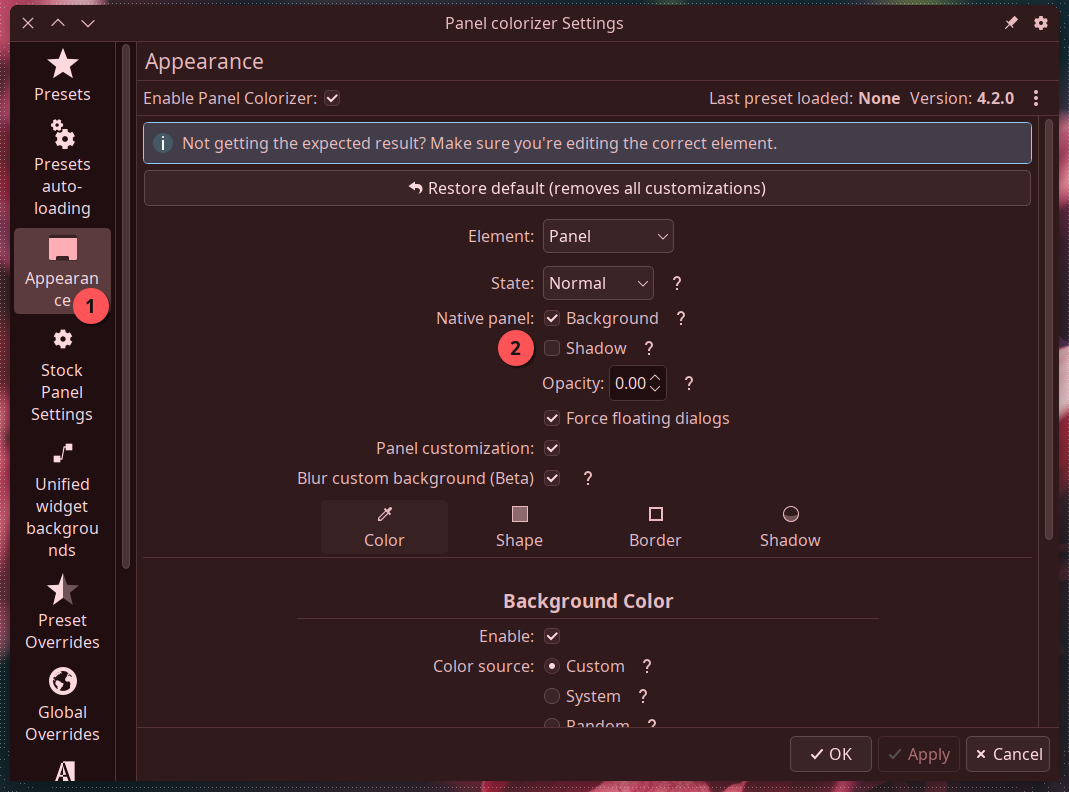
Panel Colorizer has a option for that, it’s a hack but works 

5 Likes
And it works well! I love Panel Colorizer. I’ve been using it a long time.
2 Likes
Thanks for the tip and for the ace work on the widget! 
PS. Luis is actually the maintainer!
1 Like
Oh my god this actually works, thank you so much for putting this here
I’m currently trying to set up a KDE setup for once after having switched off of it for… other reasons and last time I dealt with this was by using a panel transparency extension… thing to make the panel transparent (which also removed the shadow), then baking on the solid panel background color onto the wallpaper (with it shining through the transparent panel to make it look like an actually solid panel), which kinda worked but never felt right, so this time I wanted to try patching the shadow out of the breeze theme directly, but was extremely confused as to where I should begin…
but this just works, no idea how I didn’t know about it last time
You’re welcome 
I was using the trick of manually removing the shadow from the theme’s SVG and got tired of having to do it for all themes I used, but then I found that I could just make them render off screen and it worked feat: add option to disable native panel background shadow · luisbocanegra/plasma-panel-colorizer@444311f · GitHub
2 Likes