I am Iron Triton and I have just installed KDE neon.
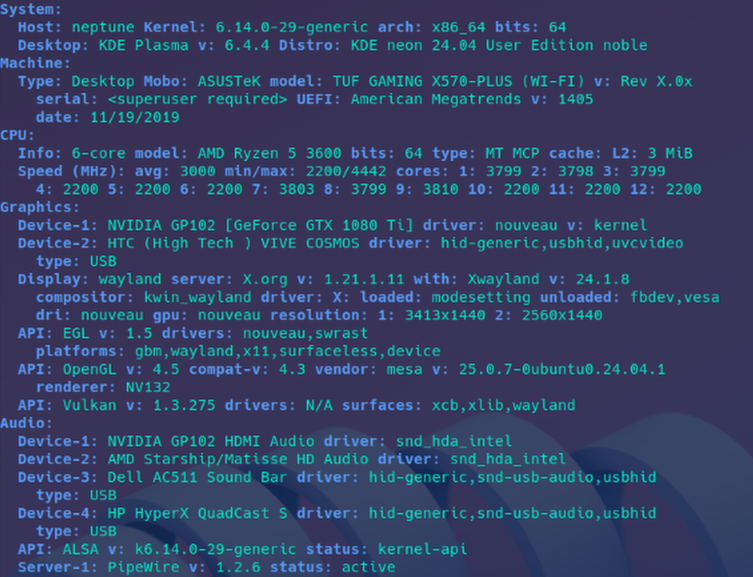
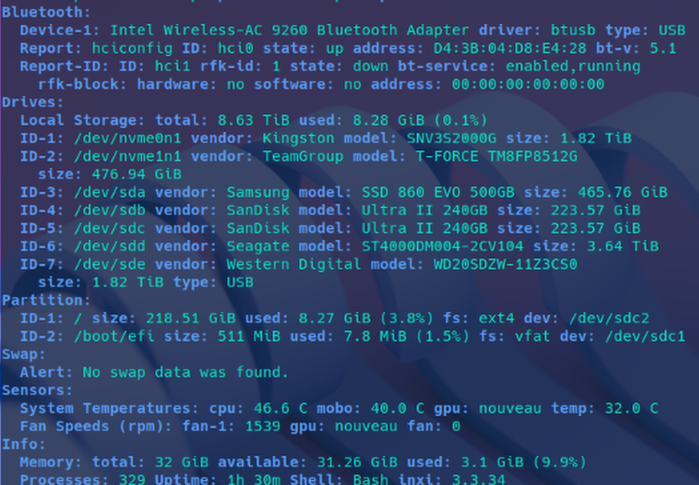
AMD Ryzen 5 3600 1080ti EVGA Hybrid 32BG RAM HD SanDisk Ultra II 240GB
My next steps are to install Nvidia drivers and steam in an attempt to get my VR headset working
HTC Vive Cosmos Elite
I am Iron Triton and I have just installed KDE neon.
AMD Ryzen 5 3600 1080ti EVGA Hybrid 32BG RAM HD SanDisk Ultra II 240GB
My next steps are to install Nvidia drivers and steam in an attempt to get my VR headset working
HTC Vive Cosmos Elite
It would be preferable to paste code between code markers
```
Paste code after typing three 'tilde' ~~~
or backtick ``` markers (on a new line).
```
Would this be a virtual install?
No its not, I am installing it straight to an ssd. I have timeshift set up so i can roll back mistakes. I have only one GPU and no integrated graphics on my cpu so I don’t think I can set up a VM to do the things I need.
I’m gonna test out the code markers thing, but I dont know how to simply paste an output into a code block after running a command in terminal, like newofitch or inxi –full
#this is a test code block
seems to work well
So far steam worked right away and Helldivers 2 was an easier process to get running smoothly than it was in Mint cinnamon and mint xfce.
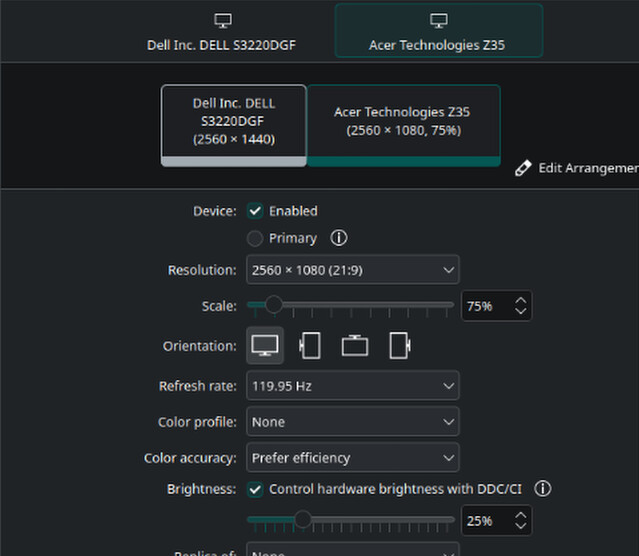
The gripes I have with KDE plasma so far are quite minimal and there are many features in kde neon that make me want to figure out those issues I have. When I start up the computer, the keyboard isn’t available during any of boot or grub, the keyboard is plugged into a usb hub built into my monitor so I assume I have to enable something in linux that lets it see things connected to hubs. I have installed guake and it seems as though I have to disable the second monitor and then open guake in order to get it to open in the primary display. In mint guake would easily switch screens by closing it with a hotkey, simply moving the mouse to the other screen and opening with the hotkey. I personally believe that this is because I have my secondary monitor set to scale by 75%. The mouse seems to stick to the separation between the monitors quite often as well.
On the front of VR, the same issues I ran into on mint I have run into on KDE neon so far. Its mostly just URI handling. When I click anything in the SteamVR Settings page, a window pops up saying no application available. It looks like SteamVR tries to run a command allong the lines of:
vrmonitor:// <command for setting change>
and neither of my linux installs appreciated that. I found a post on reddit that explains how to make a URI handler in /$USER/.local/share with a .desktop file.
Edit: fixing the URI handle only makes it so SteamVR can update its own settings. In Mint, after I fixed the URI handle I couldn’t get openxr to work correctly, but steam says on their vr page that SteamVR doesn’t work on gnome, so I chose to try things on KDE plasma.
Adding the line at the end of those two .desktop files will make it so they don’t show up in the application menu (start menu):
NoDisplay=true
The URI instructions above are/were wrong because of some auto formatting from this forum, here are my corrections:
The reddit post that talks about fixing URI handles can be found by searching “cant set openxr no apps found reddit” on google.
It says to add a couple .desktop files in your /home/$USER/.local/share/applications folder.
I personally reccomend to rplace any “$USER” string below with your proper username or folder name. There is a rare chance your username is different than your home folder name. use Terminal command:
$HOME
to display the path name to your home folder.
First is the URI handler for steamvr
File named: valve-URI-steamvr.desktop
Location /home/$USER/.local/share/applications/
[Desktop Entry]
Name=URI-steamvr
Comment=URI handler for steamvr://
Exec="/home/$USER/.local/share/Steam/steamapps/common/SteamVR/bin/linux64/vrurlhandler" %U
Terminal=false
Type=Application
Categories=Game;
MimeType=x-scheme-handler/steamvr
Second the URI handler for vrmonitor
File named: valve-URI-vrmonitor.desktop
Location: /home/$USER/.local/share/applications
[Desktop Entry]
Name=URI-vrmonitor
Comment=URI handler for vrmonitor://
Exec="/home/$USER/.local/share/Steam/steamapps/common/SteamVR/bin/linux64/vrmonitor" %U
Terminal=false
Type=Application
Categories=Game;
MimeType=x-scheme-handler/vrmonitor
I personally recommend changing the word “$USER” in these text files on line 4 with the name of your home folder, it is usually the name of your username. In terminal, if you run:
$HOME
You will see your home folder name in the format of:
/home/<user>
source goes to reddit user: bfisch1983
Edit: there is a small chance your steam install location is different. At the time of writing this I personally have to change the directory on line 4 to look like this:
/home/$USER/.steam/steam/steamapps/common/SteamVR/bin/linux64
It seems as though Sleep in KDE neon causes all manner of crash reports and no input from mouse or key board wakes the computer. I have to hit the power button and then most of the time things like audio are broken and require a restart.
Guake has a tendancy to stick to the wrong monitor often in wayland. A quick workaround is to use super+click+drag to move the window to the correct monitor.
KDE neon 6.6.4
guake 3.10 installed from apt
You could check if Yakuake is handling this differently
Yakuake works as it should, but it doesn’t have the “split” feature that guake has.
KDE neon seems to ignore mouse acceleration rules when you plug your mouse in to charge it. Using a non PC power source is a simple workaround.
Spotify natively plays local files straight out of the box. This is big deal for most linux distros. I have been suffering without local file playback since I switched to linux until now.
This one thing makes me quite happy.
Not quite sure how you meant that because I’ve been using local file playback for decades before streaming services like Spotify even existed.
Same here
It does, but it seems it’s global shortcuts is broken when you do that.
Check if your PC’s UEFI settings has ErP on. Think it needs to be disabled for it to work.
I thought I was being very clear when I said that “spotify" was the thing that was capable of playing local files in KDE neon and that “spotify" had struggled to play local files inside “spotify" in other Linux distros. In no place did my comment indicate that the built in media players struggled to play local files in any distro.
Thanks for the clarification!
It was one possible interpretation but your mention of suffering without local file playback sounded as if you had not gotten that to work until finally you had found that Spotify could do that.
Well I’ve never tried or even considered getting my spotify playlists to play in any prepackaged media player so I have relied on spotify for my music for several years. So if I want to incorporate local files into a spotify playlist I have had to just suffer through not having that functionality.
Until KDE neon, that is.
In other Distros i have tried to install the libraries and plugins for spotify to work properly but I was never succesufl
Ok so ErB almost worked lol. The keyboard wouldn’t wake and I still had to use the power button. But it did restore the system, sort of.
This was the results:
Everything you see in the picture is what I currently see right now after having clicked “Log In”