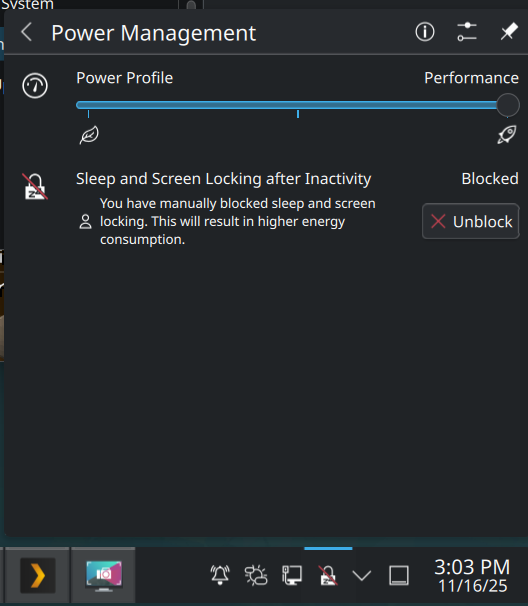
Hello!
Not sure if this is for here or the bug forum but… With some recent update my system has stopped suspending properly when it goes idle. The screen turns off, but the actual suspend never happens. If I trigger it via sudo systemctl suspend or through the Sleep button in the Application Launcher it suspends nicely and wakes up fine. The problem is only when the system tries to go to sleep when it is idle.
output of journalctl -b -u systemd-suspend.service
===> Triggered by idle timeout
Nov 15 11:52:14 hostname.int systemd[1]: Starting systemd-suspend.service - System Suspend...
Nov 15 11:52:14 hostname.int systemd-sleep[12653]: Successfully froze unit 'user.slice'.
Nov 15 11:52:14 hostname.int systemd-sleep[12653]: Performing sleep operation 'suspend'...
Nov 15 11:52:15 hostname.int systemd-sleep[12653]: Failed to put system to sleep. System resumed again: Device or resource busy
Nov 15 11:52:15 hostname.int systemd-sleep[12653]: Successfully thawed unit 'user.slice'.
Nov 15 11:52:15 hostname.int systemd[1]: systemd-suspend.service: Main process exited, code=exited, status=1/FAILURE
Nov 15 11:52:15 hostname.int systemd[1]: systemd-suspend.service: Failed with result 'exit-code'.
Nov 15 11:52:15 hostname.int systemd[1]: Failed to start systemd-suspend.service - System Suspend.
<===

===> Triggered by 'sudo systemctl suspend'
Nov 15 11:52:45 hostname.int systemd[1]: Starting systemd-suspend.service - System Suspend...
Nov 15 11:52:45 hostname.int systemd-sleep[13189]: Successfully froze unit 'user.slice'.
Nov 15 11:52:45 hostname.int systemd-sleep[13189]: Performing sleep operation 'suspend'...
Nov 15 11:52:59 hostname.int systemd-sleep[13189]: System returned from sleep operation 'suspend'.
Nov 15 11:52:59 hostname.int systemd-sleep[13189]: Successfully thawed unit 'user.slice'.
Nov 15 11:52:59 hostname.int systemd[1]: systemd-suspend.service: Deactivated successfully.
Nov 15 11:52:59 hostname.int systemd[1]: Finished systemd-suspend.service - System Suspend.
<===
output of journalctl -k | grep -i fail
Nov 15 11:52:15 hostname.int kernel: PM: Some devices failed to suspend, or early wake event detected
I have tried unplugging things that can be inhibiting it but “something” might still be failing to suspend. Problem is, I have no idea how to find out what that is!
My keyboards power button also doesn’t actually put the computer to sleep. Same behavior as when it times out. Am I right in assuming that powerdevil is handling that button press?
~ took 6s
❯ loginctl show-user | grep HandlePowerKey
HandlePowerKey=poweroff
HandlePowerKeyLongPress=ignore
~ took 4s
❯ systemd-inhibit --list
WHO            UID  USER  PID   COMM            WHAT                                                                       WHY                           >
ModemManager   0    root  1282  ModemManager    sleep                                                                      ModemManager needs to reset de>
NetworkManager 0    root  1361  NetworkManager  sleep                                                                      NetworkManager needs to turn o>
UPower         0    root  1164  upowerd         sleep                                                                      Pause device polling          >
PowerDevil     1000 devon 5055  org_kde_powerde handle-power-key:handle-suspend-key:handle-hibernate-key:handle-lid-switch KDE handles power events      >
proton-mail    1000 devon 10122 Proton Mail Bet sleep                                                                      Application cleanup before sus>
Thinking that the problem must reside somehow with powerdevil? The button is configured to poweroff (not desired but w/e) but powerdevil, which is what handles the idle timeout, tries to take over the behavior and change it to suspend, which is broken?
hi, welcome.
in the system tray there is a power management widget that should show you what is inhibiting the suspend, and make sure to uncheck the block feature.
also if you could post the output of kinfo
Sure thing! Heres kinfo:
~ took 2s
❯ kinfo
Operating System: Fedora Linux 43
KDE Plasma Version: 6.5.2
KDE Frameworks Version: 6.19.0
Qt Version: 6.10.0
Kernel Version: 6.17.7-300.fc43.x86_64 (64-bit)
Graphics Platform: Wayland
Processors: 16 × AMD Ryzen 7 9800X3D 8-Core Processor
Memory: 64 GiB of RAM (60.1 GiB usable)
Graphics Processor 1: AMD Radeon RX 7900 XTX
Graphics Processor 2: AMD Ryzen 7 9800X3D 8-Core Processor
The widget sadly hasn’t changed after the suspend, am I looking at the right one?
that’s the right one, it’s now a button in plasma 6
i assume if you click the button the status will change to “manual” similar?
when set to automatic it should follow what is set on the power savings settings page.
post a screenshot of that page, you can get to it by clicking on the configure icon in the title bar.
Yes, if I click the Manually Block button it functions as expected:
And the Power Management screen is:
you have a short timer on your dim and screen off settings, what is the timer on your screen locking?
There isn’t one, I fail to see how that is relevant though.
there is some interaction between the screen locking and the monitor power as you can see in the power settings… i was just trying to get a complete picture.
you are, of course, under no obligation to provide it.
What does your full system journal say around the time the system tries but fails to go to sleep? Could be helpful since you only posted lines directly containing ‘fail’.
You can do something like
journalctl -k | grep -B 10 -i fail
for 10 lines of context before any matches.
kscreenlocker and powerdevil don’t depend on each other to work though, no? the screen turns off fine once that timer has been reached, but the computer never suspends. if i turn locking on, it works fine.
i just wanted to stay on track, mb!
here are two failed suspends with additional lines of context between both of them, one at 11:55:20 and one at 11:56:41:
~
❯ journalctl -k | grep -B 20 -i fail
Nov 17 11:55:15 hostname.int kernel: r8169 0000:0b:00.0 enp11s0: Link is Down
Nov 17 11:55:19 hostname.int kernel: r8169 0000:0b:00.0 enp11s0: Link is Up - 2.5Gbps/Full - flow control rx/tx
Nov 17 11:55:20 hostname.int kernel: PM: suspend entry (deep)
Nov 17 11:55:21 hostname.int kernel: Filesystems sync: 0.026 seconds
Nov 17 11:55:22 hostname.int kernel: Freezing user space processes
Nov 17 11:55:22 hostname.int kernel: Freezing user space processes completed (elapsed 0.001 seconds)
Nov 17 11:55:22 hostname.int kernel: OOM killer disabled.
Nov 17 11:55:22 hostname.int kernel: Freezing remaining freezable tasks
Nov 17 11:55:22 hostname.int kernel: Freezing remaining freezable tasks completed (elapsed 0.001 seconds)
Nov 17 11:55:22 hostname.int kernel: printk: Suspending console(s) (use no_console_suspend to debug)
Nov 17 11:55:22 hostname.int kernel: r8169 0000:0b:00.0 enp11s0: Link is Down
Nov 17 11:55:22 hostname.int kernel: PM: Some devices failed to suspend, or early wake event detected
Nov 17 11:55:22 hostname.int kernel: nvme nvme0: D3 entry latency set to 10 seconds
Nov 17 11:55:22 hostname.int kernel: nvme nvme0: 16/0/0 default/read/poll queues
Nov 17 11:55:22 hostname.int kernel: nvme nvme1: D3 entry latency set to 10 seconds
Nov 17 11:55:22 hostname.int kernel: nvme nvme2: D3 entry latency set to 10 seconds
Nov 17 11:55:22 hostname.int kernel: nvme nvme1: 16/0/0 default/read/poll queues
Nov 17 11:55:22 hostname.int kernel: nvme nvme2: 16/0/0 default/read/poll queues
Nov 17 11:55:22 hostname.int kernel: r8169 0000:0b:00.0 enp11s0: Link is Down
Nov 17 11:55:22 hostname.int kernel: PM: resume devices took 0.328 seconds
Nov 17 11:55:22 hostname.int kernel: OOM killer enabled.
Nov 17 11:55:22 hostname.int kernel: Restarting tasks: Starting
Nov 17 11:55:22 hostname.int kernel: Restarting tasks: Done
Nov 17 11:55:22 hostname.int kernel: random: crng reseeded on system resumption
Nov 17 11:55:22 hostname.int kernel: PM: suspend exit
Nov 17 11:55:22 hostname.int kernel: HDR SB:01 1a 02 00 18 8a 81 37 e0 2f cf 8b 9c 1c 4d 0a
Nov 17 11:55:22 hostname.int kernel: HDR SB:09 3d 16 40 15 01 06 00 15 01 15 01 00 00 00 00
Nov 17 11:55:22 hostname.int kernel: HDR SB:01 1a 02 00 18 8a 81 37 e0 2f cf 8b 9c 1c 4d 0a
Nov 17 11:55:22 hostname.int kernel: HDR SB:09 3d 16 40 15 01 06 00 15 01 15 01 00 00 00 00
Nov 17 11:55:22 hostname.int kernel: HDR SB:01 1a 02 00 18 8a 81 37 e0 2f cf 8b 9c 1c 4d 0a
Nov 17 11:55:22 hostname.int kernel: HDR SB:09 3d 16 40 15 01 06 00 15 01 15 01 00 00 00 00
Nov 17 11:55:22 hostname.int kernel: Realtek Internal NBASE-T PHY r8169-0-b00:00: attached PHY driver (mii_bus:phy_addr=r8169-0-b00:00, irq=MAC)
Nov 17 11:55:22 hostname.int kernel: r8169 0000:0b:00.0 enp11s0: Link is Down
Nov 17 11:55:25 hostname.int kernel: r8169 0000:0b:00.0 enp11s0: Link is Up - 2.5Gbps/Full - flow control rx/tx
Nov 17 11:55:25 hostname.int kernel: r8169 0000:0b:00.0 enp11s0: Link is Up - 2.5Gbps/Full - flow control rx/tx
Nov 17 11:55:25 hostname.int kernel: r8169 0000:0b:00.0 enp11s0: Link is Down
Nov 17 11:55:29 hostname.int kernel: r8169 0000:0b:00.0 enp11s0: Link is Up - 2.5Gbps/Full - flow control off
Nov 17 11:56:36 hostname.int kernel: r8169 0000:0b:00.0 enp11s0: Link is Down
Nov 17 11:56:40 hostname.int kernel: r8169 0000:0b:00.0 enp11s0: Link is Up - 2.5Gbps/Full - flow control rx/tx
Nov 17 11:56:41 hostname.int kernel: PM: suspend entry (deep)
Nov 17 11:56:42 hostname.int kernel: Filesystems sync: 0.022 seconds
Nov 17 11:56:42 hostname.int kernel: Freezing user space processes
Nov 17 11:56:42 hostname.int kernel: Freezing user space processes completed (elapsed 0.001 seconds)
Nov 17 11:56:42 hostname.int kernel: OOM killer disabled.
Nov 17 11:56:42 hostname.int kernel: Freezing remaining freezable tasks
Nov 17 11:56:42 hostname.int kernel: Freezing remaining freezable tasks completed (elapsed 0.000 seconds)
Nov 17 11:56:42 hostname.int kernel: printk: Suspending console(s) (use no_console_suspend to debug)
Nov 17 11:56:42 hostname.int kernel: r8169 0000:0b:00.0 enp11s0: Link is Down
Nov 17 11:56:42 hostname.int kernel: PM: Some devices failed to suspend, or early wake event detected