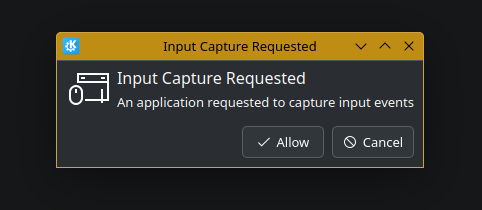
Upon login to plasma, I’m greeted with this popup after a recent update. I have two questions:
- How do I determine what application is requesting this permission? This would seem to be a baseline requirement for making an intelligent decision about the request.
- If I click cancel, the dialog re-pops infinitely. How can I suppress this?
2 Likes
Same here. How do I know what app? How do I white list it?
Interesting issue. Is this still a thing or did you find out anything? I’m not a KDE dev but it seems like we’re looking at InputCaptureDialog.qml in the case where application is unknown. Why it is unknown, I don’t know.
What might give you more info journalctl -e but that’s just my hope.
Wayland is still pretty new and the desktop providers have to implement a lot of that stuff themselves, including the capture backends - in KDE’s case that’s living in xdg-desktop-portal-kde, which is KDE’s backend implementation of xdg-desktop-portal. Maybe someone here can comment on what is possible and what is planned regarding the administration of this permission. I see there already is Settings > Flatpak Permissions but these seem to be exclusively for apps in the Flatpak sandbox.
What could cause these popups is KVM or remote control software like lan-mouse for example.
I’m also curious why the app is not detected in your case and what kind of apps it does detect. If you wanna help out you can test it with 6.4 Beta and see if this is better there. If not we should make a bug report or feature request out of this. A message like this is very concerning to the user, especially if it doesn’t recognize what app it is.
The program in question turned out to be Synergy. The popup still occurs in exactly the same way under Plasma 6.4.2 (KDE Framework 6.15.9, Qt 6.9.1, Kernel 6.15.5, wayland session).
Installing Synergy 3 (in arch, the synergy3-bin package in the AUR) presents the issue immediately after login. You may need a working synergy account to reproduce.