KDE Connect should integrate with the Windows “Share” Menu:

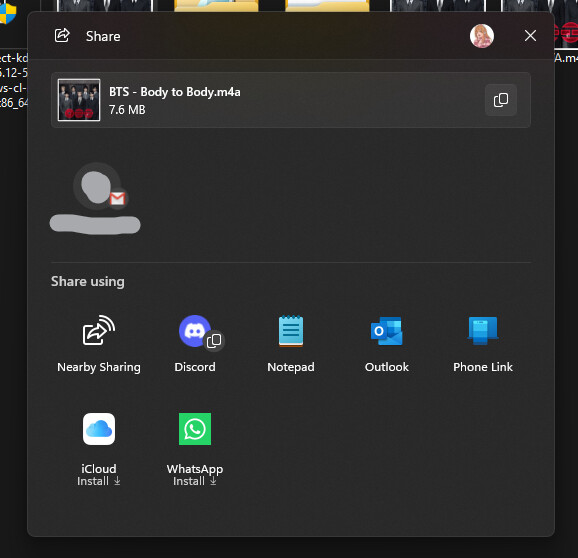
And the Share with context menu:

As sending files with this app is already very cumbersome, annoying, and slow. This would reduce the friction.
KDE Connect should integrate with the Windows “Share” Menu:
And the Share with context menu:
As sending files with this app is already very cumbersome, annoying, and slow. This would reduce the friction.
“should” as it would be a great feature addition.
But yeah that would be nice for the kdeconnect windows users.
For reference, we have the feature in Plasma.
I’m a student mostly having written simple apps with python and Java so bear with me if this is obvious, but it took me a while to chase down what needs to change.
Links aren’t allowed in this forum (..why??), so all the links are going to be really annoyingly formatted.
As per these basic instructions, the app needs package identity, and the share targets are declared in a manifest that is packaged with the app, so either with the MSIX or in KDE Connect’s case it seems to be using the older .appx format.
This probably means that you can’t easily integrate this feature on the standard windows installer version, since it’s not packaged like a “modern” windows app.
You could do this with a “sparse package” (instructions) where we just register a package containing only the metadata and the link to the win32 app (Probably exactly what the windows store build already does). The problem is that packaging seems to require signing, which I don’t understand enough about to know how that would integrate into a project like this. You’d just need to register the package through a WinRT API call afterwards.
I did find where the existing build chain for the Microsoft Store app generates the manifest:
It’s in the invent(dot)kde(dot)org/packaging/craft-blueprints-kde repository, specifically here
invent(dot)kde(dot)org /packaging/craft-blueprints-kde/-/blob/master/kde/applications/kdeconnect-kde/kdeconnect-kde.py?ref_type=heads
There is a section for “desktop extensions”, where I think we’d just have to add a ShareTarget section
self.defines[
   "desktop_extensions"
] = r"""
<desktop2:Extension Category="windows.firewallRules">
<desktop2:FirewallRules Executable="bin/kdeconnectd.exe">
   <desktop2:Rule Direction="in" IPProtocol="TCP" LocalPortMax="1764" LocalPortMin="1714" Profile="all"/>
   <desktop2:Rule Direction="in" IPProtocol="UDP" LocalPortMax="1764" LocalPortMin="1714" Profile="all"/>
   <desktop2:Rule Direction="out" IPProtocol="TCP" LocalPortMax="1764" LocalPortMin="1714" Profile="all"/>
   <desktop2:Rule Direction="out" IPProtocol="UDP" LocalPortMax="1764" LocalPortMin="1714" Profile="all"/>
</desktop2:FirewallRules>
</desktop2:Extension>

---\/--- Add ShareTarget here, something like this ---\/---
<uap:Extension Category="windows.shareTarget">
    <uap:ShareTarget>
        <uap:SupportedFileTypes>
            <uap:SupportsAnyFileType />
        </uap:SupportedFileTypes>
        <uap:DataFormat>Text</uap:DataFormat>
        <uap:DataFormat>Uri</uap:DataFormat>
        <uap:DataFormat>StorageItems</uap:DataFormat>
    </uap:ShareTarget>
</uap:Extension>

"""
Sadly I don’t know exactly where to find more detailed information on this python Packaging library and the ShareTarget xml structure and possible fields.
With that added, it would just be about checking at startup, so platform specific code on windows where it checks if it was launched from a share, something like this (warning AI slop code, I don’t know windows API or C++ much):
#include <winrt/Microsoft.Windows.AppLifecycle.h>
#include <winrt/Windows.ApplicationModel.Activation.h>
#include <winrt/Windows.ApplicationModel.DataTransfer.h>
#include <winrt/Windows.ApplicationModel.DataTransfer.ShareTarget.h>

using namespace winrt::Microsoft::Windows::AppLifecycle;
using namespace winrt::Windows::ApplicationModel::Activation;
using namespace winrt::Windows::ApplicationModel::DataTransfer;

void CheckActivation()
{
    auto args = AppInstance::GetCurrent().GetActivatedEventArgs();

    if (args.Kind() == ExtendedActivationKind::ShareTarget)
    {
        auto shareArgs = args.Data().as<IShareTargetActivatedEventArgs>();
        auto shareOp   = shareArgs.ShareOperation();
        auto data      = shareOp.Data();

        if (data.Contains(StandardDataFormats::Text()))
        {
            auto text = data.GetTextAsync().get();
            // do something with text
        }

        if (data.Contains(StandardDataFormats::StorageItems()))
        {
            auto files = data.GetStorageItemsAsync().get();
            for (auto const& file : files)
            {
                // file.Path() etc.
            }
        }

        // Tell Windows you're done
        shareOp.ReportCompleted();
    }
}