Is there a KRunner Timer?

Is there a timer function available for KRunner that I am missing?

There is the Clock plugin which says ‘Find timers and start/stop them’ - but how? All I can manage to do is open the Clock app.

I want to e.g. enter timer 5min which creates a 5 minute timer for me.

If there is nothing, I will make one.

NOTE: there is Timer and Alarm for KRunner - KDE Store but not updated in 11 years.

That would be nice krunner built-in feature.

You can send a PR to

hi. I’m already working on a plugin - will offer e.g.:

- `ktimer 5` = 5 minutes
- `kt 5:30` = 5 minutes and 30 seconds
- `kt 8 pasta is ready!` = 8 minutes with the message "pasta is ready!"
- `kt 0:20` = 20 seconds
- `kt 20s` = 20 seconds
- `kt 4h` = 4 hours
- `kt 4:15:30 plumber arrives` = 4 hours, 15 minutes, and 30 seconds with the message "plumber arrives"

named timers, dismiss / extend the timer, …and hopefully persistent across restarts.

There has been in the past but my understanding is there isn’t currently one for KDE 6+

A quick search on github will show at least a couple. You could fork one and update it for KDE6+ if you were so inclined.

A “kt”, or “ktimer” isn’t great.

A “remind” or “reminder 5”, or “alarm 5m”, “remindme in 2h to do some shopping” would be more intuitive and easier to remember.

As I said I think that would fit upstream and built-in.

thanks, will amend to remindme … would an alias of that be acceptable - rme 2h do the shopping?

I’m happy to try a PR but will be leaning heavily on LLM for this. … which appears to be OK with conditions: Guidelines and HOWTOs/Maintainers and Contributions - KDE Community Wiki

Yes that would be ok.

Do test it, that will require building krunner and maybe plasma, that can take some time depending on your machine. kde-builder and the LLM can help.

And tell the LLM to keep consistent in code style and do your best to understand the code to spot shortcoming or logical issues. Ask the LLM for review.

It is not fine if reviewing is too hard, too verbose, too hard or convoluted, be mindful of reviewers that are humans, but do mistreat your LLM that’s a program.

And you can learn along the way, LLM can act as teachers.

thanks, I’m already spinning up to speed by reading https://develop.kde.org/docs/ while working on the HLD.

I do have dev experience so not coming at this cold. :slight_smile:

watch this space…

There is the venerable KAlarm, which although in need of some love, is a very capable tool.

Perhaps a KRunner command to add timers and alarms to it would be a good way forward.

There is also the newer, KClock, which is much simpler:

Very cool of you to try and build it yourself! If I could share an idea: it would be nice if one could also set a timer to an absolute time, for example settings a timer to go off at 18:30, similar to how in the terminal one can do “shutdown 18:30”, which can be very useful instead of having to manually calculate how many minutes it would be until that time.

I forgot to mention

There’s also KTeaTime.

@dcog989 , I took a super quick look and IMHO it’d be easiest if you simply write a KRunner for KAlarm.

It can already be used through CLI, so that could be an easy hack:

Or you could use it via D-Bus:

Why I’m banging on about KAlarm is that of all of the above, it’s the most powerful, so even if for your use case you will need just one or two features, having a KRunner for KAlarm would allow a lot of other people to make use of the other features it has too.

@hook - thanks for the input.

I use Clock at the moment and the UI/UX for setting a timer is just too tedious - KAlarm looks worse!

Hence, why I want a very simple / quick timer function - and the best place for that is KRunner, which everyone has.

I’ve already made a good start on integrating with KRunner but this is not as easy as creating a standalone app / plugin, so I need to get it right before taking up dev time reviewing the PR.

Oh, KAlarm is an ancient swiss-army-knife-like tool, so the UI/UX is, for a lack of a better word, quite “power-user”-ish.

Sweet! I imagine it’s not as easy as just whipping up a quick timer app. I hope it’s worth it to you and I did not trick you into something that you’ll hate.


I still have a lot of testing / code review to do, but it’s looking good so far.

Watch this space. :slight_smile:

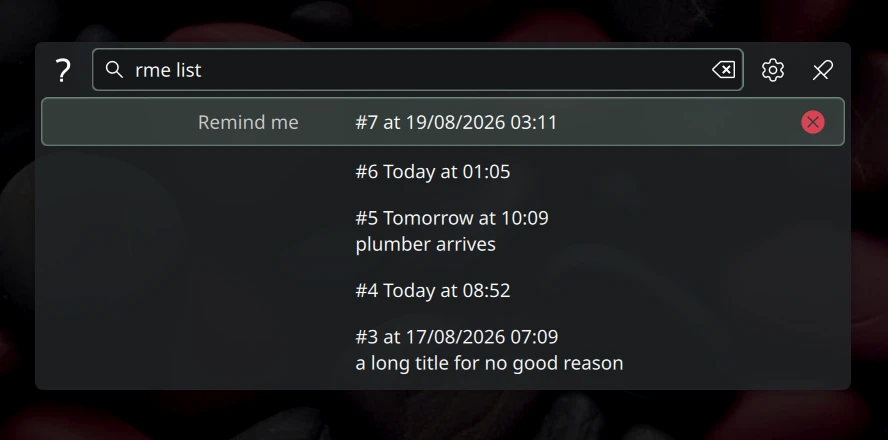
Here’s function and usage so far - feedback welcomed:


Time Syntax

Trigger words: remindme, rme (case-insensitive).

duration := HH:MM:SS | MM:SS | number [unit] | number
unit     := "s" | "m" | "h"
Input Meaning
5 5 minutes
.5 0.5 minutes = 30 s
20s 20 seconds
.5h 0.5 hours = 30 min
4h 4 hours
5:30 5 min 30 s
4:15:30 4 h 15 min 30 s
8 message 8 min, “message”
  • A bare number means minutes; fractional values (.5, .5m, .5h, …) are
    accepted for both bare numbers and unit forms, rounded to whole seconds.
  • 0 (or any non-positive) duration is invalid; the maximum is 99:59:59.
  • The message is everything after the duration and may contain spaces.

Usage

Action Query
Create timer rme 5, rme 8 msg
List active timers rme list
Cancel by id rme cancel 3
Cancel by message rme cancel meeting
Usage / help rme
  • Pressing Enter on a create match starts the timer; Enter on a listed timer (or
    its “Cancel timer” action) cancels it.
  • “Cancel by message” matches the message exactly (case-sensitive), so a short
    typo cannot nuke a large set of timers; use rme cancel <id> for a specific
    timer.

Features

  • Create a timer from KRunner: rme 5, rme 8 pasta is ready!
  • List active timers: rme list
  • Cancel timers by id or message: rme cancel 3, rme cancel meeting
  • Desktop notification on expiry with snooze (+1 min)
  • Timers survive KRunner restarts (engine runs as a D-Bus helper process)

Upgrades:


I am nearly ready to provide the plugin for others to test. Stay tuned.

ready for testing. I’ve been running it for many days, no problems.

Source: https://invent.kde.org/dcog/plasma-workspace/-/tree/remindme

Requirements: KDE Frameworks 6 development packages, Qt 6.9+, CMake 3.29+.

build + install

# 1. Get the code
git clone --single-branch -b remindme https://invent.kde.org/dcog/plasma-workspace.git
cd plasma-workspace

# 2. Build (only the remindme targets)
cmake -B build -DCMAKE_INSTALL_PREFIX="$HOME/.local" -DKDE_INSTALL_USE_QT_SYS_PATHS=OFF
cmake --build build --target remindme krunner-remindme

# 3. Install
sudo rm -f "$HOME/.local/lib/plugins/kf6/krunner/remindme.so" "$HOME/.local/lib/libexec/kf6/krunner-remindme"
sudo cmake -P build/runners/remindme/cmake_install.cmake

# 4. Make krunner find it permanently
mkdir -p "$HOME/.config/environment.d"
echo "QT_PLUGIN_PATH=$HOME/.local/lib/plugins" > "$HOME/.config/environment.d/remindme.conf"

# 5. Restart KRunner to use remindme plugin
killall krunner
QT_PLUGIN_PATH="$HOME/.local/lib/plugins" krunner

You will continue using the custom KRunner on restart.

uninstall / restore your old KRunner

# 1. Stop the helper
pkill -f krunner-remindme || true

# 2. Remove files + state
rm -f "$HOME/.config/environment.d/remindme.conf" "$HOME/.config/autostart/krunner-remindme.desktop"
rm -rf "$HOME/.local/share/kde.org/krunner-remindme"
sudo rm -f "$HOME/.local/lib/plugins/kf6/krunner/remindme.so" \
          "$HOME/.local/lib/libexec/kf6/krunner-remindme" \
          "$HOME/.local/share/dbus-1/services/org.kde.remindme.service" \
          "$HOME/.local/share/knotifications6/krunner-remindme.notifyrc"

# 3. Unload the plugin from the running krunner
killall krunner

test suggestions

use remindme or alias rme:

  • ?remindme - help
  • rme 20s - start a 20-second timer
  • rme 5 pasta is ready! - timer with a message
  • rme 1:12:24 - test different input formats
  • rme list - list active timers
  • rme cancel 1 - cancel a timer by id
  • when a timer expires: snooze (+1 min), dismiss
  • restart krunner while a timer is running - it should survive
  • with a timer set, sleep your system, check time is still active and targeting the correct time

@meven - are you able to give this a quick check before I MR?