How can Kate show (in a region or inset on main window) the function or else block name where the cursor is currently located?
Here, but this requires LSP plugin to be enabled:
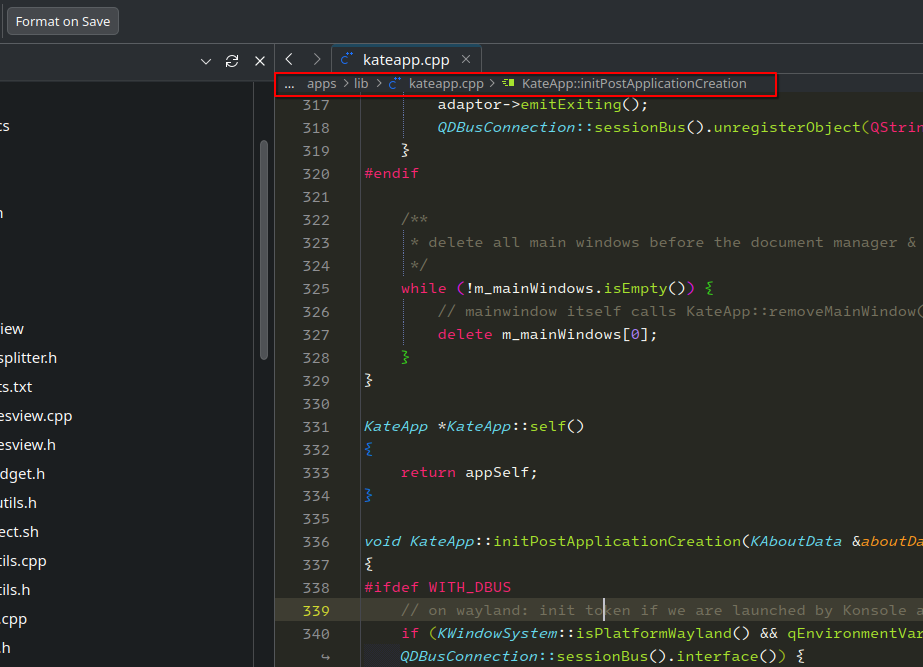
Also make sure the following setting in Behavior page is enabled

No such at all here
And some incorrect behaviors else,
Whitespace symbol always shows up no matter how it’s been toggled to get off
Icon border always shows up no matter how it’s been toggled to get off
Prooject (at sidebar) content listed in flat not in structured tree, etc
Help out solve these
You didn’t provide any info about what version of Kate you are on, the kde frameworks version etc. so I can’t help you.
I’ve been so long in Arch OS,
so everything is the latest all way
How do you toggle them off? In the menu or the settings dialog?
Try changing the settings in the dialog. Main Menu → Settings → Configure Kate…