I have tried both versions 3.1.0 and the new 4.0.2 (which I like better due to the dark theme). However, anything I put into the translator to translate doesn’t do anything when I hit the arrow between the two boxes to translate, why is this?
What is the distro you are using ? What is the package type (flatpak or provided by distro) ?
Make sure you have its dependencies are installed, in particular tesseract that does the translation heavy lifting.
Have you tried changing translation service? not all will work all the time.
Also not all services support all languages.
In both cases there will be no translation.
it’s a bit unintuitive to get started
you first need to need to click on the pencil icon to set a language button to appear above each window and then make sure they are selected (which appears greyed out in my version).
now that you have your translation setup, you can enter some text and click on the > button, or check the auto-translate box.
I’m using Windows 11. I downloaded version 4.0.2 from download.kde..org/stable/crow-translate/4.0.2/. I ran crow-translate-4.0.0-hotfix2-c9dfc26-master-windows-cl-msvc2022-x86_64.exe. Do I need tesseract to run it on Windows 11?
I have already added my languages with the pencil and tried to click on the > button.
I’ve tried all the different services.
Do I need to download dependencies for Windows 11? If so, which ones should I download?
The dependencies are all packaged. Tesseract is required for OCR, not translation. Try changing the mozhi “instance” in settings, you’re probably contacting a 3rd party server that’s not responding. I’ve been busy with real life, but hopefully I’ll get some time over the holiday period to add local translations.
Yes, that worked. I want to get TTS as well. Qt sounds bad, so I tried Mozhi and that didn’t work. I get cloned Piper and updated the voices path but that doesn’t work either. Should I set up the path to be a folder with all the languages e.g. a path like targetfolder > language folders like en or de?
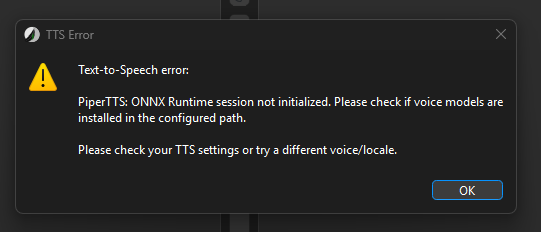
If you have the voices cloned from rhasspy/piper-voices · Hugging Face make sure the path in settings points to the top level directory, the one with the language codes. If that still doesn’t work, please run crow with windbg and send the debug output to https://bugs.kde.org/
It seems to work for English and German. However, I can’t get Russian or French to work. For some reason Russian and French only work when the piper-voices folder is in my downloads folder, I’m not sure why.
I’m trying to use it in the Documents folder, however I haven’t had much luck.
I have found a valid replacement for Crow Translate in SpeechNote.
The only downside is that it still builds on Qt5.
A simpler program that uses Qt is also LocalTranslate.
Only available on Linux 