Discover regularly displays KDE Linux updates, but the system actually does not update since 2025-09-17. Apps update fine, but the system update always displays “Unknown” instead of the size, then this update immediately disappears from the list. How to update the system in this situation?
You’re probably hitting update train got derailed (#347) · Issues · KDE Linux / KDE Linux · GitLab . There’s a set of recovery steps listed in there.
This is pretty sucky. In the future we’ll be able to warn people in the OS itself. See [RFC] News page for manual intervention / important issues (#373) · Issues · KDE Linux / KDE Linux · GitLab
Unfortunately, that fix does not solve the issue, my version is too old to be updated to the current one. Is it possible to update manually using the raw image?
Try sudo updatectl update or sudo /usr/lib/systemd-sysupdate update
No, sudo updatectl update simply responds “done” without any actions. Probably the only way to recover is a clean install.
Somehow I managed to upgrade to the previous version 202510152354, but the latest version is still marked “installed, incomplete”. How to remove it entirely?
The newest build 202510161535 installed fine (wow, Plasma 6.6!).
This worked for me. Perform all the steps mentioned in #347, until you reach the command with “list” at the end. Look carefully through the list and find any build that is marked “available”, but NOT “incomplete”, repairing incomplete updates is BROKEN.
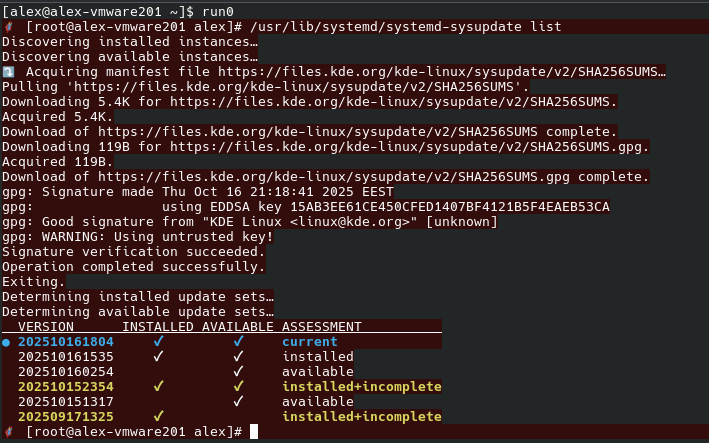
Update manually by typing its version code (in this case 202510160254) in the last command and DO NOT update automatically until the next build is released. Then run the last command again, typing the version code of the newest build.
Check that all files have been downloaded, the update contains two files with approx. 6 GB total size.
PS. If there is no suitable build (all builds are marked as “incomplete”), DO NOT run the last command until a new build is out, then run it with the explicit version code of that build.
PPS. Repairing incomplete updates is broken. Trying to do this results in downloading only the UEFI loader, but not the actual .erofs file.
Incomplete updates themselves are broken; maybe the solution here is to not show them at all?
Yes, they are broken, BUT reinstalling them is ALSO broken. The corresponding .erofs file is not downloaded at all (even if it’s available on the server), only the UEFI file (around 250 MB), causing the system to crash into emergency mode on the next boot.
I believe I’ve experienced that. Can you open an issue report about it at Issues · KDE Linux / KDE Linux · GitLab
I’ll try tomorrow.