Sorry to bother you with this again, but I did not get any answer anywhere.
I’ve had trouble creating the bootable USB drive for KDE neon. This is the very first step in installing KDE Neon. I’m thinking that if everyone is encountering this problem, there won’t be many new members joining your community… I think it’s important to resolve this issue.
More specifically, the problem occurs during the ISO verification step.
I downloaded from the KDE neon download page:
the ISO file
the PGP signature for verification
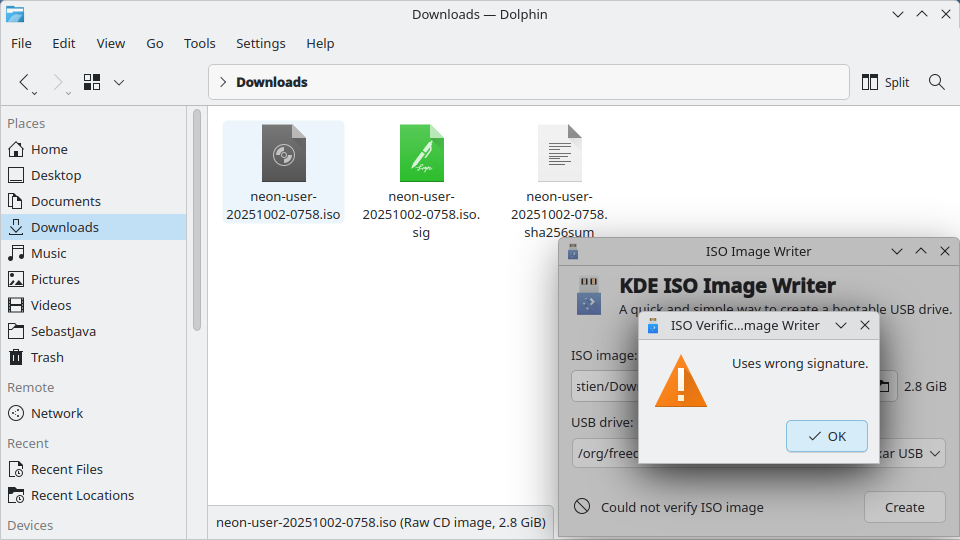
Then I used the KDE ISO Image Writer application as recommended on that same page. But it didn’t work: “Uses wrong signature.” Check my screenshot:
Is the issue with the KDE ISO Image Writer application or the files themselves?
I am not asking for help on how to check the ISO and then create the bootable USB key. I found my own way. But I want to know if you are experiencing the same issue or not, using the KDE ISO Image Writer application.
Furthermore, I suggest that KDE Neon adopt the Zorin OS ISO method. That ISO verifies itself automatically ! This way the installation is child’s play and the system is accessible to everyone.
I have though about submitting updated information about writing software, which is quite old now iirc. Haven’t gotten around to doing it, though.
A filesystem during boot check checks the USB stick. *buntu do this automatically, or have in the past, at least in 22.04 (Zorin os Ubuntu 22.04 still, iirc). Not sure if neon’s does this, tbh. I haven’t ‘burned’ an ISO in ages and ages. I may poke around if I can figure where/how this would happen.
Verifying that the downloaded ISO is not the same thing, anyway, I believe. But it is arguably probably more important.
Yes, the Latest Zorin OS does that automatically. And their Install Zorin OS page doesn’t have any complicated verification process. The whole page is very easy, nice looking, user friendly.
The KDE neon download page isn’t cumbersome either, far from it, but the only problem is… IT DOESN’T WORK, when you are using their recommended KDE ISO Image Writer.
That’s a shame. How many newcomers are we loosing? How much money?
NOTE: I am not allowed to post links!? I can’t show you this Zorin OS download page.
What I was pointing out was that the process to verify that the ISO is what it supposed to be (not tempered with, authentic) is not the same thing as verifying the physical integrity of the created USB stick. Two different things (gpg sigs and sha256sums) for two different purposes (“Is this a legitimate ISO” and “was this USB written properly”).
Also, it is possible (I have not verified yet) that during the boot process, this step you see in Zorin (and other 22.04 based images) may be happening automatically, without visible indication.
neon@neon $ sudo journalctl | grep casper-md5check
Nov 08 06:20:53 neon systemd[1]: Starting casper-md5check.service - casper-md5check Verify Live ISO checksums...
Nov 08 06:20:53 neon casper-md5check[1748]: .
Nov 08 06:20:53 neon casper-md5check[1748]: Checking integrity, this may take some time (or try: fsck.mode=skip)
So I think it is doing this, just hidden from view.
My Kubuntu ISOs have the same.
I will wager Zorin will behave the same when they finally move to 24.04.
This still doesn’t fix the ISO Image Writer error, and the inherent awkwardness in using gpg